The Data Streams feature within Device Cloud allows for time-series data storage and data visualization. Virtually any type of data can be stored and you can create real-time charts to monitor your data streams. Data streams are fully searchable and the data within a stream can be rolled up into time interval summaries. Data is stored and replicated in multiple secure, commercial-grade storage systems to ensure complete data protection, and is based on GB usage per day billed monthly.
Time series data involves two concepts: data points and data streams:
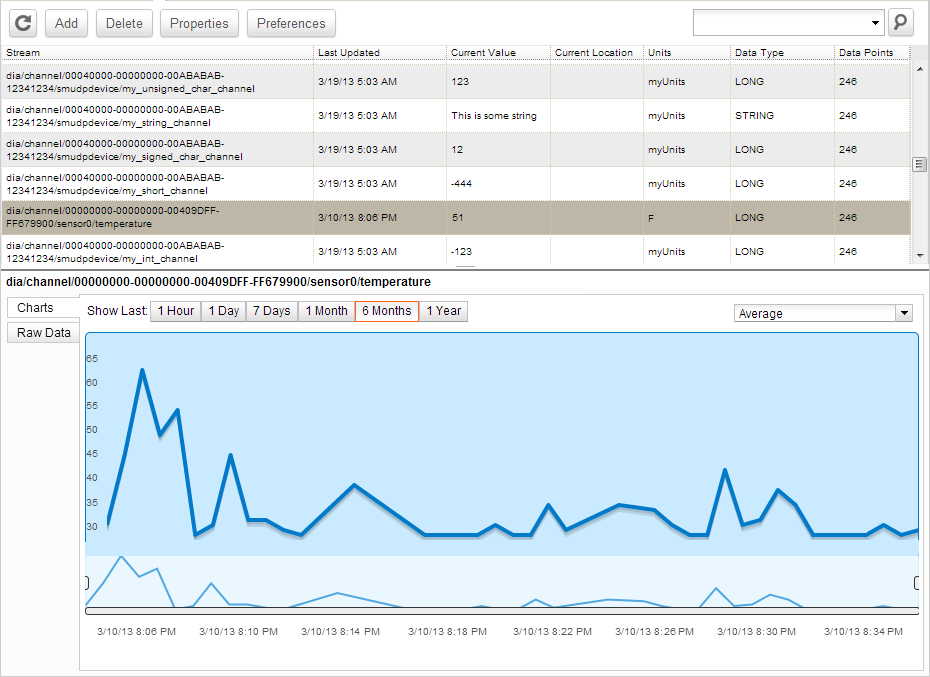
Data streams are primarily intended for numeric data and typically hold data points for a specific attribute on a device; for example, the temperature from a specific thermostat. However, data streams can be used for virtually any type of data. Smart Energy attribute data and DIA channel data can be configured to automatically store their data via the time series data feature. The following example shows a temperature related data stream. The upper part of the image shows a sample list of data streams with a particular data stream selected, while the bottom part of the image shows the charted data associated with the selected stream.
In order to upload data points you need to add data point support to your project. In order to do so, add the following macro to the connector_config.h file:
#define CONNECTOR_DATA_POINTS
The connector_send_data_point() function must be used when uploading data points. It takes a pointer to a previously-filled connector_request_data_point_single_t structure as unique argument.