Creating your first Cloud Connector application
This tutorial will teach you how to easily develop and launch your first Cloud Connector application for the Kinetis K60 module. The application will connect to Device Cloud and send a simple text file containing the text "Hello Device Cloud!" to the device's storage section in Device Cloud.
Before creating the project, make sure you have the following components:
- Tower modules:
- A Tower microcontroller module (TWR-K60N512, TWRK53N512 or TWRK70F120M).
- Primary and Secondary tower elevator modules (TWR-ELEV).
- Serial module including USB host/device/OTG, Ethernet, CAN, RS232 and RS485 (TWR-SER).
- A Device Cloud account with your device already registered.
Also, verify that your components are connected correctly:
- Your tower should resemble the following assembly:
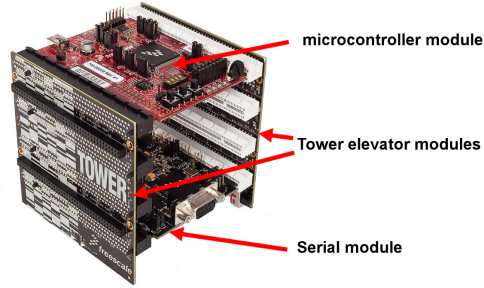
- The TWR-SER board should be connected to your LAN using an Ethernet cable.
- A mini-B USB cable should be connected between the TWR-Kxx board and a USB port of your computer.
- Your hardware should be setup correctly and the OSJTag firmware must be up to date. See the Hardware Setup section for more information.
Creating your first application from an example

|
Before modifying an example, it is recommended that you clone its folder to avoid overriding the original code. |
Depending on your RTOS and IDE, follow one of the following steps: