Products Applications Support Partners News About Digi Where to Buy


Products

device servers
terminal servers
console management
USB
async


Adding and XEM module to the Digi PortServer II and PortServer TS 2/4/8/16 in Windows 2000

1.  Go to Start> Settings> Control Panel. 

2.  Double-click System and select the Hardware tab (see Figure 1).
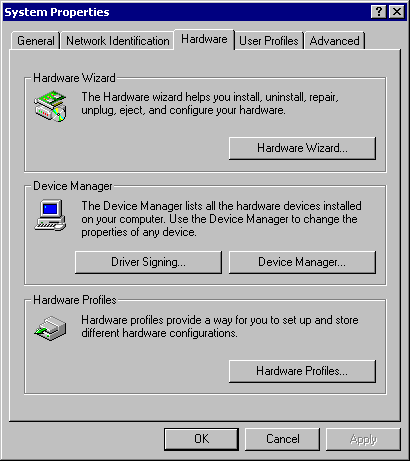
    
                                                                                               Figure 1

3.  Select Device Manager and you will get the next screen (see Figure 2).
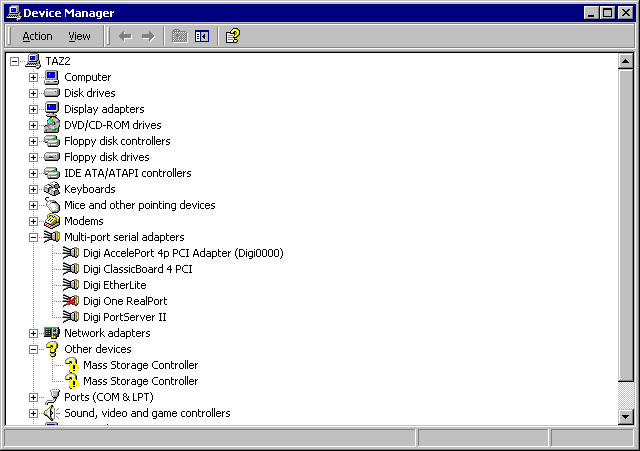
    
                                                                                                                                                        Figure 2                                                 

4.  Double-click the Digi PortServer (II or TS) product to get to the properties screen (see Figure 3).
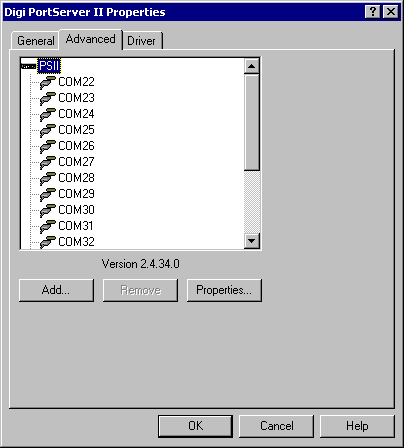
   
                                                                                             Figure 3

5.   To add the Xem adapter, you will need to add the ports from this screen by adding each com port individually.

6.   To begin click Add.

7.   Enter the new com port name (see Figure 4).  
      For example, if you have com3-18 on the PortServer (II or TS) product, you would add com19 for the first port on the Xem.  
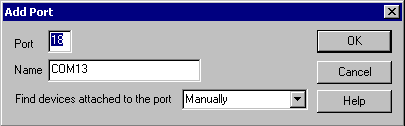
       
                                                                                               Figure 4                                                                           

8.   Click Ok.

9.   Repeat steps 6-8 for the remaning ports.

10. The ports should now be ready for you to use.  To verify everything is working, follow the Hyperterminal Guide for testing the ports.


products | applications | support | partners | news | about Digi | where to buy | contact us | site map

Copyright © 1996-2002 Digi International. All rights reserved.


Contact Us Site Map Product Selector Digi Homepage