Adapter Diagnostic LEDs
|
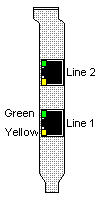
Each of the RJ-45 connector jacks on the adapter front panel (PCI
form factor shown) has two embedded light emitting diodes (LEDs), one
green and one yellow. These LEDs provide feedback on the adapter's operational status.
The LEDs indicate status for two phases of adapter operation:
Execution and completion of the Power On Self Test (POST). This occurs when the system is powered on or reset.
Successful loading and startup of the Front End Processor (FEP). FEP binaries are loaded by the adapter driver after POST successfully completes.
Note: In the fully operational state, the green LEDs blink continuously and the yellow LEDs remain off.
| 
|
cPCI Insertion Indicators
The LEDs act as insertion indicators for the cPCI form factor
adapters only (the DataFire DSP PTE Series). If the yellow LEDs blink
alternately when the adapter is powered or the backplane is reset, this
indicates that the adapter is inserted but the ejector handles are not
yet locked into place. The cPCI adapter cannot perform the Power On Self
Test until the ejector handles are locked.
| Green LEDs
| Yellow LEDs
| Status
|
| Off
| Alternately Blinking
| Ejectors Unlocked
|
Power On Self Test--Normal Operation
During POST (about 30 seconds) the green LEDs remain off and the Yellow LEDs are on
continuously. The yellow LEDs go off when POST is successful.
| Green LEDs
| Yellow LEDs
| Status
|
| Off
| On
| POST Loading
|
| Off
| Off
| POST Successful
|
Power On Self Test--Error
If a POST error occurs, the green LEDs remain off and the yellow LEDs blink continuously.
| Green LEDs
| Yellow LEDs
| Status
|
| Off
| Continuous Blinking
| POST Error
|
Front End Processor--Normal Operation
After the FEP has loaded and no line error is detected, the green LEDs blink
continuously and the Yellow LEDs remain off. This is the normal operating state.
| Green LEDs
| Yellow LEDs
| Status
|
| Continuous Blinking
| Off
| Normal Operation
|
Front End Processor--Line Error
If a line error is detected after the FEP has loaded, the green LEDs blink
continuously and the Yellow LEDs remain on continuously.
| Green LEDs
| Yellow LEDs
| Status
|
| Continuous Blinking
| On
| Line Error
|