Terminal Server Configuration Without RealPort
Introduction
In this configuration, the Digi device functions as a terminal server, providing telnet and rlogin access to hosts. This configuration enables the following:
-
Telnet or rlogin access to the LAN-based hosts, both from the locally-connected terminals and from devices accessing the LAN from the telephone network.
-
Access for the LAN-based hosts to the Digi device's ports (sometimes called reverse telnet) and LPD printing to the printer connected to PortServer.
Illustration
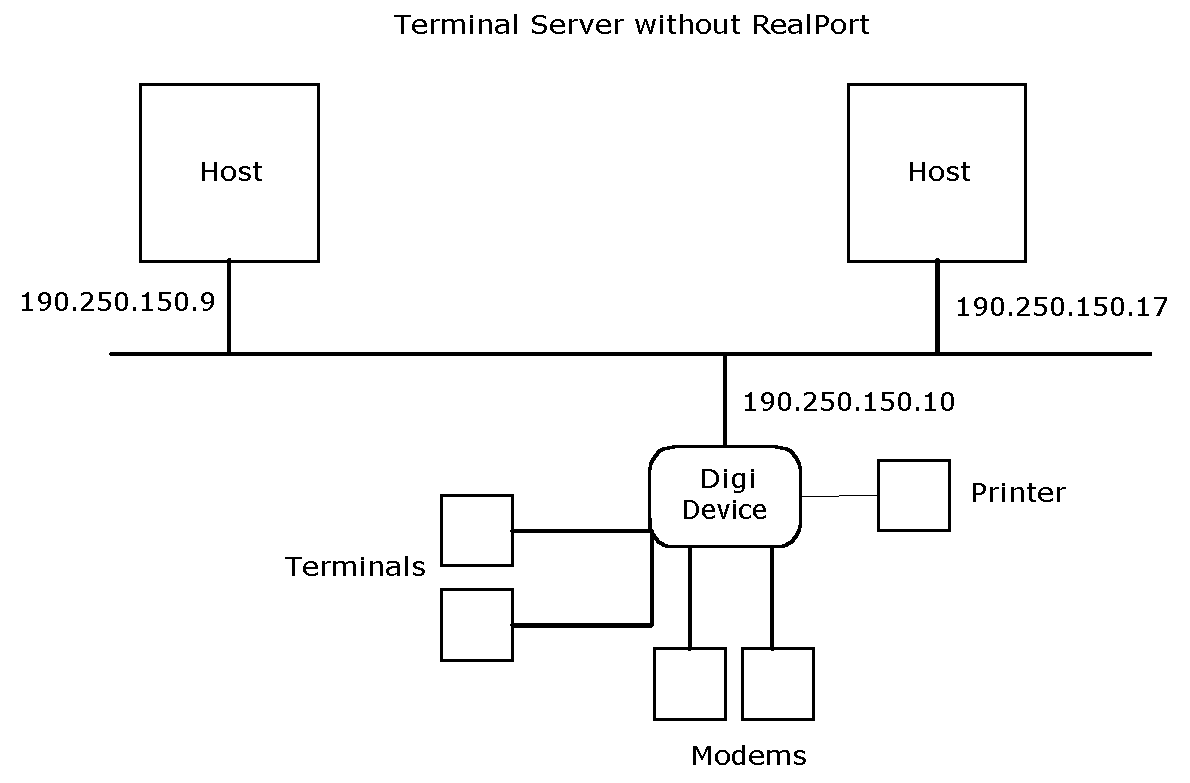
Configuration
set config ip=190.250.150.10


set ports range=2-3 dev=term


set line range=2-3 baud=9600


set flow range=2-3 ixon=on ixoff=on


 set ports range=4-5 dev=mio


 set line range=4-5 baud=115200


 set flow range=4-5 ixon=off ixoff=off
rts=on cts=on


set user name=user1


 set ports range=15 dev=prn


set line range=15 baud=9600


set flow range=15 ixon=on ixoff=on
Configuration Notes
-
The set config command configures the IP address and mask for the Ethernet interface.
-
The first set ports, set line, and set flow commands configure ports 2 and 3 for terminal connections.
-
The next set ports, set line and set flow commands configure the ports for bi-directional
modems. Software flow control (the default) is explicitly shut off and hardware flow control turned on using the set flow command.
-
The set user command defines a user, which assigns a user name for login purposes. All
users can login with this name. Because no password is defined (see the newpass command), the user name functions as a password as well.
-
This set ports, set line and set flow commands configure port 15 for a printer using software flow control.