Use this section to become familiar with PortServer TS 8/16 LEDs, ports and controls, which you may find helpful when you install the hardware.
For information on using the controls and interpreting the LEDs, refer to the PortServer TS 8/16 Configuration and Administration Guide.
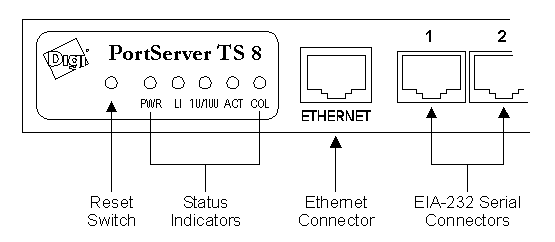
With the exception of the power connector, all controls, LEDs and connectors are on the front panel of the PortServer, as shown below. Depending on the PortServer model, the exact arrangement of components differs slightly; a PortServer TS 8 is shown.
Component |
Function |
| Reset Switch | Use to reset PortServer to factory defaults |
| PWR LED | Indicates power-on status |
| LI LED | Indicates Ethernet connection status |
| 10/100 LED | Indicates Ethernet connection speed: off=10 megabits/second; on=100 megabits/second |
| ACT LED | Indicates Ethernet activity status |
| COL LED | Indicates Ethernet collision status |
| Ethernet Connector | RJ-45 jack for connecting to Ethernet |
| EIA-232 Serial Connectors | RJ-45 jacks for connecting to EIA-232 serial devices |
The power connector is located on the rear of the PortServer. 16-port models have a built-in power supply, and take a standard 3-prong power cord (provided with the unit). 8-port models require an external power supply (provided with the unit).
The power switch for the PortServer TS 16 is located on the front panel, to the left of the LED panel. The PortServer TS 8 has no integral power switch; instead, power is controlled by plugging/unplugging the external power supply.
The Ethernet connector is a standard RJ-45 jack that accepts a Category-V 10/100-Base-T twisted-pair Ethernet cable.
The EIA-232 serial connectors are Digi-standard 10-pin RJ-45 jacks that provide EIA-232 connectivity at data rates up to 920k bps.