![[Top]](../images/home.jpg)

![[Contents]](../images/contents.jpg)
![[Prev]](../images/previous.jpg)
![[Next]](../images/next.jpg)
![[Last]](../images/index.jpg)


User interface specifications
The interface for the control-monitor, palmtop-controller, and MIF each has its own cabling pinout specifications. The MAX supports control-monitor, palmtop-controller, and MIF interfaces. Control port and cabling pinouts for the control-monitor and MIF
The control-port uses a standard DE-9 female connector that conforms to the EIA RS-232 standard for serial interfaces. Table C-1 applies to all MAX models that use the RS-232 pinouts.
Pin 9 is not active. (Ring Indication signal not supplied.)
Pinouts for the palmtop-controller
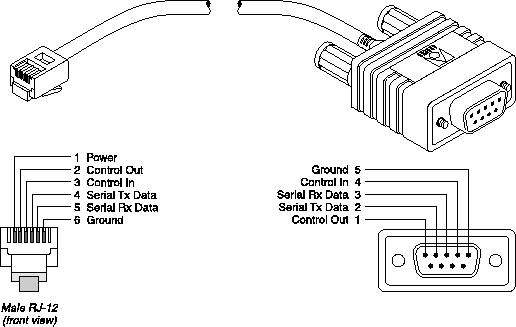
Table C-2 specifies the pins and corresponding functions of the palmtop-controller jacks.
MAX RJ-12 pin |
Function |
I/O |
|---|---|---|
|
1
|
Power to Palmtop, +5V
|
O
|
|
2
|
Control Out
|
O
|
|
3
|
Control In
|
I
|
|
4
|
Serial Transmit Data
|
O
|
|
5
|
Serial Receive Data
|
I
|
|
6
|
Ground
|
|
In the I/O column, O (Out) is from the MAX toward the palmtop.
Palmtop port and cabling pinouts for a control-monitor
Figure C-1 illustrates the MIF palmtop port and cabling pinouts for a control-monitor.
Figure C-1. Control-monitor and MIF palmtop port and cable
Ethernet interface specifications
The base unit of a MAX has an Ethernet interface that supports the physical specifications of IEEE 802.3 and IEEE 802.14 with Ethernet 2 (Ethernet/DIX) framing. The unit provides a single Ethernet interface that auto-senses the Ethernet type to which it is connected. It supports the following types of Ethernet interfaces:
To install the Ethernet interface, you must have the cables described in either of the following two sections.
Use an EIA/TIA 568 or IEEE 802.3 10Base-T cable.
Use one of the following cables: 100BASE-T2, 100BASE-T4 (not very popular), 100BASE-TX, or 100BASE-FX.
T1/PRI interface specifications
Specifications for the MAX unit's T1/PRI interface include Channel Service Unit (CSU) requirements, specifications for the cables and plugs available for the unit's WAN interfaces, the pins to be used on the WAN ports, and the WAN switched services that are available to the MAX. T1/PRI CSU requirements
CSU requirements depend on whether or not you enable the internal CSU on each T1/PRI port on the MAX. To enable the internal CSU, set the Net/T1 > Line Config > slot Line N > Front End parameter to CSU. To disable the internal CSU set Front End to DSX. Port with internal CSU
If you enable the internal CSU on a T1/PRI port, you can connect the port directly to the metallic interface of the WAN. To avoid harming the WAN, you must contact your carrier for approval before installation. Once you install the MAX, you must notify the carrier before disconnecting the MAX from the WAN. If you disconnect or turn off the MAX without prior notification, the carrier might temporarily discontinue your T1/PRI service. The MAX unit's internal CSUs are compatible with dry-loop T1/PRI lines, and with span-powered or wet-loop powered T1/PRI lines. Port without internal CSU
If you disable the internal CSU on a T1/PRI port, you cannot connect directly to the WAN. You must connect the port to other equipment that provides the interface to the WAN (for example, an external CSU). Your carrier determines the correct value for the line buildout setting of the CSU. You configure this parameter during installation. (For detailed information about each parameter, see the Reference Guide for the MAX.)
T1/PRI cable specifications
The maximum cable distance between the T1/PRI WAN interface equipment and the MAX should not exceed 655 feet (200 m) for a MAX without CSUs. Measure the line length and record it when you install the MAX. You must specify this length when you configure the Line N profile parameters. (For detailed information about parameters, see the Reference Guide for the MAX.)

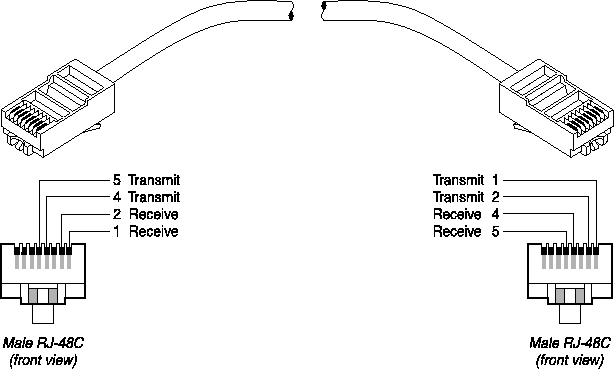
Figure C-2. RJ-48C/RJ-48C crossover cable
T1/PRI straight-through cable: RJ-48C/RJ-48C
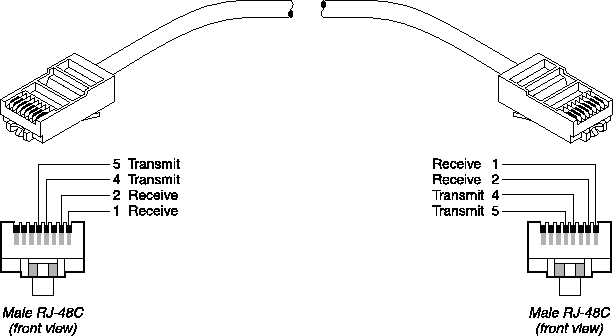
Before installing the RJ-48C/RJ-48C straight-through cable, verify that the WAN interface transmits on pins 2 and 1 and receives on pins 5 and 4. Figure C-3 and Table C-6 show the pinouts.
Figure C-3. RJ-48C/RJ-48C straight-through cable specifications
T1/PRI straight-through cable: RJ-48C/DA-15
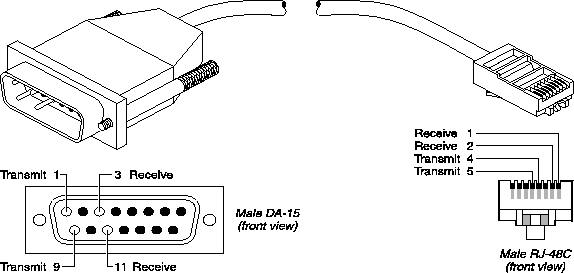
Before installing the RJ-48C/DA-15 straight-through cable, verify that the WAN interface transmits on pins 3 and 11 and receives on pins 1 and 9. Figure C-4 and Table C-7 show the pinouts.
Figure C-4. RJ-48C/DA-15 straight-through cable
T1/PRI crossover cable: RJ-48C/DA
Before installing the RJ-48C/DA crossover cable, verify that the WAN interface transmits on pins 1 and 9 and receives on pins 3 and 11. Figure C-5 and Table C-8 show the pinouts.
Figure C-5. RJ-48C/DA crossover cable
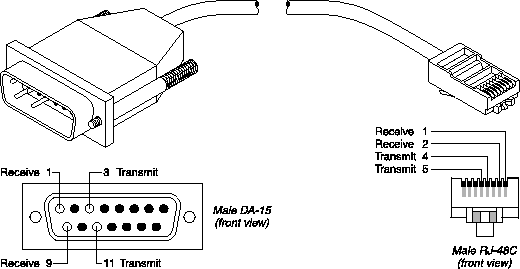
Model number DA15-SPart number 2510-0065-001 | |||
|---|---|---|---|
Pair # |
Signal (MAX) |
Male RJ-48C (MAX) |
Male DA-15P (remote) |
|
1
|
Receive
|
1 2
|
1 9
|
|
2
|
Transmit
|
5 4
|
3 11
|
T1/PRI straight-through cable: RJ-48C/Bantam
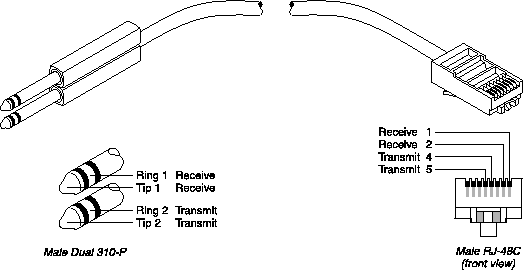
The WAN side of the RJ-48C/Bantam straight-through cable connects to dual bantam jacks. Figure C-6 and Table C-9 show the pinouts.
Figure C-6. RJ-48C/Bantam straight-through cable
T1 RJ-48C-Loopback plug
This plug loops the transmit signal back to the MAX
Pair # |
Signal |
Male RJ-48C |
|---|---|---|
|
1
|
Receive
|
1 (connects to 5) 2 (connects to 4)
|
|
2
|
Transmit
|
5 (connects to 1) 4 (connects to 2)
|
T1/PRI WAN ports
Table C-11 lists the pins on RJ-48C sockets on the MAX used for T1/PRI WAN interface. Only pins 1, 2, 4, and 5 are used. The remaining pins are not connected.
WAN switched services available to the MAX
The MAX is compatible with both AT&T and Northern Telecom central office switches, and can access all T1/PRI switched digital services offered by AT&T's ACCUNET Switched Digital Services:
E1/PRI interface specifications
The MAX unit's E1/PRI interface has cabling and port specifications. During loss of power or whenever the MAX restarts, a relay closure returns the E1/PRI signal to the WAN. That is, the E1/PRI line is looped back. However, if you configure the MAX for framing-compatible drop-and-insert functionality, all channels of line #1 are passed to line #2. Note that line #1 and line #2 of a MAX Net/E1 expansion module always loop back upon loss of power, regardless of how they are configured. E1/PRI cable specifications
The WAN interface cables and plugs described in this section are available for the MAX unit's WAN interfaces. Use only the cable specifically constructed for transmission. E1/PRI crossover cable: RJ-48C/RJ-48C
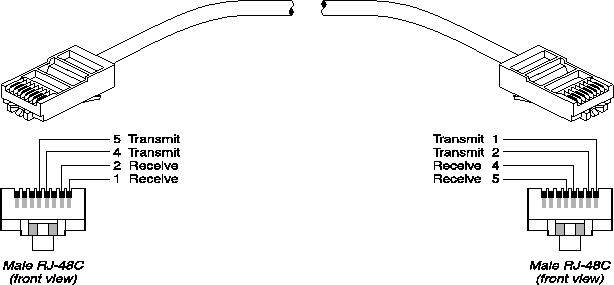
Install the RJ-48C/RJ-48C crossover when the WAN interface transmits on pins 5 and 4 and receives on pins 2 and 1. Figure C-7 and Table C-12 show the pinouts.
Figure C-7. RJ-48C/RJ-48C crossover cable
E1/PRI straight-through cable: RJ-48C/RJ-48C
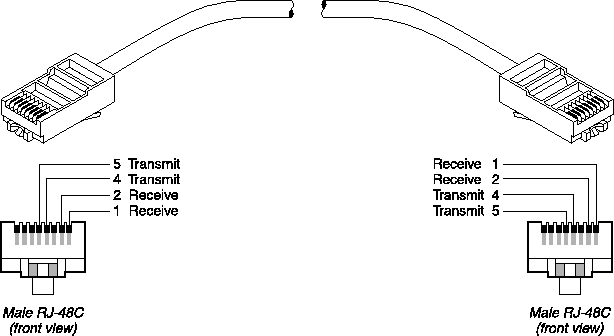
Before installing the RJ-48C/RJ-48C straight-through cable, verify that the WAN interface transmits on pins 2 and 1 and receives on pins 5 and 4. Figure C-8 and Table C-13 show the pinouts.
Figure C-8. RJ-48C/RJ-48C straight-through cable specifications
E1/PRI straight-through cable: RJ-48C/DA-15
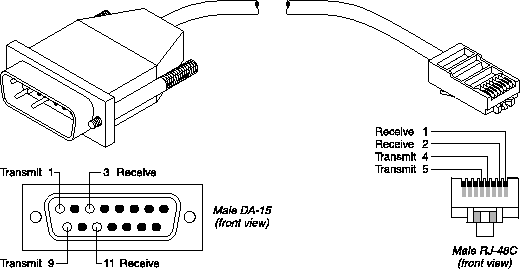
Before installing the RJ-48C/DA-15 straight-through cable, verify that the WAN interface transmits on pins 3 and 11 and receives on pins 1 and 9. Figure C-9 and Table C-14 show the pinouts.
Figure C-9. RJ-48C/DA-15 straight-through cable
E1/PRI crossover cable: RJ-48C/DA
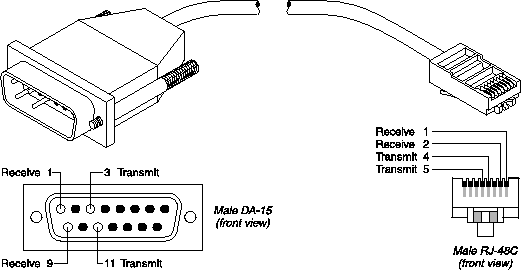
Before installing the RJ-48C/DA cable, verify that the WAN interface transmits on pins 1 and 9 and receives on pins 3 and 11. Figure C-10 and Table C-15 show the pinouts.
Figure C-10. RJ-48C/DA crossover cable
Model number DA15-SPart number 2510-0065-001 | |||
|---|---|---|---|
Pair # |
Signal (MAX) |
Male RJ-48C (MAX) |
Male DA-15P (remote) |
|
1
|
Receive
|
1 2
|
1 9
|
|
2
|
Transmit
|
5 4
|
3 11
|
E1/PRI straight-through cable: RJ-48C/Bantam
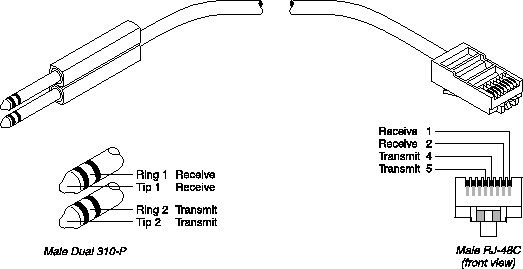
The WAN side of the RJ-48C/Bantam straight-through cable connects to dual bantam jacks. Figure C-11 and Table C-16 show the pinouts.
Figure C-11. RJ-48C/Bantam straight-through cable
E1/PRI straight-through cable: MAX 6000 BNC to RJ-48C
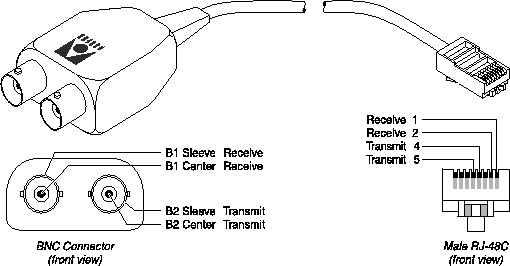
The MAX 6000 BNC to RJ-48C cable adapts a modular E1 port on the MAX to coaxial cable E1 lines. You must also set the jumpers within the MAX for 50 ohm service. Figure C-12 and Table C-17 show the pinouts.
Figure C-12. MAX 6000 BNC to RJ-48C straight-through cable
E1/PRI WAN ports
Table C-18 lists the pins on RJ-48C sockets on the MAX used for E1/PRI WAN interface. Only pins 1, 2, 4, and 5 are used. The remaining pins are not connected.
ISDN BRI interface specifications
The MAX unit's ISDN BRI interface has specifications for the Net/BRI module and the Host/BRI module. Warning: To reduce the risk of fire, communication cable conductors must be 26 AWG or
larger.
Warning: To reduce the risk of fire, communication cable conductors must be 26 AWG or
larger.
For the Net/BRI module
The Net/BRI module (MX-SL-8BRIN) connects to the WAN through a network termination (NT1) device. You must install a cable from the NT1 that ends in a 100 termination. The maximum distance between the NT1 and its termination is 3280 feet (1000 m). You can install the Net/BRI module anywhere along the length of the cable. Use only cable specifically constructed for ISDN BRI interfaces.
For the Host/BRI module
Each ISDN BRI line provided by the Host/BRI module (MX-SL-8BRIT) must end in a 100 termination. The maximum cable distance between the Host/BRI and its termination is 3280 feet (1000 m). You can install the local ISDN BRI device anywhere along the length of the cable. Use only cable specifically constructed for ISDN BRI S interfaces.
Serial host interface specifications
Specifications for the serial host ports on the MAX include cabling requirements, timing requirements, and interface types.
V.35 cabling
You can use V.35 cabling to connect the MAX to some Cisco routers, to a wide variety of serial hosts, and to CLI and PictureTel codecs. V.35/V.25 bis cable to Cisco
The V.35/V.25 bis cable connects the MAX to the V.35 port of a Cisco router that uses V.25 bis dialing. Figure C-13 and Table C-20 show the V.35/V.25 bis cable pinouts.
Figure C-13. V.35/V.25 bis cable to Cisco
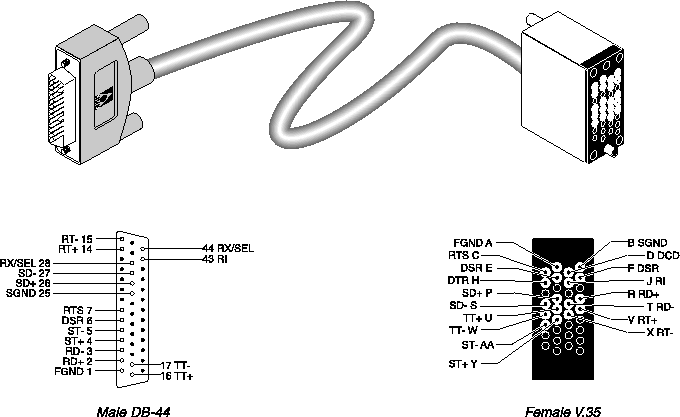
Pair # |
Signal(MAX) |
MAX male DB-44(MAX) |
Host female V.35 |
|---|---|---|---|
|
1
|
FGND
|
1
|
A
|
|
2
|
SD+ SD-
|
26 27
|
P S
|
|
3
|
RD+ RD-
|
2 3
|
R T
|
|
4
|
ST+ ST-
|
4 5
|
Y AA
|
|
5
|
RT+ RT-
|
14 15
|
V X
|
|
6
|
DSR DCD
|
6 36
|
E, F* D
|
|
7
|
RTS RI
|
7 43
|
C J
|
|
8
|
DTR SGND
|
8 25
|
H B
|
|
9
|
TT+ TT-
|
16 17
|
U W
|
|
10
|
RX/SEL
|
28, 44*
|
|
Pin positions separated by commas are jumped to each other.
V.35 cable to generic serial host
The V.35 cable for connection to generic serial hosts connects the MAX to the V.35 ports of a wide variety of equipment. A female-to-male V.35 gender changer is included when you order the cable. Figure C-14 and Table C-21 show the V.35 cable pinouts.
Figure C-14. V.35 cable to generic serial host
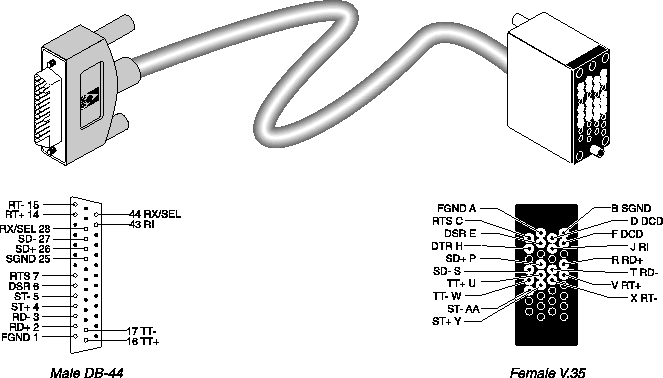
Pair # |
Signal(MAX) |
MAX male DB-44(MAX) |
Host female V.35 |
|---|---|---|---|
|
1
|
FGND
|
1
|
A
|
|
2
|
SD+ SD-
|
26 27
|
P S
|
|
3
|
RD+ RD-
|
2 3
|
R T
|
|
4
|
ST+ ST-
|
4 5
|
Y AA
|
|
5
|
RT+ RT-
|
14 15
|
V X
|
|
6
|
DSR DCD
|
6 36
|
E D, F*
|
|
7
|
RTS RI
|
7 43
|
C J
|
|
8
|
DTR SGND
|
8 25
|
H B
|
|
9
|
TT+ TT-
|
16 17
|
U W
|
|
10
|
RX/SEL
|
28, 44*
|
|
Pin positions separated by commas are jumped to each other.
V.35/RS-366 cable to generic serial host
The V.35/RS-366 cable connects the MAX to the V.35 ports of a wide variety of equipment that uses RS-366 dialing. A female-to-male V.35 gender changer is included when you order the cable. Figure C-15 and Table C-22 show the V.35/RS-366 cable pinouts.
Figure C-15. V.35/RS-366 cable to generic serial host
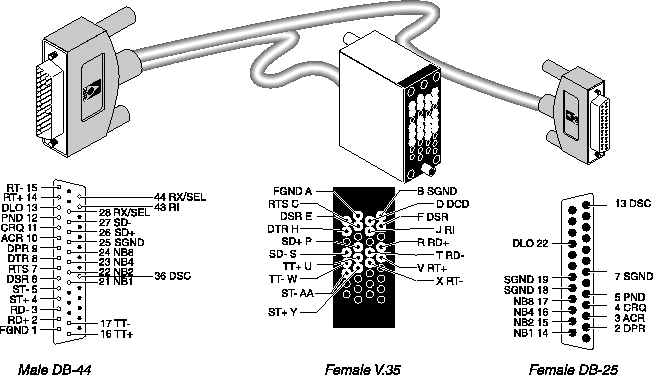
V.35/RS-366 cable to CLI
The V.35/RS-366 cable connects the MAX to the V.35 port of the Compression Labs Rembrandt II codec with support for RS-366 dialing. Figure C-16 and Table C-23 show the V.35/RS-366 cable pinouts.
Figure C-16. V.35/RS-366 cable to CLI codec
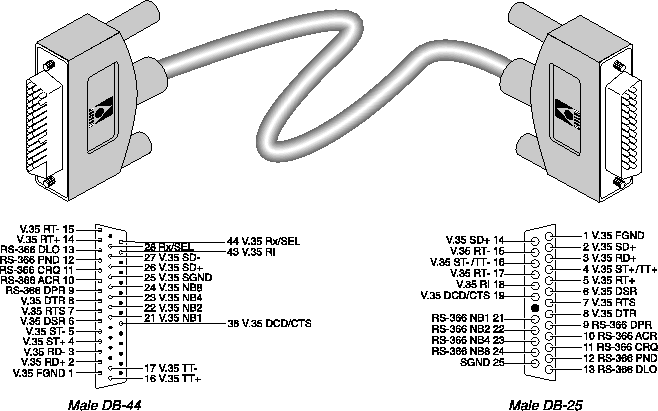
V.35/RS-366 cable to PictureTel
The V.35/RS-366 cable connects the MAX to the V.35 port of the PictureTel codec with support for RS-366 dialing. Figure C-17 and Table C-24 show the V.35/RS-366 cable pinouts.
Figure C-17. V.35/RS-366 cable to PictureTel
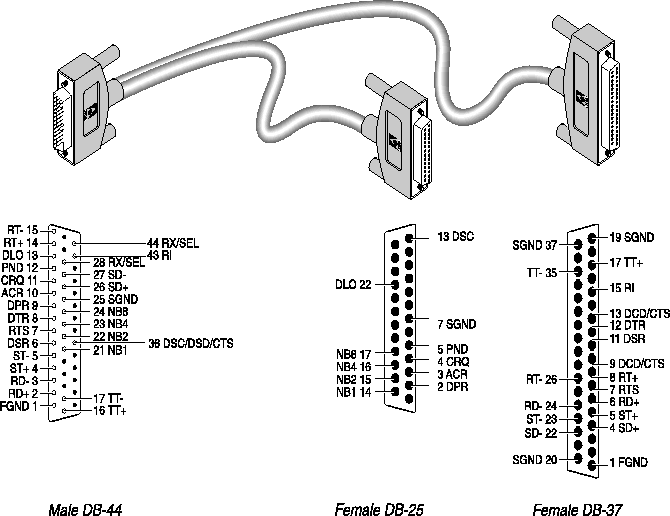
Model number MBHD-449PTPart number 2510-0093-001 | ||||
|---|---|---|---|---|
Pair # |
Signal(MAX) |
MAX male DB-44(MAX) |
Host female DB-37 |
RS-366 female DB-25 |
|
1
|
FGND
|
1
|
1
|
|
|
2
|
SD+ SD-
|
26 27
|
4 22
|
|
|
3
|
RD+ RD-
|
2 3
|
6 24
|
|
|
4
|
ST+ ST-
|
4 5
|
5 23
|
|
|
5
|
RT+ RT-
|
14 15
|
8 26
|
|
|
6
|
DSR DCD/CTS
|
6 36
|
11 9, 13*
|
|
|
7
|
RTS RI
|
7 43
|
7 15
|
|
|
8
|
DTR SGND
|
8 25
|
12 19, 20, 37*
|
|
|
9
|
TT+ TT-
|
16 17
|
17 35
|
|
|
10
|
DPR ACR
|
9 10
|
|
2 3
|
|
11
|
CRQ PND
|
11 12
|
|
4 5
|
|
12
|
DLO SGND
|
13 25
|
|
22 7
|
|
13
|
NB1 NB2
|
21 22
|
|
14 15
|
|
14
|
NB4 NB8
|
23 24
|
|
16 17
|
|
15
|
DSC
|
36
|
|
13
|
|
16
|
RX/SEL
|
28, 44*
|
|
|
*Pin positions separated by commas are jumped to each other.
RS-366 cabling
Ascend supplies a variety of RS-366 cables which you can use to connect the MAX to Video Telecom and to a wide variety of serial hosts. RS-449/RS-366/DB-37 cable to Video Telecom
The RS-449/RS-366/DB-37 cable connects the MAX to the RS-449 port of a Video Telecom codec with support for RS-366 dialing. Figure C-18 and Table C-25 show the RS-449/RS-366/ DB-37 cable pinouts.
Figure C-18. RS-449/RS-366/DB-37 cable to Video Telecom codec
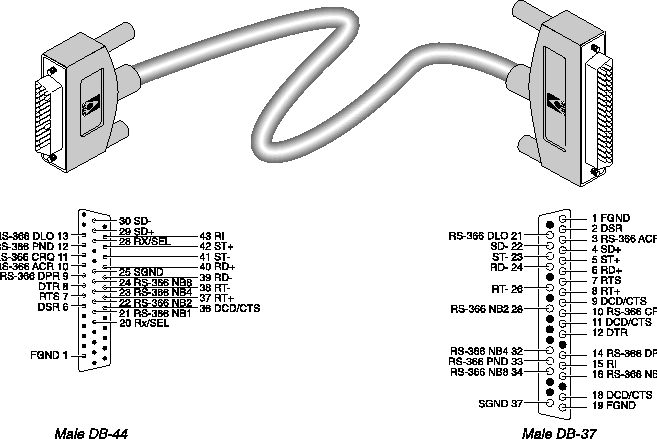
Pin positions separated by commas are jumped to each other. This cable does not support terminal timing.
RS-449/RS-366 cable to generic serial host
The RS-449/RS-366 cable connects the MAX to the RS-449 ports of a wide variety of equipment that uses RS-366 dialing. A female-to-male DB-37 gender changer is included when you order the cable. Figure C-19 and Table C-26 show the RS-449/RS-366 cable pinouts.
Figure C-19. RS-449/RS-366 cable to generic serial host
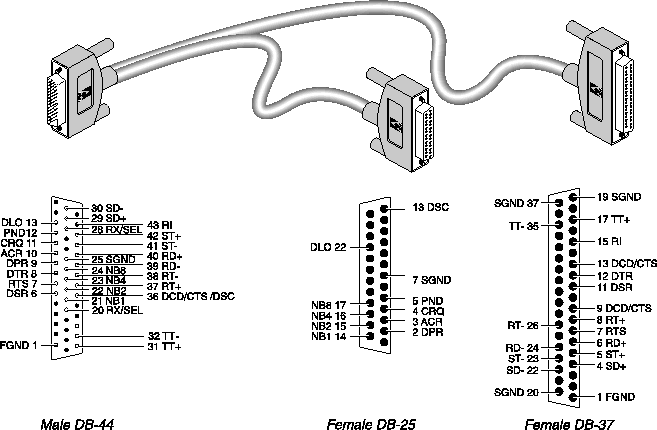
Model number MBHD-449-366Part number 2510-0078-001 | ||||
|---|---|---|---|---|
Pair # |
Signal(MAX) |
MAX male DB-44(MAX) |
Host female DB-37 |
RS-366 female DB-25 |
|
1
|
FGND
|
1
|
1
|
|
|
2
|
SD+ SD-
|
29 30
|
4 22
|
|
|
3
|
RD+ RD-
|
40 39
|
6 24
|
|
|
4
|
ST+ ST-
|
42 41
|
5 23
|
|
|
5
|
RT+ RT-
|
37 38
|
8 26
|
|
|
6
|
DSR DCD/CTS
|
6 36
|
11 9, 13*
|
|
|
7
|
RTS RI
|
7 43
|
7 15
|
|
|
8
|
DTR SGND
|
8 25
|
12 19, 20, 37*
|
|
|
9
|
TT+ TT-
|
31 32
|
17 35
|
|
|
10
|
DPR ACR
|
9 10
|
|
2 3
|
|
11
|
CRQ PND
|
11 12
|
|
4 5
|
|
12
|
DLO SGND
|
13 25
|
|
22 7
|
|
13
|
NB1 NB2
|
21 22
|
|
14 15
|
|
14
|
NB4 NB8
|
23 24
|
|
16 17
|
|
15
|
DSC
|
36
|
|
13
|
|
16
|
RX/SEL
|
20, 28*
|
|
|
Pin positions separated by commas are jumped to each other.
RS-449 cable to generic serial host
The RS-449 cable for connection to generic serial hosts connects the MAX to the RS-449 ports of a wide variety of equipment. A female-to-male DB-37 gender changer is included when you order the cable. Figure C-20 and Table C-27 show the RS-449 cable pinouts.
Figure C-20. RS-449 cable to generic serial host
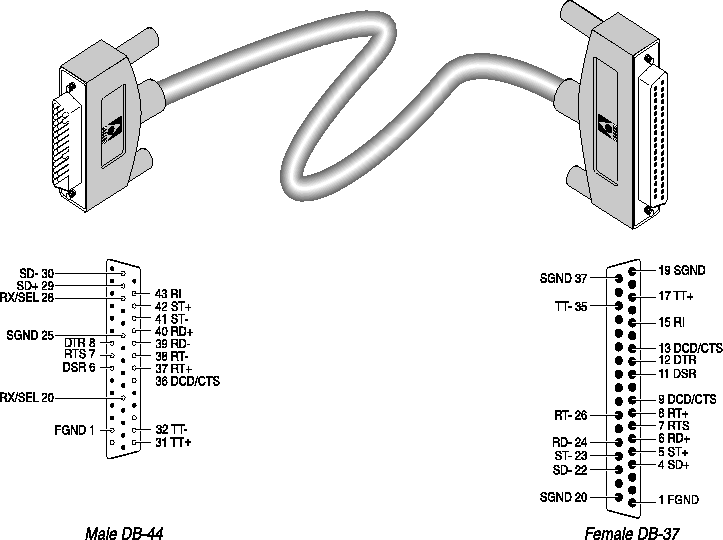
Figure C-21. X.21 cable to generic serial host
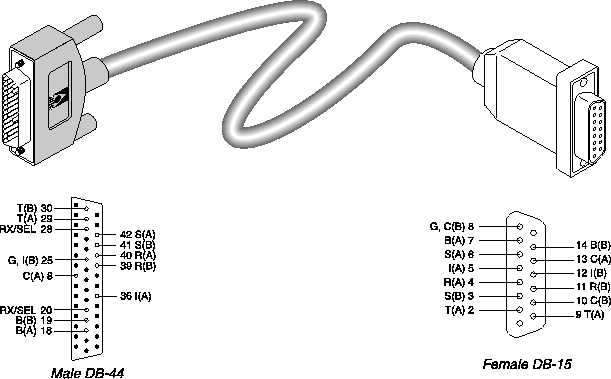
Cable length requirements
Table C-29 specifies the recommended maximum length of the cable between the MAX and the serial host equipment. Longer distances at the specified data rates are possible when you use terminal timing. If you require still longer distances you can install the Ascend RPM, a hardware device that provides an extended-distance high-speed link between the MAX and the serial host equipment.
MAX cable length |
Serial data rate |
|---|---|
|
25 feet
|
3 Mbps
|
|
75 feet
|
2 Mbps
|
|
150 feet
|
512 Kbps
|
Serial WAN cabling specifications
The MAX unit's serial WAN interface supports nailed-up connections to the WAN. Data packets from the MAX unit's bridge/router module can use this interface, but bit streams from devices connected to the MAX unit's serial host ports cannot.
RS-449/422 V.35 cable to WAN
You can connect a V.35 cable to the V.35 port of a DCE device. Table C-30 describes the V.35 cable pinouts.
Pair # |
Signal(MAX) |
MAX male DB-44(MAX) |
Host male V.35 |
|---|---|---|---|
|
1
|
FGND RI
|
1 8
|
A J
|
|
2
|
SD+ SD-
|
39 40
|
P S
|
|
3
|
RD+ RD-
|
30 29
|
R T
|
|
4
|
ST+ ST-
|
41 42
|
Y AA
|
|
5
|
RT+ RT-
|
32 31
|
V X
|
|
6
|
TT+ TT-
|
38 37
|
U W
|
|
7
|
DTR DSR
|
6 11
|
H E
|
|
8
|
DCD SGND
|
9 25
|
F B
|
|
9
|
CTS RTS
|
7 36
|
D C
|
RS-449 cable to WAN
You can connect the RS-449 cable to the RS-449 port of a DCE device. Table C-31 describes the RS-449 pinouts.
Pair # |
Signal(MAX) |
MAX male DB-44(MAX) |
Host female DB-37 |
|---|---|---|---|
|
1
|
FGND RI
|
1 8
|
1 15
|
|
2
|
SD+ SD-
|
39 40
|
4 22
|
|
3
|
RD+ RD-
|
30 29
|
6 24
|
|
4
|
ST+ ST-
|
41 42
|
5 23
|
|
5
|
RT+ RT-
|
32 31
|
8 26
|
|
9
|
TT+ TT-
|
38 37
|
17 35
|
|
8
|
DTR DSR
|
6 11
|
12 11
|
|
6
|
DCD SGND
|
9 25
|
13 19, 20, 37*
|
|
7
|
CTS RTS
|
7 36
|
9 7
|
Pin positions separated by commas are jumped to each other.
IDSL specifications
Check with your provider regarding the network-interface specifications for the ISDN Digital Subscriber Line (IDSL) card. The card supports loopback testing. It includes an RS-449 cable for connection to a DCE device. General specifications
Following are the general specifications for the IDSL card:.
Network-interface specifications
Specifications for the IDSL network interface are as follows:
Copyright © 1998, Ascend Communications, Inc. All rights reserved.