
![[Top]](../images/home.jpg)
![[Contents]](../images/contents.jpg)
![[Prev]](../images/previous.jpg)
![[Next]](../images/next.jpg)
![[Last]](../images/index.jpg)


AppleTalk Routing
This chapter covers the following topics:
Introduction to AppleTalk routing
The MAX functions as an AppleTalk internet router, providing routing functions for AppleTalk nodes (Macintosh workstations or Apple printers) that are connected to the MAX over Ethernet or a WAN. MAX routing supports the following AppleTalk protocols:
- Datagram Delivery Protocol (DDP)
- Routing Table Maintenance Protocol (RTMP)
- AppleTalk Echo Protocol (AEP)
- Zone Information Protocol (ZIP)
- Name Binding Protocol (NBP)
- AppleTalk Control Protocol (ATCP- for router-to-router applications)
When to use AppleTalk routing
Use AppleTalk routing to connect two or more networks that have AppleTalk nodes such as Mac OS computers or Apple printers. The primary benefits of routing AppleTalk traffic (as opposed to bridging this traffic) are:
- Gives you more control over calls
- Reduces broadcast and multicast traffic over the WAN
- Provides startup information to local AppleTalk devices
Reducing broadcast and multicast traffic
Because AppleTalk uses multicast and broadcast addresses extensively, routing AppleTalk can greatly improve the efficiency of a LAN or WAN. By using AppleTalk zones to segment traffic, you can significantly reduce the amount of broadcast and multicast traffic on a LAN or WAN. When you set up a router for the first time, you identify the cable range (network-number range) for the subnetwork segment and one or more zones.
For example, when a user on a network without a router selects a device in the Chooser, the MAC OS computer sends out a Name Binding Protocol (NBP) Lookup as a broadcast packet. Because a bridge forwards all broadcast traffic, all devices on the network receive the Lookup packet. A router can significantly reduce AppleTalk traffic over the WAN because it does not forward broadcast traffic from one subnetwork to another, but stops it at the subnetwork port of the router.
Zone multicasting is intended to prevent any node not in the destination zone for the lookup from receiving the lookup packet. Any AppleTalk node responds only to NBP lookups for that node's zone name. In the example in the preceding paragraph, a router would convert the Broadcast Request packet generated by the Lookup request to a Forward Request packet for each network that contains nodes in the target zone specified by the Lookup request.
A bridge can filter directed traffic between two specific nodes but cannot filter broadcast or multicast traffic, since there is not a specific port that can be assigned to a multicast or broadcast address. This means that although filters used with bridging can reduce the number of AppleTalk packets sent to remote network segments, bridging does not reduce the number of broadcast and multicast packets over these networks.
Providing dynamic startup information to local devices
In addition to routing services, the Ascend AppleTalk router provides startup information to AppleTalk stations. As with other routed protocols, AppleTalk station, or node, addresses consist of a unique network number/node combination. AppleTalk addresses are dynamically assigned when a node starts up. In addition, the router provides an AppleTalk node with the network cable range to which it is attached, and supplies zone name information.
Understanding AppleTalk zones and network ranges
AppleTalk zones and network ranges are configured in AppleTalk routers. Network numbers are assigned to network segments, and must be unique within the internetwork. A network range is a range of network numbers specified the port descriptor of the router port and then transmitted through RTMP to the other nodes of the network. Each of the numbers within a network range can represent up to 253 devices.
AppleTalk zones
A zone is a multicast address containing an arbitrary subset of the AppleTalk nodes in an internet. Each node belongs to only one zone, but a particular extended network can contain nodes belonging to any number of zones. Zones provide departmental or other groupings of network entities that a user can easily understand.
In the Ascend AppleTalk router, zone names are case-insensitive. However, because some routers regard zone names as case-sensitive, you should be consistent in spelling zone names when you configure multiple connections or routers.
Extended and nonextended AppleTalk networks
AppleTalk subnetworks are either nonextended or extended. Nonextended networks theoretically allow up to 254 nodes. A nonextended network has one network number (not a range) and one zone. Examples of nonextended networks are LocalTalk and ARA dial-up networks.
An extended network is a group of nonextended networks on the same physical data link, and contains a range of network numbers. Each network in the range supports up to 253 devices. EtherTalk and TokenTalk are examples of extended networks.
At least one router on a network, called the seed router, must have the network number range specified in its port description. Other routers on the network can have a network range of 0 (zero), which specifies that they acquire the network-number range from RTMP packets sent by the seed router. AppleTalk routers on a network must not have conflicting network-number ranges for that network. A zero value does not cause a conflict, but otherwise, all seed routers on the same network must have the same value for the start and end of the network-number range.
Figure 4-1 shows a network with three routers and three zones configured. Each zone has a range of network numbers.
Figure 4-1. AppleTalk LAN
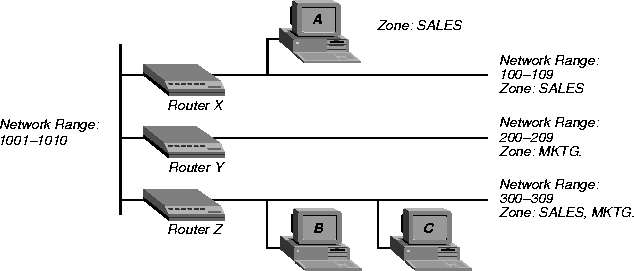
Router X, Router Y, and Router Z connect to the backbone network (Range 1001-1010). Each router has an additional connection to a local network segment. For example, Router X has a connection to the network range 100-109. User A's computer also connects to the 100-109 range.
Because Router X is configured with only one zone, any AppleTalk device joining the segment belongs to the SALES zone. But User B's computer can belong to either the SALES zone or the MKTG. zone. Some AppleTalk devices allow you to select the zone to which they belong. If there is no way to manually assign the zone, the AppleTalk device is put into the default zone, which is defined on the AppleTalk router.
Figure 4-1 shows two important concepts about network numbers and zones. When a network range is defined, all values within that range are unusable for any other segment. The segment to which user C's computer connects uses network range 300-309. No other network segment in this AppleTalk network can use network numbers 300, 301, 302, etc., in their ranges. As an example, network number 310 is available to a new network segment
Zones can be shared among network segments. In Figure 4-1, network 100-109 supports zone SALES. So does network 300-309.
Understanding how AppleTalk works
Figure 4-2 illustrates a connection between a workstation on a MAX that is connected to another MAX over a synchronous PPP WAN connection.
Figure 4-2. Routed connection
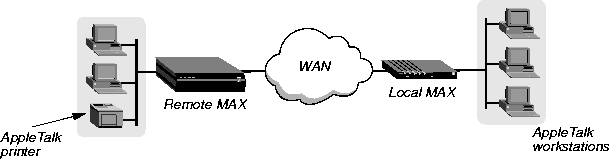
Following is a brief description of how a workstation user sees a typical AppleTalk connection. The steps describe in a general way what is happening as the user makes the choices that lead to a connection:
- An AppleTalk workstation user opens the Macintosh Chooser for the first time since it has been attached to the router and configured.
- The workstation sends a ZIP Query to obtain an updated zone list from the local MAX, and the MAX returns the updated zone list. This list might contain different zones than did the initial list.
- The user selects a zone and a specific device in the Chooser.
- The workstation sends a Name Binding Protocol (NBP) Broadcast Request to the MAX, which checks its Zone Information Table (ZIT) to determine which subnetwork that printer is located in, and sends the request to the remote MAX via the port configured in the Connection profile.
- The remote MAX determines the port to which the subnetwork is attached and performs the lookup in the appropriate multicast address (multicast addresses are assigned to zones).
- All devices in the appropriate zone on the subnetwork detect and process the NBP Lookup packet.
- The selected printer obtains the sender's address from the Lookup packet (in this case the routers are forwarders and the workstation is the sender) and sends the reply through the routers to the workstation.
- The user sends the print job to the printer.
- When the print job is complete and no data packets are passing through the connection, the MAX units continue to pass routing information.
Configuring AppleTalk routing
To configure AppleTalk routing, you must set system-level parameters in the Ethernet Mod COnfig profile and, if required for caller authentication, in the Answer profile. In addition, you can configure AppleTalk for specific connections, You can also configure AppleTalk connections in RADIUS.
System-level AppleTalk routing parameters
To set the required parameters in the Ethernet Mod Config profile:
- Open the Ethernet > Mod Config > Ether Options menu.
- Set AppleTalk to Yes.
Otherwise you cannot configure the remaining parameters.
- In the Ethernet > Mod Config > AppleTalk Options menu, set the Zone Name parameter to the name of any of the zones assigned to the network segment to which the Ascend unit is connected. Enter up to 33 alphanumeric characters. For example, for router X in Figure 4-1:
90-B00 Mod Config
        AppleTalk Options
            Peer=Router
         >Zone Name=SALES
            AppleTalk Router=Seed
            Net Start=300
            Net End=309
            Default Zone=SALES
            Zone Name #1=MKTG
            Zone Name #2=ENGINEERING
            Zone Name #3=
            Zone Name #4=
- Set the AppleTalk Router parameter to Seed or Non-Seed to specify whether the Ascend unit is a seed or nonseed router. For example:
90-B00 Mod Config
        AppleTalk Options
            Peer=Router
          >Zone Name=SALES
            AppleTalk Router=Seed
            Net Start=300
            Net End=309
            Default Zone=SALES
            Zone Name #1=MKTG
            Zone Name #2=ENGINEERING
            Zone Name #3=
            Zone Name #4=
A seed router has a manually defined network configuration. When a nonseed router boots, it has no local network configuration. It examines local network traffic and learns its local network configuration.
Note: You should configure the MAX as a nonseed router provided there is at least one
seed router on the local network. Having only one seed router on a local network
simplifies potential network configuration changes. Should you need to change the
network numbering, only the seed router needs to be reconfigured. The remaining nonseed
routers simply need to be rebooted to learn the changes.
- If the MAX is to be a seed router, set the Net Start and Net End parameters to specify the range for the network to which the unit is attached. (For example, the menu shown in step 4 specifies a range of 300-309.)
If there are other seed routers sharing the MAX unit's network segment, this information must be identical on all routers that share the network segment. If there are no other seed routers, every network number from Net Start to Net End must be unique for the entire internet. Valid network numbers are of from 1-65,534.
- If the MAX is to be a seed router, specify the default-zone name assigned to the local AppleTalk network segment. Enter up to 33 alphanumeric characters in the Default Zone field. (For example, the menu shown in step 4 specifies SALES as the default zone.)
AppleTalk routers assign the default zone to any AppleTalk device that is connected to the local Ethernet segment but has not explicitly been assigned to another zone.
Note: Zones can be shared across network segments. However, the Default Zone and list
of additional zones need to be identical for any AppleTalk router sharing the local network
segment.
- If the MAX is to be a seed router, specify the names of any other zones assigned to the network segment to which the MAX is connected. Enter up to 33 alphanumeric characters in each of one or more of the Zone Name fields. (For example, the menu shown in step 4 specifies MKTG in the Zone Name #1 field and SALES, MKTG in Zone Name #2.)
Answer profile parameter
If you configure the MAX to authenticate with names and passwords, enable AppleTalk routing in the Ethernet > Answer profile by setting Route AppleTalk=Yes. For example:
90-700 Answer
    PPP Options
       >Route IP=No
      Route IPX=No
      Route AppleTalk=Yes
      Bridge=Yes
      Recv Auth=None
      MRU=1524
(You cannot set the Route AppleTalk parameter if AppleTalk is set to No in the Ethernet Configuration profile or if AppleTalk Router is set to Off in that profile's AppleTalk Options submenu.)
Per-connection AppleTalk routing parameters
To enable AppleTalk routing for a specific connection:
- Open Ethernet > Connections > any Connection profile.
- Set Route AppleTalk to Yes.
You cannot set the Route AppleTalk parameter unless you set Ethernet > Mod Config > AppleTalk Options > AppleTalk to No or Ethernet > Answer profile > Route AppleTalk to No in the Answer profile.
- Set the Encaps parameter to PPP, MPP, or MP.
- Set Dial # to the number the MAX dials when it receives AppleTalk data that it should forward to the remote network specified by this profile.
- Open the AppleTalk Options menu.
- Set Zone Name to specify the zone name for the AppleTalk router at the remote end of the connection. For example:
90-101 Macintosh 1
    >AppleTalk options...
        Peer=Router
        Zone Name=ENGINEERING
        Net Start=2001
        Net End=2010
This zone name appears in the AppleTalk Zones window of the Chooser. If the WAN segment for the zone is not already connected when packets for the zone are received (for example, when a user selects this zone in the Chooser, and then selects AppleShare), the MAX places a call to the number in the Dial # field of the Connection profile.
- Enter the network range in the Net Start and Net End fields.
This range defines the networks available for packets that are to be routed to this static route. Valid entries for these fields are in the range from 1-65,534. All routes that share a network segment must specify the same network range.
Configuring an AppleTalk connection with RADIUS
You can configure an AppleTalk-routed connection in a RADIUS user profile and configure static AppleTalk routes in a RADIUS pseudo-user file. For more information, see the MAX RADIUS Configuration Guide.
Reading more about AppleTalk
This chapter provides only a very brief description of AppleTalk networking. For more complete information, see the following books:
Apple Computer. Inside Macintosh: Networking.
Chappell, Laura A., and Roger L. Spicer. Novell's Guide to Multiprotocol Internetworking.
Sidhu, Andrews, and Alan B. Oppenheimer. Inside AppleTalk, Second Edition.
Cougias, Dell, and Heiberger. Designing AppleTalk Network Architectures.
techpubs@ascend.com
Copyright © 1998, Ascend Communications, Inc. All rights
reserved.