![[Top]](../images/home.jpg)

![[Contents]](../images/contents.jpg)
![[Prev]](../images/previous.jpg)
![[Next]](../images/next.jpg)
![[Last]](../images/index.jpg)


Setting Up Virtual Private Networks in RADIUS
Introducing ATMP
Ascend Tunnel Management Protocol (ATMP) is a UDP/IP-based protocol that provides a tunnelling mechanism between two Ascend units across the Internet or a frame relay network. Each Ascend unit can be a MAX or a Pipeline 400. The protocol uses standard Generic Routing Encapsulation (GRE).
How ATMP connections work
Figure 7-1 shows a sample ATMP tunnel connection.
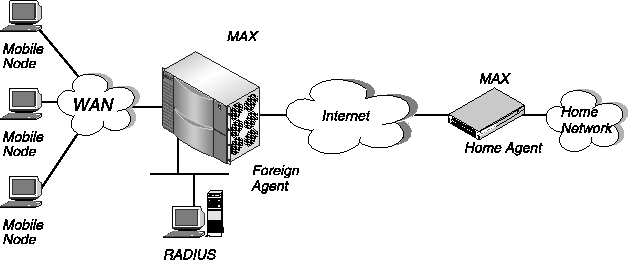
Figure 7-1. Sample cross-Internet ATMP tunnel
The Ascend-Primary-Home-Agent attribute specifies the IP address or hostname of the first home agent the foreign agent tries to reach when setting up an ATMP tunnel. The Ascend-Secondary-Home-Agent specifies the home agent the foreign agent tries to reach if the primary home agent is unavailable.
The MAX authenticates the connection in the usual way (for example, by using CHAP).
The foreign agent sends up to ten RegisterRequest messages at two-second intervals, timing out and logging a message if it receives no response to those requests.
This reply includes an encrypted version of the Ascend-Home-Agent-Password value in the mobile node's RADIUS profile. This password must match the value of the home agent's Password parameter in the Ethernet > Mod Config > ATMP Options menu.
If registration fails, the home agent logs a message and the foreign agent disconnects the mobile node. If registration succeeds, the MAX creates a tunnel between the foreign agent and the home agent. At this point, the mobile node connects to the home network as though it had dialed locally, and can transfer data across the tunnel.
In the case of routing an IPX packet from the mobile node, the home agent must see the mobile node as connected to another IPX network. ATMP adds this virtual IPX network to the home agent's routing table based on the IPX attributes it receives from the foreign agent. The RADIUS user profile for the mobile node must specify the IPX network number unique within the enterprise.
Overview of RADIUS attributes for ATMP
The foreign agent must have a RADIUS user profile that authenticates the mobile node and specifies the attributes listed Table 7-2. The IPX attributes shown in Table 7-2 are not ATMP-specific, but may be required for ATMP connections to an IPX home network.
For information on non-ATMP attributes
The home agent and the foreign agent must have their own outgoing RADIUS user profiles in order to connect to each other. Each user profile must enable IP routing, and make use of non-ATMP attributes. In addition, if you are tunneling IPX, you must set IPX attributes. This chapter provides the basic steps for setting up these profiles. For complete information on each attribute you can set, see Chapter 9, Reference to RADIUS Attributes.
Overview of MAX configuration parameters for ATMP
Both the foreign agent and home agent require some ATMP configuration on the MAX. The related parameters appear in Table 7-3.
For information on non-ATMP parameters
A home agent in gateway mode must have its own Connection profile to the home network. Except for the ATMP Gateway setting, this profile uses non-ATMP parameters. The present chapter provides the basic steps for setting up the Connection profile. For complete information on each non-ATMP Connection profile parameter you can set in the MAX configuration interface, see the MAX Reference Guide.
Setting up a tunnel in router mode for an IP network
A private IP network is a network with an unregistered IP address. An ATMP tunnel enables a remote user to log into a private IP network across the Internet using a local ISP connection.
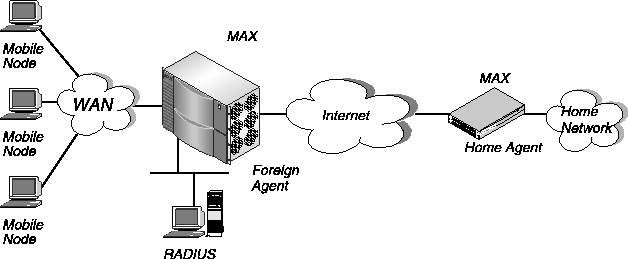
Figure 7-2. ATMP router mode
Configuring the foreign agent in router mode
To configure the foreign agent in router mode, you must perform these tasks:
ATMP options...
        ATMP Mode=Foreign
        Type=N/A
        Password=N/A
        UDP Port=5150
Configuring an incoming RADIUS profile for the mobile node
To create a RADIUS users profile for the mobile node, follow these steps:
This attribute specifies the first home agent the foreign agent tries to reach when setting up the ATMP tunnel, and indicates the UDP port the foreign agent uses for the link.
This attribute specifies the secondary home agent the foreign agent tries to reach when the primary home agent (specified by Ascend-Primary-Home-Agent) is unavailable. The attribute also indicates the UDP port the foreign agent uses for the link.
You must specify the same password indicated by the Password parameter in the Ethernet > Mod Config > ATMP Options menu on the home agent.
By default, ATMP uses UDP port 5150 for communicating ATMP messages between the foreign and home agents. Both the foreign and home agent must agree on the UDP port number. If you specify a non-default UDP port number in one unit's configuration, make sure that the other end of the tunnel specifies the same number.
Node1 Password="Top-secret"
Ascend-Metric=2,
Framed-Protocol=PPP,
Ascend-IP-Route=Route-IP-Yes,
Framed-Address=200.1.1.2,
Framed-Netmask=255.255.255.0,
Ascend-Primary-Home-Agent=10.8.9.10,
Ascend-Home-Agent-Password="private"When the mobile node logs into the foreign agent with the password Top-secret, the foreign agent authenticates the mobile node. The foreign agent then looks for a profile with an IP address that matches the Ascend-Primary-Home-Agent value, so it can bring up an IP connection to the home agent.
Set the attributes on the first line in this way:
For example, you might enter this first line in the profile for the foreign agent Alameda:
Alameda-Out Password="Ascend", User-Service=Dialout-Framed-User
The values of the Framed-Address and Framed-Netmask attributes for the local MAX must match the value of the NAS-Identifier attribute on the home agent. If there is no match, the home agent clears the call.
The Ascend-Send-Auth attribute specifies the authentication protocol that the MAX requests when initiating a connection using PPP or MP+ encapsulation. The answering side of the connection determines which authentication protocol, if any, the connection uses.
Both of these attributes specify the password that the MAX sends to the remote end of a connection on outgoing calls. If the value you specify for Ascend-Send-Secret or Ascend-Send-Password does not match the value of the remote end's Ascend-Receive-Secret attribute (in a RADIUS user profile) or Recv PW parameter (in a Connection profile), the remote system rejects the call.
Alameda-Out Password="Ascend", User-Service=Dialout-Framed-User
User-Name="Alameda",
Framed-Protocol=PPP,
Ascend-Route-IP=Route-IP-Yes,
Framed-Address=10.0.100.1,
Framed-Netmask=255.255.255.0,
Ascend-Metric=2,
Framed-Routing=None,
Ascend-Idle-Limit=30,
Ascend-Dial-Number=1-800-555-5555,
Ascend-PRI-Number-Type=National-Number,
Ascend-Send-Auth=Send-Auth-PAP,
Ascend-Send-Secret="Password1"
ATMP options...The value you specify for Password must match the value of the Ascend-Home-Agent-Password attribute in the mobile node's RADIUS user profile. All mobile node profiles that access this home agent must specify the same password for Ascend-Home-Agent-Password.
ATMP Mode=Home
Type=Router
Password=private
UDP Port=5150
Set the attributes on the first line in this way:
For example, you might enter this first line in the profile for the home agent Boston:
Boston-Out Password="Ascend", User-Service=Dialout-Framed-User
The values of the Framed-Address and Framed-Netmask attributes for the local MAX must match the value of the NAS-Identifier attribute on the foreign agent. If there is no match, the home agent clears the call.
Boston-Out Password="Ascend", User-Service=Dialout-Framed-User
User-Name="Boston",
Framed-Protocol=PPP,
Ascend-Route-IP=Route-IP-Yes,
Framed-Address=10.0.100.1,
Framed-Netmask=255.255.255.0,
Ascend-Metric=2,
Framed-Routing=None,
Ascend-Idle-Limit=30,
Ascend-Dial-Number=1-800-555-1111,
Ascend-PRI-Number-Type=National-Number,
Ascend-Send-Auth=Send-Auth-PAP,
Ascend-Send-Secret="Password1"
Setting up a tunnel in gateway mode for an IP network
In gateway mode, the home agent forwards packets it receives through the tunnel to the home network across an open WAN connection. The home agent must have a nailed-up connection to the home network, because it will not dial the WAN connection based on packets it receives through the tunnel.
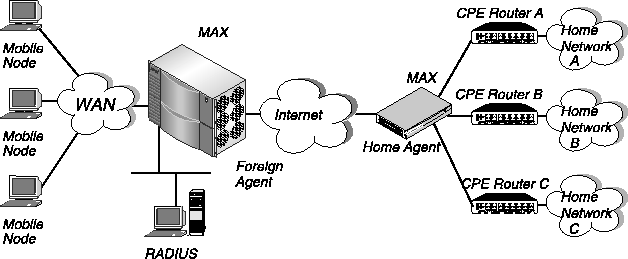
Figure 7-3. ATMP gateway mode
Configuring the foreign agent in gateway mode
To configure the foreign agent in gateway mode, you must perform these tasks:
ATMP options...
        ATMP Mode=Foreign
        Type=N/A
        Password=N/A
        UDP Port=5150
Configuring an incoming RADIUS user profile for the mobile node
To create a RADIUS users profile for the mobile node, follow these steps:
This attribute specifies the first home agent the foreign agent tries to reach when setting up the ATMP tunnel, and indicates the UDP port the foreign agent uses for the link.
This attribute specifies the secondary home agent the foreign agent tries to reach when the primary home agent (specified by Ascend-Primary-Home-Agent) is unavailable. The attribute also indicates the UDP port the foreign agent uses for the link.
You must specify the same password indicated by the Password parameter in the Ethernet > Mod Config > ATMP Options menu on the home agent.
The Connection profile must have the ATMP Gateway parameter set to Yes in the Session Options submenu.
By default, ATMP uses UDP port 5150 for communicating ATMP messages between the foreign and home agents. Both the foreign and home agent must agree on the UDP port number. If you specify a non-default UDP port number in one unit's configuration, make sure that the other end of the tunnel specifies the same number.
Node3 Password="Top-secret"
Ascend-Metric=2,
Framed-Protocol=PPP,
Ascend-Route-IP=Route-IP-Yes,
Framed-Address=200.1.1.2,
Framed-Netmask=255.255.255.0,
Ascend-Primary-Home-Agent=10.8.9.10,
Ascend-Home-Agent-Password="private",
Ascend-Home-Network-Name="Homenet"When the mobile node logs into the foreign agent with the password Top-secret, the foreign agent authenticates the mobile node. The foreign agent then looks for a RADIUS user profile with an IP address that matches the Ascend-Primary-Home-Agent value, so it can bring up an IP connection to the home agent. Note that for an ATMP gateway mode connection, you must specify the name of the home agent's Connection profile to the home network using Ascend-Home-Network-Name.
Set the attributes on the first line in this way:
For example, you might enter this first line in the profile for the foreign agent Alameda:
The values of the Framed-Address and Framed-Netmask attributes for the local MAX must match the value of the NAS-Identifier attribute for the home agent. If there is no match, the home agent clears the call.
The Ascend-Send-Auth attribute specifies the authentication protocol that the MAX requests when initiating a connection using PPP or MP+ encapsulation. The answering side of the connection determines which authentication protocol, if any, the connection uses.
Both of these attributes specify the password that the MAX sends to the remote end of a connection on outgoing calls. If the value you specify for Ascend-Send-Secret or Ascend-Send-Password does not match the value of the remote end's Ascend-Receive-Secret attribute (in a RADIUS user profile) or Recv PW parameter (in a Connection profile), the remote system rejects the call.
Alameda-Out Password="Ascend", User-Service=Dialout-Framed-User

User-Name="Alameda",

        Framed-Protocol=PPP,

        Framed-Address=10.0.100.1,

        Framed-Netmask=255.255.255.0,

        Ascend-Route-IP=Route-IP-Yes,

        Ascend-Metric=2,

        Framed-Routing=None,

        Ascend-Idle-Limit=30,

        Ascend-Dial-Number=1-800-555-5555,

        Ascend-PRI-Number-Type=National-Number,

        Ascend-Send-Auth=Send-Auth-PAP,

        Ascend-Send-Secret="Password1"
ATMP options...The value you specify for Password must match the value of the Ascend-Home-Agent-Password attribute in the mobile node's RADIUS user profile. All mobile node profiles that access this home agent must specify the same password for Ascend-Home-Agent-Password.
ATMP Mode=Home
Type=Gateway
Password=private
UDP Port=5150
Set the attributes on the first line in this way:
For example, you might enter this first line in the profile for the home agent Boston:
The values of the Framed-Address and Framed-Netmask attributes for the local MAX must match the value of the NAS-Identifier attribute on the foreign agent. If there is no match, the home agent clears the call.
Boston-Out Password="Ascend", User-Service=Dialout-Framed-User
User-Name="Boston",
Framed-Protocol=PPP,
Ascend-Route-IP=Route-IP-Yes,
Framed-Address=10.0.100.1,
Framed-Netmask=255.255.255.0,
Ascend-Metric=2,
Framed-Routing=None,
Ascend-Idle-Limit=30,
Ascend-Dial-Number=1-800-555-1111,
Ascend-PRI-Number-Type=National-Number,
Ascend-Send-Auth=Send-Auth-PAP,
Ascend-Send-Secret="Password1"
The value you enter becomes the name of the Connection profile. The name of this Connection profile must match the name specified by the Ascend-Home-Network-Name attribute in the mobile node's RADIUS user profile.
Station=homenet

Active=Yes

Encaps=FR

PRI # Type=National

Dial #=N/A

Calling #=N/A

Route IP=Yes

Route IPX=N/A

Bridge=No

Dial brdcast=N/A
Encaps options...

        FR Prof=Pac Bell

        DLCI=18
IP options...

        LAN Adrs=10.9.8.32/24
Session options...

        ATMP Gateway=Yes
Tunneling ATMP between two IP networks
Typically, the mobile node at the remote end of an ATMP tunnel is a dial-in user. If the home network is an IP network, ATMP can also enable LAN-to-LAN connectivity through the tunnel. An IP router can connect as a mobile node. This functionality does not apply to IPX home networks.
Specifying the mobile node's subnet mask
To enable an IP router to connect as a mobile node, the foreign agent's RADIUS entry for the mobile node must specify the same subnet mask as the home network.
Framed-Address=10.168.6.21,
Framed-Netmask=255.255.255.240,With this address for the mobile node router, the connecting LAN can support up to 14 hosts.
The network base address represents the network cable itself, which is always address 0 (zero).
In this example, the mobile node router has this address 10.168.6.21/28.
If the home agent does not connect directly to the home network, the situation is the same as for any remote network-you must enable the router to learn about routes through dynamic updates, or you must configure static routes.
The mobile node always requires static routes to the home agent as well as to other networks it reaches through the home agent. (It cannot learn routes from the home agent.)
In addition, because the mobile node and the home agent do not exchange routing information, the mobile node's LAN can only support local subnets that fall within the network specified in the RADIUS entry.
For example, a mobile node router at the address 10.168.6.21/28 could support two subnets with a subnet mask of 255.255.255.248-one at the 10.168.6.16 address and the other at the 10.168.6.24 address. The answering unit on the home network would have only one route to the router itself (10.168.6.21/28).
Tunneling IPX across the Internet
ATMP tunnels enable remote NetWare clients to log into corporate IPX networks across the Internet by using a local ISP connection.
Configuring the foreign agent
For the home agent to route correctly to the mobile node, the foreign agent must specify a virtual IPX network number for its mobile nodes. This network number must be unique within the IPX routing domain. Typically, the foreign agent's RADIUS profiles for mobile nodes all use the same virtual IPX network, with unique IPX node addresses on that virtual network. When the home agent receives IPX packets through the ATMP tunnel, it adds the unique virtual network number to its routing table.
ATMP options...

        ATMP Mode=Foreign

        Type=N/A

        Password=N/A

        UDP Port=5150
Configuring an incoming RADIUS user profile for the mobile node
To create a RADIUS users profile for the mobile node, follow these steps:
You must specify the IPX network number in decimal format, not hexadecimal. (IPX network numbers are typically specified in hexadecimal.) It must be unique in the IPX routing domain. All mobile nodes logging into an IPX home network through the same foreign agent typically use the same Framed-IPX-Network number.
The number you indicate must be unique for each mobile node on the virtual IPX network. Specify the number as a 12-digit string enclosed in double quotes. This value completes the IPX address of a mobile node.
This attribute specifies the first home agent the foreign agent tries to reach when setting up the ATMP tunnel, and indicates the UDP port the foreign agent uses for the link.
This attribute specifies the secondary home agent the foreign agent tries to reach when the primary home agent (specified by Ascend-Primary-Home-Agent) is unavailable. The attribute also indicates the UDP port the foreign agent uses for the link.
You must specify the same password indicated by the Password parameter in the Ethernet > Mod Config > ATMP Options menu on the home agent.
The named Connection profile must have the ATMP Gateway parameter set to Yes in the Session Options submenu.
By default, ATMP uses UDP port 5150 for communicating ATMP messages between the foreign and home agents. Both the foreign and home agent must agree on the UDP port number. If you specify a non-default UDP port number in one unit's configuration, make sure that the other end of the tunnel specifies the same number.
Node2 Password="Top-secret"
Ascend-Metric=2,
Framed-Protocol=PPP,
Ascend-Route-IPX=Route-IPX-Yes,
Ascend-IPX-Peer-Mode=IPX-Peer-Dialin,
Framed-IPX-Network=00004999,
Ascend-IPX-Node-Addr="001122334567",
Ascend-Route-IPX=Route-IPX-Yes
Ascend-Primary-Home-Agent=10.8.9.10,
Ascend-Home-Agent-Password="private",
Ascend-Home-Network-Name="Homenet"When the mobile node logs into the foreign agent with the password Top-secret, the foreign agent looks for a Connection profile or RADIUS profile with an IP address that matches the Ascend-Primary-Home-Agent value, so it can bring up an IP connection to the home agent.
Set the attributes on the first line in this way:
For example, you might enter this first line in the profile for the foreign agent Alameda:
Alameda-Out Password="Ascend", User-Service=Dialout-Framed-User
The values of the Framed-Address and Framed-Netmask attributes for the local MAX must match the value of the NAS-Identifier attribute on the home agent. If there is no match, the home agent clears the call.
The Ascend-Send-Auth attribute specifies the authentication protocol that the MAX requests when initiating a connection using PPP or MP+ encapsulation. The answering side of the connection determines which authentication protocol, if any, the connection uses.
Both of these attributes specify the password that the MAX sends to the remote end of a connection on outgoing calls. If the value you specify for Ascend-Send-Secret or Ascend-Send-Password does not match the value of the remote end's Ascend-Receive-Secret attribute (in a RADIUS user profile) or Recv PW parameter (in a Connection profile), the remote system rejects the call.
Alameda-Out Password="Ascend", User-Service=Dialout-Framed-User
User-Name="Alameda",
Framed-Protocol=PPP,
Ascend-Route-IP=Route-IP-Yes,
Framed-Address=10.0.100.1,
Framed-Netmask=255.255.255.0,
Ascend-Metric=2,
Framed-Routing=None,
Ascend-Idle-Limit=30,
Ascend-Dial-Number=1-800-555-5555,
Ascend-PRI-Number-Type=National-Number,
Ascend-Send-Auth=Send-Auth-PAP,
Ascend-Send-Secret="Password1"
To configure the home agent in router mode, you must perform these tasks:
ATMP options...The value you specify for Password must match the value of the Ascend-Home-Agent-Password attribute in the mobile node's RADIUS user profile. All mobile node profiles that access this home agent must specify the same password for Ascend-Home-Agent-Password.
ATMP Mode=Home
Type=Router
Password=private
UDP Port=5150
Set the attributes on the first line in this way:
For example, you might enter this first line in the profile for the home agent Boston:
Boston-Out Password="Ascend", User-Service=Dialout-Framed-User
The values of the Framed-Address and Framed-Netmask attributes for the local MAX must match the value of the NAS-Identifier attribute on the foreign agent. If there is no match, the home agent clears the call.
Denver-Out Password="Ascend", User-Service=Dialout-Framed-User
User-Name="Denver",
Framed-Protocol=PPP,
Ascend-Route-IP=Route-IP-Yes,
Framed-Address=10.0.100.1,
Framed-Netmask=255.255.255.0,
Ascend-Metric=2,
Framed-Routing=None,
Ascend-Idle-Limit=30,
Ascend-Dial-Number=1-800-555-7777,
Ascend-PRI-Number-Type=National-Number,
Ascend-Send-Auth=Send-Auth-PAP,
Ascend-Send-Secret="Password1"
Setting up the MAX as a multi-mode agent
You can configure the MAX to act as a home agent or a foreign agent on a tunnel-by-tunnel basis. A typical network topology appears in Figure 7-4.
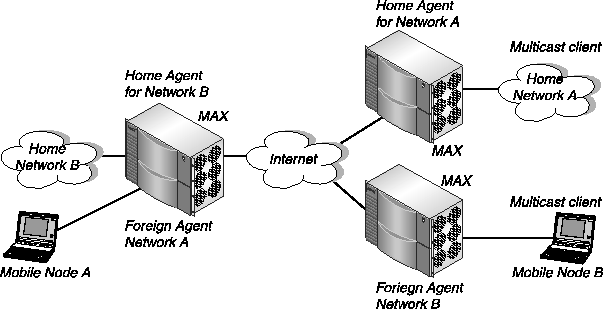
Figure 7-4. The MAX acting as a home agent and a foreign agent
This setting indicates that the MAX will function as both a home agent and foreign agent on a tunnel-by-tunnel basis.
The mobile node must specify this password only when the unit acts as its home agent.
This parameter applies only when the unit is acting as a home agent. It enables or disables a home agent's ability to reply to the mobile node's IPX Nearest Server Query. If you set SAP Reply=Yes, the home agent replies to the mobile node's Nearest Server Query if it knows about a server on the home network. If you set SAP Reply=No, the home agent simply tunnels the mobile node's request to the home network.
Setting up ATMP to bypass a foreign agent
If a home agent MAX has the appropriate RADIUS entry for a mobile node, the mobile node can connect directly to the home agent, bypassing the foreign agent entirely.
Mobile-IPX Password="unit"
User-Service=Framed-User,
Ascend-Route-IPX=Route-IPX-Yes,
Framed-Protocol=PPP,
Ascend-IPX-Peer-Mode=IPX-Peer-Dialin,
Framed-IPX-Network=40000000,
Ascend-IPX-Node-Addr=12345678,
Ascend-Primary-Home-Agent=192.168.6.18,
Ascend-Home-Network-Name="Dave's Max",
Ascend-Home-Agent-Password="Pipeline"If the home agent were in router mode, you would not include the Ascend-Home-Network-Name line in the user entry. The Ascend-Home-Network-Name attribute specifies the name of the answering unit across the WAN on the home IPX network.
Configuring call routing to PPTP servers
You can use RADIUS to route PPP calls to the Point-to-Point Tunneling Protocol (PPTP) server based on the calling or dialed number, and access more than four PPTP servers. Creating tunnels on a per-user basis
In previous releases, when a client dialed into the MAX and wanted to use a PPTP tunnel, the MAX chose a tunnel on the basis of the Route Line n parameters. Each T1 PRI line was associated with a different Route Line n parameter. Each parameter specified a particular PPTP server at the end of the PPTP tunnel. The MAX simply created a tunnel for each T1 line on which the user connected.
When a PPP call comes in on any WAN line and the authentication process begins, the MAX will first check whether the line is a dedicated PPTP line (the same behavior as previously).
5105551212 Password = "Ascend-CLID"
Tunnel-Server-Endpoint = "192.168.6.199",
Tunnel-Type = PPTP,
Tunnel-Medium-Type = IP
7894 Password = "Ascend-DNIS"
Tunnel-Server-Endpoint = "eng-lab-199",
Tunnel-Type = PPTP,
Tunnel-Medium-Type = IP
Layer 2 Tunneling Protocol (L2TP)
Layer 2 Tunneling Protocol (L2TP) provides tunneling at OSI layer 2 (for example, at the HDLC layer of a PPP connection). The MAX currently operates as an L2TP Access Concentrator (LAC) only, which means that it receives incoming PPP calls and initiates a connection to an L2TP Network Server (LNS).
Components of an L2TP tunnel
Figure 7-5 shows the elements of an L2TP tunnel. A PPP client dials in across an asynchronous or synchronous link, using any protocol that can be carried within PPP. The MAX answers the call and passes it to the LNS. LAC-to-LNS communication requires IP connectivity.

Figure 7-5. L2TP tunnel
The connection to the LNS is an IP link, which consists of a control link and zero or more data links. Both the control and data links use UDP port 1701 and are encapsulated in UDP.
Configuring L2TP operations
If the LNS is on a remote IP network, the MAX requires a RADIUS profile (or comparable IP-routing Connection profile) to the LNS. For example:
l2tp-1 Password = "lac-pw"

    User-Service = Framed-User,

    Framed-Protocol = MPP,

    Framed-Address = 1.1.1.1
route-tnt-1 Password = "ascend", User-Service = Dialout-Framed-User

    Framed-Route = "1.0.0.0 1.1.1.1 1 n l2tp-1-out"
l2tp-1-out Password = "lac-pw" User-Service = Dialout-Framed-User

    User-Name = "l2tp-1",

    Ascend-Dial-Number = "9-1-333-555-1212",

    Framed-Protocol = MPP,

    Framed-Address = 1.1.1.1,

    Ascend-Send-Password = "lns-pw"
Examples of profiles that initiate a tunnel on the basis of CLID
For the system to authenticate a mobile client profile using CLID information, the telco switch must send the CLID and the system must be configured to use it.
5551000 Password  =  "Ascend-CLID", User-Service = Dialout-Framed-User

    Tunnel-Type = L2TP,

    Tunnel-Medium-Type = IP,

    Tunnel-Server-Endpoint = "1.1.1.1"
When the MAX brings up an L2TP tunnel after verifying DNIS information, the LNS performs all PPP negotiations and terminates the PPP connection. For security purposes, the LNS should password authenticate the connection.
The following RADIUS profile initiates an L2TP tunnel to an LNS named L2TP-1 if the dialed number is 8001234567:
8001234567 Password = "Ascend-DNIS", User-Service=Dialout-Framed-User

    Tunnel-Server-Endpoint = "l2tp-1.example.com",

    Tunnel-Type = L2TP,

    Tunnel-Medium-Type = IP
The following RADIUS profile is authenticated using the
localpw password before bringing up a tunnel to an LNS at 1.1.1.1:
l2test Password = "localpw"

    User-Service = Framed-User,

    Framed-Protocol = PPP,

    Framed-Address = 3.1.1.1,

    Framed-Netmask = 255.0.0.0

    Tunnel-Server-Endpoint = "1.1.1.1",

    Tunnel-Type = L2TP,

    Tunnel-Medium-Type = IP
Copyright © 1998, Ascend Communications, Inc. All rights reserved.