
User's Manual
|
|
| Rabbit 2000 Microprocessor User's Manual |
|
 |
 |
 |
2. Rabbit Design Features
The Rabbit is an evolutionary design. The instruction set and the register layout is that of the Z80 and Z180. The instruction set has been augmented by a substantial number of new instructions. Some obsolete or redundant Z180 instructions have been dropped to make available efficient 1-byte opcodes for important new instructions. (see "Differences Rabbit vs. Z80/Z180 Instructions" on page 187.) The advantage of this evolutionary approach is that users familiar with the Z80 or Z180 can immediately understand the Rabbit. Existing source code can be assembled or compiled for the Rabbit with minimal changes.
Changing technology has made some features of the Z80/Z180 family obsolete, and these have been dropped. For example, the Rabbit has no special support for dynamic RAM but it has extensive support for static memory. This is because the price of static memory has decreased to the point that it has become the preferred choice for medium-scale embedded systems. The Rabbit has no support for DMA (direct memory access) because most of the uses for which DMA is traditionally used do not apply to embedded systems, or they can be accomplished better in other ways, such as fast interrupt routines, external state machines or slave processors.
Our experience in writing C compilers has revealed the shortcomings of the Z80 instruction set for executing the C language. The main problem is the lack of instructions for handling 16-bit words and for accessing data at a computed address, especially when the stack contains that data. New instructions correct these problems.
Another problem with many 8-bit processors is their slow execution and a lack of number-crunching ability. Good floating-point arithmetic is an important productivity feature in smaller systems. It is easy to solve many programming problems if an adequate floating-point capability is available. The Rabbit's improved instruction set provides fast floating-point and fast integer math capabilities.
The Rabbit supports four levels of interrupt priorities. This is an important feature that allows the effective use of super fast interrupt routines for real-time tasks.
2.1 The Rabbit 8-bit Processor vs. 16-bit and 32-bit Processors
The Rabbit is an 8-bit processor with an 8-bit external data bus and an 8-bit internal data bus. Because the Rabbit makes the most of its external 8-bit bus and because it has a compact instruction set, its performance is as good as many 16-bit processors. Thus the Rabbit can handle many 16-bit operations.
We hesitate to compare the Rabbit to 32-bit processors, but there are undoubtedly occasions where the user can use a Rabbit instead of a 32-bit processor and save a vast amount of money. Many Rabbit instructions are 1 byte long. In contrast, the minimum instruction length on most 32-bit RISC processors is 32 bits.
2.2 Overview of On-Chip Peripherals
The on-chip peripherals were chosen based on our experience as to what types of peripheral devices are most useful in small embedded systems. The major on-chip peripherals are the serial ports, system clock, time/date oscillator, parallel I/O, slave port, and timers. These are described below.
2.2.1 Serial Ports
There are four serial ports designated ports A, B, C, and D. All four serial ports can operate in an asynchronous mode up to the baud rate of the system clock divided by 32. The asynchronous ports can handle 7 or 8 data bits. A 9th bit address scheme, where an additional bit is sent to mark the first byte of a message, is also supported. The software can tell when the last byte of a message has finished transmitting from the output shift register - correcting an important defect of the Z180. This is important for RS-485 communication because the line driver cannot have the direction of transmission reversed until the last bit has been sent. In many UARTs, including those on the Z180, it is difficult to generate an interrupt after the last bit is sent. Parity bits and multiple stop bits are not supported directly by the Rabbit, but can be accomplished with appropriate driving software.
Serial ports A and B can be operated alternately in the clocked serial mode. In this mode, a clock line synchronously clocks the data in or out. Either device of the two devices communicating can supply the clock. When the Rabbit provides the clock, the baud rate can be up to 1/4 of the system clock frequency, or more than 7,375,000 bps for a 29.5 MHz clock speed.
Serial port A has special features. It can be used to cold boot the system after reset. Serial port A is the normal port that is used for software development under Dynamic C.
2.2.2 System Clock
The main oscillator uses an external crystal with a frequency typically in the range from 1.8 MHz to 29.5 MHz. The processor clock is derived from the oscillator output by either doubling the frequency, using the frequency directly, or dividing the frequency by 8. The processor clock can also be driven by the 32.768 kHz oscillator for very low power operation, in which case the main oscillator can be shut down under software control.
Table 2-1 provides estimates of the operating power for selected clock speeds.
Table 2-1. Operating Power Estimates at Selected Clock Speeds Clock Speed
(MHz)Voltage
(V)Current (mA) Power
(mW)Clock Speed
(MHz)Voltage
(V)Current (mA) Power
(mW)
2.2.3 Time/Date Oscillator
The 32.768 kHz oscillator drives an external 32.768 kHz quartz crystal. The 32.768 kHz clock is used to drive a battery-backable (there is a separate power pin) internal 48-bit counter that serves as a real-time clock (RTC). The counter can be set and read by software and is intended for keeping the date and time. There are enough bits to keep the date for more than 100 years. The 32.768 kHz oscillator is also used to drive the watchdog timer and to generate the baud clock for serial port A during the cold boot sequence.
2.2.4 Parallel I/O
There are 40 parallel input/output lines divided among five 8-bit ports designated A through E. Most of the port lines have alternate functions, such as serial data or chip select strobes. Parallel ports D and E have the capability of timer-synchronized outputs. The output registers are cascaded.
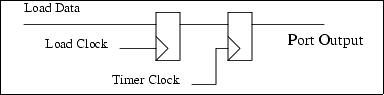
Stores to the port are loaded in the first-level register. That register in turn is transferred to the output register on a selected timer signal. The timer signal can also cause an interrupt that can be used to set up the next bit to be output on the next timer pulse. This feature can be used to generate precisely controlled pulses whose edges are positioned with high accuracy in time. Applications include communications signaling, pulse width modulation and driving stepper motors.
2.2.5 Slave Port
The slave port is designed to allow the Rabbit to be a slave to another processor, which could be another Rabbit. The port is shared with parallel port A and is a bidirectional data port. The master can read any of three registers selected via two select lines that form the register address and a read strobe that causes the register contents to be output by the port. These same registers can be written as I/O registers by the Rabbit slave. Three additional registers transmit data in the opposite direction. They are written by the master by means of the two select lines and a write strobe.
Figure 2-2 shows the data paths in the slave port.
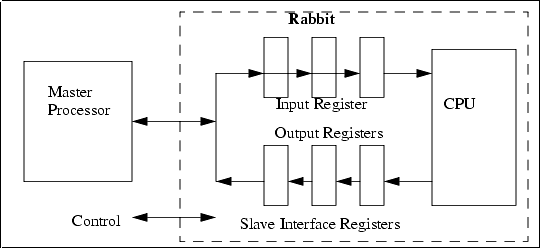
The slave Rabbit can read the same registers as I/O registers. When incoming data bits are written into one of the registers, status bits indicate which registers have been written, and an optional interrupt can be programmed to take place when the write occurs. When the slave writes to one of the registers carrying data bits outward, an attention line is enabled so that the master can detect the data change and be interrupted if desired. One line tells the master that the slave has read all the incoming data. Another line tells the master that new outgoing data bits are available and have not yet been read by the master. The slave port can be used to direct the master to perform tasks using a variety of communication protocols over the slave port.
2.2.6 Timers
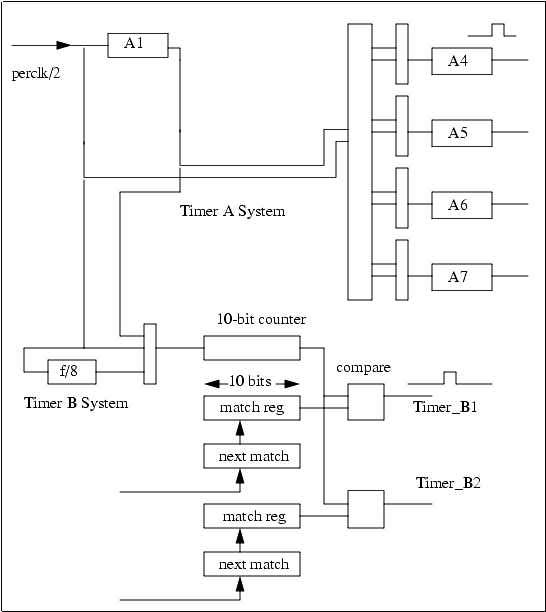
The Rabbit has several timer systems. The periodic interrupt is driven by the 32.768 kHz oscillator divided by 16, giving an interrupt every 488 µs if enabled. This is intended to be used as a general-purpose clock interrupt. Timer A consists of five 8-bit countdown and reload registers that can be cascaded up to two levels deep. Each countdown register can be set to divide by any number between 1 and 256. The output of four of the timers is used to provide baud clocks for the serial ports. Any of these registers can also cause interrupts and clock the timer-synchronized parallel output ports. Timer B consists of a 10-bit counter that can be read but not written. There are two 10-bit match registers and comparators. If the match register matches the counter, a pulse is output. Thus the timer can be programmed to output a pulse at a predetermined count in the future. This pulse can be used to clock the timer-synchronized parallel-port output registers as well as cause an interrupt. Timer B is convenient for creating an event at a precise time in the future under program control.
Figure 2-3 illustrates the Rabbit timers.
2.3 Design Standards
The same functionality can be accomplished in many ways using the Rabbit. By publishing design standards, or standard ways to accomplish common objectives, software and hardware support become easier.
2.3.1 Programming Port
Rabbit Semiconductor publishes a specification for a standard programming port (see Appendix A.1, "The Rabbit Programming Port") and provides a converter cable that may be used to connect a PC serial port to the standard programming interface. The interface is implemented using a 10-pin connector with two rows of pins on 2 mm centers. The port is connected to Rabbit serial port A, to the startup mode pins on the Rabbit, to the Rabbit reset pin, and to a programmable output pin that is used to signal the PC that attention is needed. With proper precautions in design and software, it is possible to use serial port A as both a programming port and as a user-defined serial port, although this will not be necessary in most cases.
Rabbit Semiconductor supports the use of the standard programming port and the standard programming cable as a diagnostic and setup port to diagnosis problems or set up systems in the field.
2.3.2 Standard BIOS
Rabbit Semiconductor provides a standard BIOS for the Rabbit. The BIOS is a software program that manages startup and shutdown, and provides basic services for software running on the Rabbit.
2.4 Dynamic C Support for the Rabbit
Dynamic C is Rabbit Semiconductor's interactive C language development system. Dynamic C runs on a PC under Windows 95/98/Me/XP or Windows NT. It provides a combined compiler, editor and debugger. The usual method for debugging a target system based on the Rabbit is to implement the 10-pin programming connector that connects to the PC serial port via a standard converter cable. Dynamic C libraries contain highly perfected software to control the Rabbit. These includes drivers, utility and math routines and the debugging BIOS for Dynamic C.
In addition, the internationally-known real-time operating system, uC/OS-II, has been ported to the Rabbit and is available starting with Dynamic C Premier v. 6.50.
| Rabbit Semiconductor www.rabbit.com |
| |
|
|