![[Top]](../images/home.jpg)

![[Contents]](../images/contents.jpg)
![[Prev]](../images/previous.jpg)
![[Next]](../images/next.jpg)
![[Last]](../images/index.jpg)


Setting Up IP Multicast Forwarding
Configuring multicast forwarding
The multicast backbone (MBONE) is a virtual network layered on top of the Internet to support IP multicast routing across point-to-point links. It is used to transmit audio and video on the Internet in real time, because multicasting is a much cheaper and faster way to communicate the same information to multiple hosts.
Ethernet
      Mod Config
            Multicast...
                  Forwarding=Yes
                  Membership Timeout=60
                  Mbone Profile=
                  Client=No
                  Rate Limit=5
                  Grp Leave Delay=
                  HeartBeat Addr=224.0.1.1
                  HeartBeat Udp Port=123
                  HeartBeat Slot Time=10
                  HeartBeat Slot Count=10
                  Alarm threshold=3
                  Source Addr=128.232.0.0
                  Source Mask=0.0.0.0
Ethernet
      Connections
            any Connection profile
                  Ip options...
                        Multicast Client=No
                        Multicast Rate Limit=5
When you change the Forwarding parameter from No to Yes, the multicast subsystem reads the values in the Ethernet profile and initiates the forwarding function.
Membership Timeout
When you configure the Ascend unit as a multicast forwarder, it forwards polling messages generated by the multicast router and keeps track of active memberships from its client interfaces. To configure the timeout value for deactivating memberships, you can set the Membership Timeout parameter to a value from 60 seconds to 65535 seconds. The factory default is six minutes. Mbone Profile
The multicast router resides in the MBONE interface. If it resides across the WAN, the Mbone Profile parameter must specify the name of a resident Connection profile to that router. If the Mbone Profile name is null and Multicast Forwarding is on, the MAX assumes that its Ethernet is the MBONE interface. Client and Rate Limit
Each local or WAN interface that supports multicast clients must set the Client parameter to Yes (or set Multicast Client in each Client's Connection profile to Yes). With this setting, the MAX begins handling IGMP requests and responses on the interface. It does not begin forwarding multicast traffic until you set the Rate Limit parameter. Grp Leave Delay
Because multiple multicast clients can have multiple active sessions for identical IGMP groups via a single WAN interface on the MAX, you can configure the MAX to query each WAN interface from which it receives a leave group message, to make sure there are no clients with active multicast sessions for the same group on that interface.leave group message for a WAN interface for which you configure a value for Grp Leave Delay, it sends a query to the WAN interface, requesting that any active members of the group respond. If the MAX receives a response within the time period of time you specify in the Grp Leave Delay parameter, it does not forward the leave group message to the MBONE. Otherwise, it sends a leave group message to the MBONE, and it clears the IGMP group session from its tables. HeartBeat
When running as a multicast forwarder, the MAX continually receives multicast traffic. The heartbeat-monitoring feature enables the administrator to monitor possible connectivity problems by continuously polling for this traffic and generating an SNMP alarm trap in the event of a traffic breakdown. Following is the SNMP alarm trap:
Trap type: TRAP_ENTERPRISE
Code: TRAP_MULTICAST_TREE_BROKEN (19)
Arguments:
1) Multicast group address being monitored (4 bytes),
2) Source address of last heartbeat packet received (4 bytes),
3) Slot time interval configured in seconds (4 bytes),
4) Number of slots configured (4 bytes).
5) Total number of heartbeat packets received before the MAX started sending SNMP Alarms (4bytes).
Multicast Client
The Multicast Client parameter enables the MAX to respond to multicast clients on the WAN link. Clients cannot be supported on the MBONE interface, so this means another WAN link or the local Ethernet supports a multicast router. Multicast Rate Limit
The Multicast Rate Limit parameter specifies the rate at which the MAX accepts multicast packets from clients on this interface. It does not affect the MBONE interface.
To begin forwarding multicast traffic on the interface, you must set the rate limit to a number less than 100. For example if you set it to 5, the MAX accepts a packet from multicast clients on the interface every 5 seconds. Any subsequent packets received in that 5-second window are discarded. You can specify a number lower than the default 100 to begin forwarding multicast traffic on the interface.
Implicit priority setting for dropping multicast packets
For high-bandwidth data, voice, and audio multicast applications, the MAX supports both multicast rate limiting (as described in Client and Rate Limit) and prioritized packet dropping. If the MAX is the receiving device under extremely high loads, it drops packets according to a priority ranking, which the following UDP port ranges determine:
Forwarding from an MBONE router on Ethernet
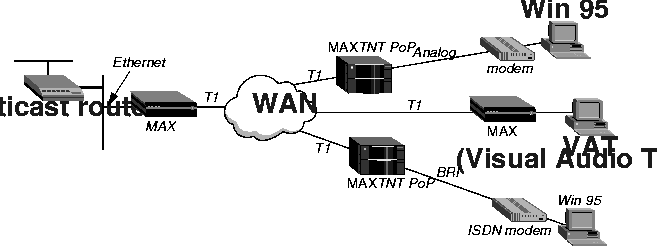
Figure 12-1 shows a local multicast router on one of the MAX unit's Ethernet interfaces, and dial-in multicast clients.
Figure 12-1. MAX forwarding multicast traffic to dial-in multicast clients
Ethernet
      Mod Config
            Multicast...
                  Forwarding=Yes
                  Membership Timeout=60
                  Mbone Profile=
                  Client=No
                  Rate Limit=5
                    HeartBeat Addr=224.1.1.1
                  HeartBeat Udp Port=16387
                  HeartBeat Slot Time=10
                  HeartBeat Slot Count=10
                  Alarm threshold=3
                  Source Addr=0.0.0.0
                  Source Mask=0.0.0.0
Ethernet
      Connections
          any Connection profile
                Ip options...
                      Multicast Client=Yes
                      Multicast Rate Limit=5
Forwarding from an MBONE router on a WAN link
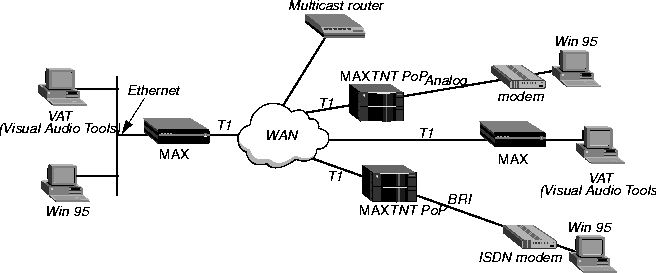
Figure 12-2 shows a multicast router on the WAN with local and dial-in multicast clients.
Figure 12-2. MAX acting as a multicast forwarder on Ethernet and WAN interfaces
Configuring the MAX to respond to multicast clients
To configure the MAX to respond to multicast clients on the Ethernet:
Ethernet
Mod Config
Multicast...
Forwarding=Yes
Membership Timeout=60
Mbone Profile=20
Client=Yes
Rate Limit=5
Ethernet
      Connections
            profile #20...
                  Ip options...
                        Multicast Client=No
                        Multicast Rate Limit=5
Ethernet
      Connections
          any Connection profile
                Ip options...
                      Multicast Client=Yes
                      Multicast Rate Limit=5
Copyright © 1998, Ascend Communications, Inc. All rights reserved.