![[Top]](../images/home.jpg)

![[Contents]](../images/contents.jpg)
![[Prev]](../images/previous.jpg)
![[Next]](../images/next.jpg)
![[Last]](../images/index.jpg)


techpubs@ascend.com.
IP-routing environment
Figure D-1 illustrates the main office and three remote offices of Smith Company. All sites support IP routing. Twelve dial-in analog circuits are available for employees to dial into the corporate office while traveling. The remote sites and dial-in users access the Internet by way of the corporate office.
The corporate site belongs to the 10.10.10.0 network. The remote sites share subnetted segments of the 20.20.20.0 network. The corporate site maintains a 128k link to the Internet, and also reserves twelve connections available for employees to dial into while traveling. The MAX dynamically assigns up to ten dial-in users with IP addresses from a pool that begins with the address 10.10.10.40.
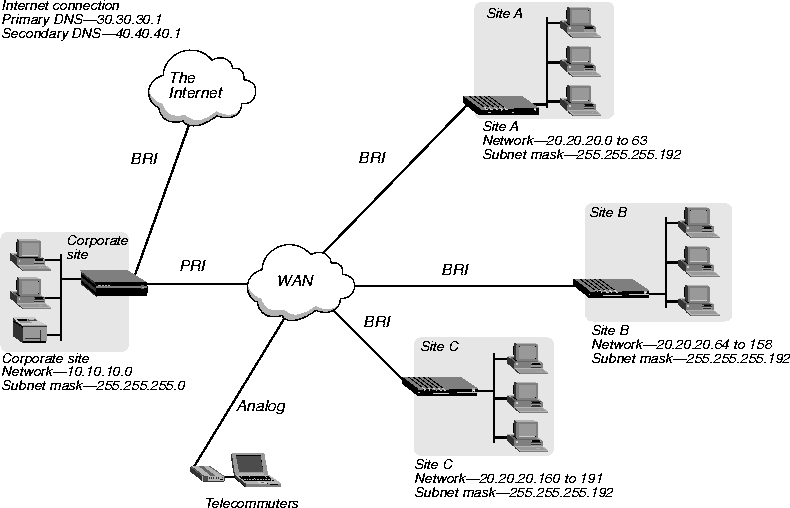
MAX configuration
Following is a section of the saved configuration from the MAX at the corporate site:
START=ROUTE=500=0

Name=Default

Active=Yes

Gateway=30.30.56.18

Metric=1

Private=Yes

END=ROUTE=500=0

START=ROUTE=500=1

Name=SiteA

Dest=20.20.20.0/26

Gateway=20.20.20.1

END=ROUTE=500=1

START=ROUTE=500=2

Name=SiteB-1

Dest=20.20.20.64/26

Gateway=20.20.20.65

END=ROUTE=500=2

START=ROUTE=500=3

Name=SiteB-2

Dest=20.20.20.128/27

Gateway=20.20.20.65

END=ROUTE=500=3

START=ROUTE=500=4

Name=SiteC

Dest=20.20.20.160/27

Gateway=20.20.20.161

END=ROUTE=500=4

START=CONN=500=0

Profile Reqd=Yes

Assign Adrs=Yes

Encaps...ARA=Yes

PPP options...Recv Auth=Either

END=CONN=500=0

START=CONN=500=1

Station=SiteA

Active=Yes

Dial #=918885551212

Ip options...LAN Adrs=20.20.20.1/26

Telco options...AnsOrig=Ans Only

END=CONN=500=1

START=CONN=500=2

Station=SiteB

Active=Yes

PRI # Type=Unknown

Dial #=95551212

Ip options...LAN Adrs=20.20.20.65/26

END=CONN=500=2

START=CONN=500=3

Station=SiteC

Active=Yes

PRI # Type=Unknown

Dial #=913335551212

Ip options...LAN Adrs=20.20.20.161/27

END=CONN=500=3

START=CONN=500=4

Station=mega

Active=Yes

PRI # Type=Unknown

Dial #=95553333

Ip options...LAN Adrs= 30.30.227.33/27

Ip options...WAN Alias=30.30.56.18

Ip options...IF Adrs=30.30.227.58/27

Session options...Idle=0

Telco options...Data Svc=64K

END=CONN=500=4

START=ETHERNET=500=0

Ether options...IP Adrs=10.10.10.230/24

Ether options...Proxy Mode=Active

WAN options...Pool#1 start=10.10.10.40

WAN options...Pool#1 count=10

TServ options...TS Enabled=Yes

TServ options...PPP=Yes

TServ options...Telnet=Yes

TServ options...Modem Dialout=Yes

TServ options...Immediate Modem=Yes

Telnet PW=*SECURE*

END=ETHERNET=500=0

START=SYSTEM=0=0

Name=corp

END=SYSTEM=0=0
START=SYSTEM=0=0

Name=SiteC

END=SYSTEM=0=0

START=ROUTE=200=0

Name=Default

Active=Yes

Gateway=10.10.10.230

Metric=1

Private=Yes

END=ROUTE=200=0

START=CONN=200=0

Profile Reqd=Yes

PPP options...Route IP=Yes

PPP options...Route AppleTalk=Yes

PPP options...Bridge=No

PPP options...Recv Auth=Either

END=CONN=200=0

START=CONN=200=1

Station=corp

Active=Yes

Dial #=9915655551212

Route IP=Yes

Bridge=No

Dial brdcast=No

Encaps options...Send Auth=CHAP

Encaps options...Send PW=*SECURE*

Encaps options...Recv PW=*SECURE*

Encaps options...Base Ch Count=2

Encaps options...Min Ch Count=2

Ip options...LAN Adrs=10.10.10.230/24

Session options...Idle=0

Telco options...AnsOrig=Call Only

Telco options...Call Type=Perm/Switched

Telco options...Data Svc=64K

END=CONN=200=1

START=ETHERNET=200=0

Ether options...IP Adrs=20.20.20.161/27

Ether options...RIP=Off

Ether options...Proxy Mode=Active

END=ETHERNET=200=0
IP-routing and AppleTalk-routing environment
As another example, Smith Company adds AppleTalk devices to the network and sets up an AppleTalk-routed environment, illustrated in Figure D-2. All sites support IP routing and AppleTalk routing. Twelve dial-in analog circuits are available for employees to dial into the corporate office while traveling. The remote sites and dial-in users access the Internet by way of the corporate office.
For the company's IP-routed environment, the corporate site belongs to the 10.10.10.0 network. The remote sites share subnetted segments of the 20.20.20.0 network. The corporate site maintains a 128 kbps link to the Internet, and also reserves twelve connections available for employees to dial into while traveling. The MAX dynamically assigns up to ten dial-in users with IP addresses from a pool that begins with the address 207.107.84.40.
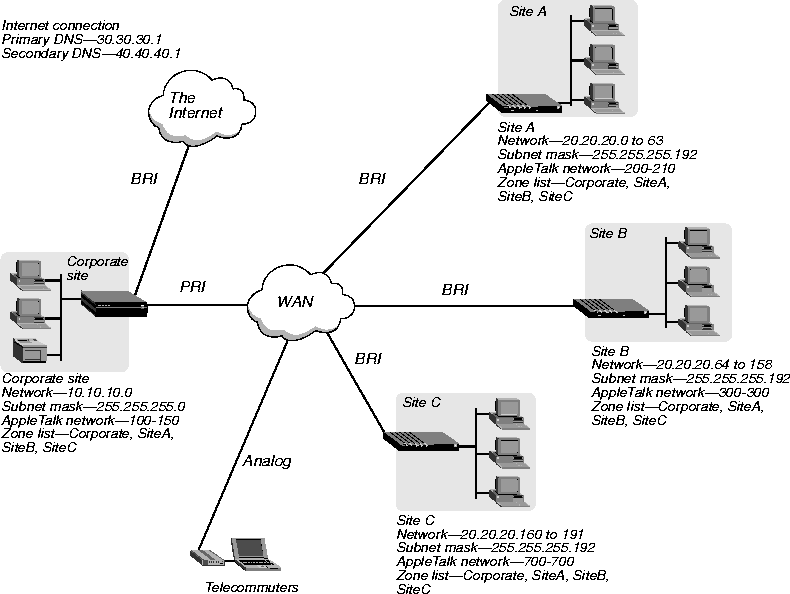
MAX configuration
Following is a section of the saved configuration from the MAX at the corporate site:
START=ROUTE=500=0

Name=Default

Active=Yes

Gateway=30.30.56.18

Metric=1

Private=Yes

END=ROUTE=500=0

START=ROUTE=500=1

Name=SiteA

Dest=20.20.20.0/26

Gateway=20.20.20.1

END=ROUTE=500=1

START=ROUTE=500=2

Name=SiteB-1

Dest=20.20.20.64/26

Gateway=20.20.20.65

END=ROUTE=500=2

START=ROUTE=500=3

Name=SiteB-2

Dest=20.20.20.128/27

Gateway=20.20.20.65

END=ROUTE=500=3

START=ROUTE=500=4

Name=SiteC

Dest=20.20.20.160/27

Gateway=20.20.20.161

END=ROUTE=500=4

START=CONN=500=0

Profile Reqd=Yes

Assign Adrs=Yes

Encaps...ARA=Yes

PPP options...Route AppleTalk=Yes

PPP options...Recv Auth=Either

END=CONN=500=0

START=CONN=500=1

Station=SiteA

Active=Yes

Dial #=918885551212

Route AppleTalk=Yes

Bridge=Yes

Ip options...LAN Adrs=20.20.20.1/26

AppleTalk options...Zone Name=SiteA

AppleTalk options...Net Start=200

AppleTalk options...Net End=210

Telco options...AnsOrig=Ans Only

END=CONN=500=1

START=CONN=500=2

Station=SiteB

Active=Yes

PRI # Type=Unknown

Dial #=95551212

Route AppleTalk=Yes

Ip options...LAN Adrs=20.20.20.65/26

AppleTalk options...Zone Name=SiteB

AppleTalk options...Net Start=300

AppleTalk options...Net End=300

END=CONN=500=2

START=CONN=500=3

Station=SiteC

Active=Yes

PRI # Type=Unknown

Dial #=913335551212

Route AppleTalk=Yes

Ip options...LAN Adrs=20.20.20.161/27

AppleTalk options...Zone Name=SiteC

AppleTalk options...Net Start=700

AppleTalk options...Net End=700

END=CONN=500=3

START=CONN=500=4

Station=mega

Active=Yes

PRI # Type=Unknown

Dial #=95553333

Ip options...LAN Adrs= 30.30.227.33/27

Ip options...WAN Alias=30.30.56.18

Ip options...IF Adrs=30.30.227.58/27

Session options...Idle=0

Telco options...Data Svc=64K

END=CONN=500=4

START=ETHERNET=500=0

Ether options...IP Adrs=10.10.10.230/24

Ether options...Proxy Mode=Active

WAN options...Pool#1 start=10.10.10.40

WAN options...Pool#1 count=10

TServ options...TS Enabled=Yes

TServ options...PPP=Yes

TServ options...Telnet=Yes

TServ options...Modem Dialout=Yes

TServ options...Immediate Modem=Yes

AppleTalk=Yes

Telnet PW=*SECURE*

AppleTalk...Zone Name=Corporate

AppleTalk...AppleTalk Router=Seed

AppleTalk...Net Start=100

AppleTalk...Net End=150

AppleTalk...Default Xone=Corporate

AppleTalk...Zone Name #1=SiteB

AppleTalk...Zone Name #2=SiteA

AppleTalk...Zone Name #3=SiteC

END=ETHERNET=500=0

START=SYSTEM=0=0

Name=corp

END=SYSTEM=0=0
START=SYSTEM=0=0

Name=SiteC

END=SYSTEM=0=0

START=ROUTE=200=0

Name=Default

Active=Yes

Gateway=10.10.10.230

Metric=1

Private=Yes

END=ROUTE=200=0

START=CONN=200=0

Profile Reqd=Yes

PPP options...Route IP=Yes

PPP options...Route AppleTalk=Yes

PPP options...Bridge=No

PPP options...Recv Auth=Either

END=CONN=200=0

START=CONN=200=1

Station=corp

Active=Yes

Dial #=9915655551212

Route IP=Yes

Route AppleTalk=Yes

Bridge=No

Dial brdcast=No

Ip options...LAN Adrs=10.10.10.230/24

AppleTalk options...Zone Name=Corporate

AppleTalk options...Net Start=100

AppleTalk options...Net End=150

Session options...Idle=0

Telco options...AnsOrig=Call Only

Telco options...Call Type=Perm/Switched

Telco options...Data Svc=64K

END=CONN=200=1

START=ETHERNET=200=0

Ether options...IP Adrs=20.20.20.161/27

Ether options...RIP=Off

Ether options...Proxy Mode=Active

AppleTalk=Yes

AppleTalk...Zone Name=SiteC

AppleTalk...AppleTalk Route=Seed

AppleTalk...Net Start=700

AppleTalk...Net End=700

AppleTalk...Default Zone=SiteC

AppleTalk...Zone Name #1=Corporate

AppleTalk...Zone Name #2=SiteA

AppleTalk...Zone Name #3=SiteB

END=ETHERNET=200=0
Copyright © 1998, Ascend Communications, Inc. All rights reserved.