![[Top]](../images/home.jpg)
![[Contents]](../images/contents.jpg)
![[Prev]](../images/previous.jpg)
![[Next]](../images/next.jpg)
![[Last]](../images/index.jpg)


Configuring OSPF Routing
Introduction to OSPF
Open Shortest Path First (OSPF) is the next generation Internet routing protocol. The Open in its name refers to OSPF's development in the public domain as an open specification. Shortest Path First refers to an algorithm developed by Dijkstra in 1978 for building a self-rooted shortest-path tree from which routing tables can be derived. (This algorithm is described in The link-state routing algorithm.)
RIP limitations solved by OSPF
The rapid growth of the Internet has pushed Routing Information Protocol (RIP) beyond its capabilities, especially because of the following problems:
Problem
|
Description and solution
|
|---|
|
Distance-vector metrics
|
RIP is a distance-vector protocol, which uses a hop count to select the shortest route to a destination network. RIP always uses the lowest hop count, regardless of the speed or reliability of a link.
OSPF is a link-state protocol, which means that OSPF can take into account a variety of link conditions, such as the reliability or speed of the link, and whether the link is up or down when determining the best path to a destination network.
|
|
15-hop limitation
|
With RIP, destination that requires more than 15 consecutive hops is considered unreachable, which inhibits the maximum size of a network.
OSPF has no hop limitation. You can add as many routers to a network as you want.
|
|
Excessive routing traffic and slow convergence
|
RIP creates a routing table and then propagates it throughout the internet of routers, hop by hop. Convergence is the time it takes for all routers to receive information about a topology change. Slow convergence can result in routing loops and errors.
A RIP router broadcasts its entire routing table every 30 seconds. On a 15-hop network, convergence can be as high as 7.5 minutes. In addition, a large table can require multiple broadcasts for each update, which consumes a lot of bandwidth.
OSPF uses a topological database of the network and propagates only changes to the database (as described in Exchange of routing information).
|
Ascend implementation of OSPF
The primary goal for Ascend's current implementation of OSPF is to enable the MAX to communicate with other routers within a single Autonomous System (AS).
The MAX acts as an OSPF internal router with limited border router capability. At this release, Ascend does not recommend an Area Border Router (ABR) configuration for the MAX, so the Ethernet interface and all of the MAX WAN links should be configured in the same area.
The MAX does not function as a full AS Border Router (ASBR) at this release. However, it performs ASBR calculations for external routes such as WAN links that do not support OSPF. The MAX imports external routes into its OSPF database and flags them as Autonomous System External (ASE). It redistributes those routes by means of OSPF ASE advertisements, and propagates its OSPF routes to remote WAN routers that are running RIP.
The MAX supports null and simple password authentication.
OSPF features
This section provides a brief overview of OSPF routing to help you properly configure the MAX. For full details about how OSPF works, see RFC 1583, OSPF Version 2, 03/23/1994, J. Moy.
An Autonomous System (AS) is a group of OSPF routers exchanging information, typically under the control of one company. An AS can include a large number of networks, all of which are assigned the same AS number. All information exchanged within the AS is interior.
Exterior protocols are used to exchange routing information between Autonomous Systems. The protocols are referred to by the acronym EGP (exterior gateway protocol). Border routers can use the AS number to filter out certain EGP routing information. OSPF can make use of EGP data generated by other border routers and added into the OSPF system as ASEs, and can also use static routes configured in the MAX or RADIUS.
Security
All OSPF protocol exchanges are authenticated. This means that only trusted routers can participate in the AS's routing. A variety of authentication schemes are available. In fact, different authentication types can be configured for each area. In addition, authentication provides added security for the routers that are on the network. Routers that do not have the password cannot gain access to the routing information, because authentication failure prevents a router from forming adjacencies.
Support for variable length subnet masks
OSPF enables the flexible configuration of IP subnets. Each route distributed by OSPF has a destination and mask. Two different subnets of the same IP network number can have different sizes (different masks). This capability is commonly referred to as Variable Length Subnet Masks (VLSM), or Classless Inter-Domain Routing (CIDR). The MAX routes a packet to the best (longest, or most specific) match. The MAX considers host routes to be subnets whose masks are all ones (0xFFFFFFFF).
Note: Although OSPF is very useful for networks that use VLSM, Ascend recommends that
you attempt to assign subnets as contiguously as possible, to prevent excessive link-state
calculations by all OSPF routers on the network.
Interior gateway protocol (IGP)
OSPF keeps all AS-internal routing information within the AS. All information exchanged within the AS is interior.
The MAX requires an AS Border Router (ASBR) to use an external gateway protocol (EGP) for communicating with other autonomous systems, as shown in Figure 8-1. An EGP acts as a shuttle service between autonomous systems.
Figure 8-1. Autonomous system border routers
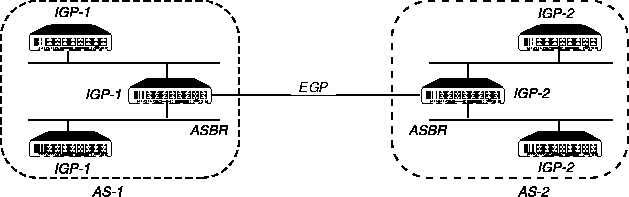
ASBRs perform calculations related to external routes. The MAX imports external routes from RIP (for example, when it establishes a WAN link with a caller that does not support OSPF) and always performs the ASBR calculations.
If you must prevent the MAX from performing ASBR calculations, you can disable them in Ethernet > Mod Config > OSPF Global Options.
Exchange of routing information
OSPF uses a topological database of the network and propagates only changes to the database. Part of the SPF algorithm involves acquiring neighbors and then forming an adjacency with one neighbor, see Figure 8-2.
Figure 8-2. Adjacency between neighboring routers
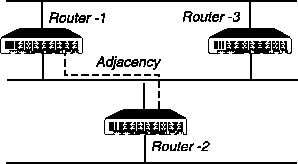
An OSPF router dynamically detects its neighboring routers by sending Hello packets to the multicast address All SPFRouters. It then attempts to form adjacencies with some of its newly acquired neighbors.
Adjacency is a relationship formed between selected neighboring routers for the purpose of exchanging routing information. Not every pair of neighboring routers becomes adjacent. Adjacencies are established during network initialization in pairs, between two neighbors. As the adjacency is established, the neighbors exchange databases and build a consistent, synchronized database between them.
When an OSPF router detects a change on one of its interfaces, it modifies its topological database and multicasts the change to its adjacent neighbor, which in turn propagates the change to its adjacent neighbor until all routers within an area have synchronized topological databases. The result is quick convergence among routers. OSPF routes can also be summarized in Link-State Advertisements (LSAs).
Designated and backup designated routers
In OSPF terminology, a broadcast network is any network that has more than two OSPF routers attached and that supports the capability to address a single physical message to all of the attached routers.
Figure 8-3. Designated and backup designated routers
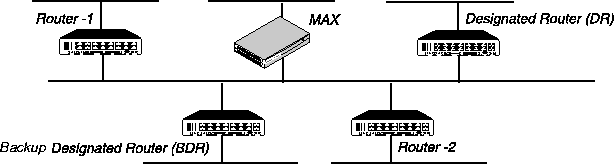
The MAX can function as a Designated Router (DR) or Backup Designated Router (BDR). However, many sites choose to assign a LAN-based router for these roles in order to dedicate the MAX to WAN processing.
To reduce the number of adjacencies each router must form, OSPF calls one of the routers the designated router. A designated router is elected as routers are forming adjacencies, and then all other routers establish adjacencies only with the designated router. This simplifies the routing table update procedure and reduces the number of link-state records in the database. The designated router also plays other important roles in reduce the overhead of a OSPF link-state procedures. For example, other routers send link-state advertisements it to the designated router only by using the all-designated-routers multicast address of All SPFRouters.
To prevent the designated router from becoming a serious liability to the network if it fails, OSPF elects a backup designated router at the same time. Other routers maintain adjacencies with both the designated router and its backup router, but the backup router leaves as many of the processing tasks as possible to the designated router. If the designated router fails, the backup immediately becomes the designated router and a new backup is elected.
The administrator chooses which router is to be the designated router on the basis of the processing power, speed, and memory of the system, and then assigns priorities to other routers on the network in case the backup designated router is also down at the same time.
Configurable metrics
The administrator assigns a cost to the output side of each router interface. The lower the cost, the more likely the interface is to be used to forward data traffic. Costs can also be associated with the externally derived routing data.
You can also use the OSPF cost for preferred path selection. If two paths to a destination have equal costs, you can assign a higher cost to one of the paths, to configure it as a backup to be used only when the primary path is not available.
Figure 8-4 shows how costs direct traffic over high-speed links. For example, if Router-2 in Figure 8-4 receives packets destined for Host B, it routes them through Router-1, across two T1 links (Cost=20), rather than across one 56Kbps B-channel to Router-3 (Cost=240).
Figure 8-4. OSPF costs for different types of links
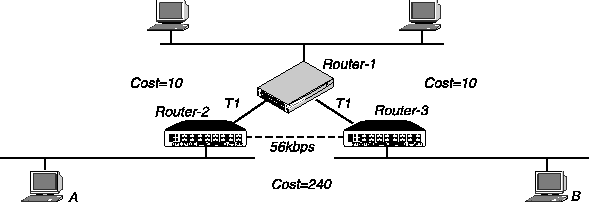
The MAX has a default cost of one for a connected route (Ethernet) and ten for a WAN link. If you have two paths to the same destination, the MAX selects the one with the lower cost. You might want to account for the bandwidth of a connection when assigning costs. For example, for a single B-channel connection, the cost would be 24 times greater than for a T1 link.
Note: Be careful when assigning costs. Incorrect cost metrics can cause delays and
congestion on the network.
Hierarchical routing (areas)
If a network is large, the size of the database, time required for route computation, and related network traffic can become excessive. An administrator can partition an AS into areas to provide hierarchical routing connected by a backbone.
The backbone area is special and always has the area number 0.0.0.0. Other areas are assigned area numbers that are unique within the autonomous system.
Each areas acts like its own network. All area-specific routing information stays within the area, and all routers within an area must have a synchronized topological database. To tie the areas together, some routers belong to the backbone area and to another area. These routers are Area Border Routers (ABRs). In Figure 8-5, all of the routers are ABRs. If you set up the ABRs and area boundaries correctly, link-state databases are unique to an area.
Figure 8-5. Dividing an AS into areas
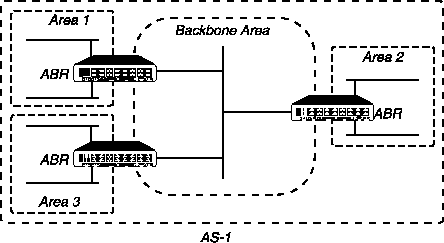
Note: At this release, Ascend recommends that you do not configure the MAX as an ABR.
The current recommendation is that you use the same area number for the Ethernet interface of
the MAX and each of its WAN links. That number does not have to be the backbone area
number. The MAX can reside in any OSPF area.
Stub areas
To reduce the cost of routing, OSPF supports stub areas, in which a default route summarizes all external routes. For areas that are connected to the backbone by only one ABR (that is, the area has one exit point), there is no need to maintain information about external routes. Stub areas are similar to regular areas except that the routers do not enter external routes in the area's databases.
To prevent flooding of external routes throughout the AS, you can configure an area as a stub if the area has a single exit point or if the choice of exit point need not be made on a per-external-destination basis. You might need to specify a stub area with no default cost (StubNoDefault) if the area has more than one exit point.
In a stub area, routing to AS-external destinations is based on a per-area default cost. The per-area default cost is advertised to all routers within the stub area by a border router, and is used for all external destinations.
If the MAX supports external routes across its WAN links, you should not configure it in a stub area. Because an ABR configuration is not currently recommended for the MAX, the area in which it resides should not be a stub area if any of its links are AS-external.
Not So Stubby Areas (NSSAs)
The MAX supports OSPF Not So Stubby Areas (NSSAs) as described in RFC 1587. NSSAs enable you to treat complex networks similarly to stub areas. This can simplify your network's topology and reduce OSPF-related traffic.
NSSAs and Type-7 LSAs
NSSAs are similar to stub areas, except that they enable limited importing of AS-external routes. NSSAs use Type-7 LSAs to import external route information into an NSSA. Type-7 LSAs are similar to Type-5 LSAs except that:
- NSSAs can originate and import Type-7 LSAs; like stub areas, NSSAs cannot originate or import type-5 LSAs.
- Type-7 LSAs can only be advertised within a single NSSA; they are not flooded throughout the AS as are type-5 LSAs.
When you configure the MAX as an NSSA internal router, you define the Type-7 LSAs you want to advertise throughout the NSSA as static routes.
You must also specify whether these Type-7 LSAs should be advertised outside the NSSA. If you choose to advertise a Type-7 LSA, the NSSA Area Border Router (ABR) converts it to a Type-5 LSA, which can then be flooded throughout the AS. If you choose not to advertise a Type-7 LSA, it is not advertised beyond the NSSA.
(For complete information about NSSAs, see RFC 1587.)
Configuring the MAX as an NSSA internal router
Because the MAX cannot be an Area Border Router, when you configure OSPF on the MAX keep in mind that:
- The area-type must be the same on all MAX interfaces running OSPF.
- The area ID (configured in the Area parameter) must be the same on all MAX interfaces running OSPF.
To configure the MAX as an NSSA:
- Select Ethernet > Mod Config > OSPF options.
- Set AreaType to NSSA.
- Exit and save the Mod Config profile.
- Select Ethernet > Static Rtes > any Static Route profile.
- Configure a static route to the destination outside the NSSA which include the following parameters (shown with sample settings):
Ethernet
          Static Rtes
          any Static Rtes profile
                Name=descriptivename
                Active=Yes
                Dest=20.20.20.20
                Gateway=10.10.10.10
                ...
                ...
                NSSA-ASE7=
Note: Set the NSSA-ASE7 parameter to Advertise or to DoNotAdvertise to specify
whether you want to advertise this route outside the NSSA.
Configure the additional parameters to assign attributes to the route that are specific to your environment:
                Metric=
                Preference=
                Private=
                Ospf-Cost=
                LSA-type=
                ....
                ASE-tag=
              Third-Party=
- Exit and save the Static Rtes profile.
- Reset the MAX.
The link-state routing algorithm
Link-state routing algorithms require that all routers within a domain maintain synchronized (identical) topological databases, and that the databases describe the complete topology of the domain. An OSPF router's domain can be an AS or an area within an AS.
OSPF routers exchange routing information and build link-state databases. Link-state databases are synchronized between pairs of adjacent routers (as described in Exchange of routing information). In addition, each OSPF router uses its link-state database to calculate a self-rooted tree of shortest paths to all destinations, as shown in Figure 8-6.
Figure 8-6. Sample network topology
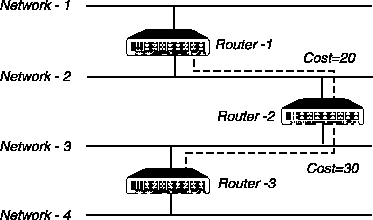
The routers then use the trees to build their routing tables, as shown in Table 8-1.
Table 8-2, Table 8-3, and Table 8-4 show another example of self-rooted shortest-path trees calculated from link-state databases, and the resulting routing tables. Actual routing tables also contain externally derived routing data, which is advertised throughout the AS but kept separate from the link-state data. Also, each external route can be tagged by the advertising router, enabling the passing of additional information between routers on the boundary of the AS.
Configuring OSPF routing in the MAX
Following are the parameters related to OSPF routing in the MAX. (The settings shown are examples.)
Ethernet
      Mod Config
            OSPF options...
                  RunOSPF=Yes
                  Area=0.0.0.0
                  AreaType=Normal
                  HelloInterval=10
                  DeadInterval=40
                  Priority=5
                  AuthType=Simple
                  AuthKey=ascend0
                  Cost=1
                  ASE-type=N/A
                  ASE-tag=N/A
                  TransitDelay=1
                  RetransmitInterval=5
            OSPF global options...
                  Enable ASBR=Yes
Ethernet
      Connections
            OSPF options
                  RunOSPF=Yes
                  Area=0.0.0.0
                  AreaType=Normal
                  HelloInterval=40
                  DeadInterval=120
                  Priority=5
                  AuthType=Simple
                  AuthKey=ascend0
                  Cost=10
                  ASE-type=N/A
                  ASE-tag=N/A
                  TransitDelay=5
                  RetransmitInterval=20
Ethernet
      Static Rtes
            any Static Rtes profile
                  LSA-type=ExternalType1
Understanding the OSPF routing parameters
This section provides some background information about the OSPF parameters. (For detailed information about each parameter, see the MAX Reference Guide.)
Notice that the same configuration parameters appear in Ethernet > Mod Config > OSPF Options and Ethernet > Connections > OSPF Options. The parameters are the same, but some of the default values are different. For OSPF routing, you configure the following parameters:
Parameter
|
Description
|
|---|
|
RunOSPF
|
OSPF is turned off by default. To enable it on the interface, set RunOSPF to Yes.
|
|
Area
|
Sets the area ID for the interface. The format for this ID is dotted decimal, but it is not an IP address. (For a description of areas, see Hierarchical routing (areas).)
|
|
AreaType
|
Specifies the type of area: Normal, Stub, or StubNoDefault. (For descriptions, see Stub areas.)
|
|
Intervals for communicating with an adjacent router
|
HelloInterval specifies how frequently, in seconds, the MAX sends out Hello packets on the specified interface. OSPF routers use Hello packets to dynamically detect neighboring routers in order to form adjacencies.
|
|
DeadInterval
|
Specifies how many seconds the MAX waits before declaring its neighboring routers down after it stops receiving their Hello packets. (For background information, see Exchange of routing information.)
|
|
Priority
|
Specifies a value the routers in the network use to elect a Designated Router (DR) and Backup Designated Router (BDR). Assigning a priority of 1 would place the MAX near the top of the list of possible designated routers. (Currently, you should assign a larger number.) Acting as a DR or BDR significantly increases the amount of OSPF overhead for the router. (For a discussion of the functions of DRs and BDRs, see Designated and backup designated routers.)
|
|
AuthType
|
Type of authentication supported. The Normal setting specifies that the MAX supports OSPF router authentication.
|
|
Auth Key
|
Specifies the key the MAX looks for in packets to support OSPF router authentication. (For more information, see Security.)
|
|
Cost
|
Specifies the link-state or output cost of a route. Assign realistic costs for each interface that supports OSPF. The lower the cost, the higher the likelihood of using that route to forward traffic. (For more information, see Configurable metrics.)
|
|
Autonomous System External (ASE) and their LSAs are used.
ASE-Type
ASE-Tag
|
Autonomous System External routes only when OSPF is turned off on a particular interface. When OSPF is enabled, these parameters are not applicable.
ASE-Type specifies the type of metric that the MAX advertises for external routes. A Type-1 external metric is expressed in the same units as the link-state metric (the same units as interface cost). A Type-2 external metric is considered larger than any link- state path. Use of Type-2 external metrics assumes that routing between autonomous systems is the major cost of routing a packet, and eliminates the need for conversion of external costs to internal link-state metrics. ASE-Tag is a hexadecimal number used to tag external routes for filtering by other routers.
|
|
LSA-Type
|
Use LSAType to specify the OSPF ASE type of this link-state advertisement (LSA). Specify one of the following values:
- ExternalType-1-A type-1 external metric is expressed in the same units as the link-state metric (the same units as interface cost). The default is Type-1.
- ExternalType-2-Considered larger than any link state path. Use of type-2 external metrics assumes that routing between autonomous systems is the major cost of routing a packet, and eliminates the need for conversion of external costs to internal link-state metrics.
- Internal-Indicates that this static route should be advertised in an internal LSA.
The MAX advertises the static route only if the Static Route gateway has a corresponding entry in a Connection profile. When you set LSA-type to Internal, the internal LSA static route appears as a stub area to external OSPF routers.
|
|
TransitDelay
|
Specifies the estimated number of seconds it takes to transmit a Link State Update Packet over this interface, taking into account transmission and propagation delays. On a connected route, you can leave the default of 1.
|
|
RetransmitInterval
|
Specifies the number of seconds between retransmissions of Link-State Advertisements, Database Description, and Link State Request Packets.
|
|
Enable ASBR
|
In the OSPF Global Options submenu, you set this parameter to enable or disable Autonomous System Border Routers (ASBRs) perform calculations related to external routes. The MAX imports external routes from RIP (for example, when it establishes a WAN link with a caller that does not support OSPF) and performs the ASBR calculations. If you must prevent the MAX from performing ASBR calculations, set Ethernet > Mod Config > OSPF Global Options > Enable ASBR to No.
|
Examples of configurations for adding the MAX to an OSPF network
This section shows how to add a MAX to your OSPF network. It assumes that you know how to configure the MAX with an appropriate IP address, (as described in Chapter 7, Configuring IP Routing.) The procedures in this section are examples based on Figure 8-7. To apply one or more of the procedures to your network, enter the appropriate settings instead of the ones shown.
Figure 8-7. Example of an OSPF setup
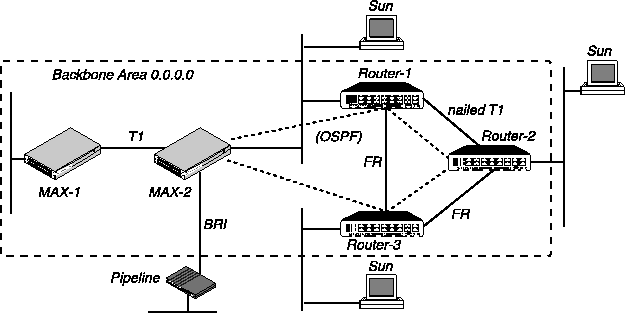
In Figure 8-7, all OSPF routers are in the same area (the backbone area), so the units all form adjacencies and synchronize their databases together.
Note: All OSPF routers in Figure 8-7 have RIP turned off. OSPF can learn routes from RIP
without the added overhead of running RIP.
Configuring OSPF on the Ethernet interface
The MAX Ethernet interface in Figure 8-7 is in the OSPF backbone area. Although there is no limitation stated in the RFC about the number of routers in the backbone area, you should keep the number of routers relatively small, because changes that occur in area zero are propagated throughout the AS.
Another way to configure the same units would be to create a second area (such as 0.0.0.1) in one of the existing OSPF routers, and add MAX-1 to that area. You could then assign the same area number (0.0.0.1) to all OSPF routers reached through the MAX across a WAN link.
After you configure MAX-1 as an IP host on that interface, you can configure it in the Ethernet profile as an OSPF router in the backbone area. To configure MAX-1 as an OSPF router on Ethernet:
- Open Ethernet > Mod Config > Ether Options, and make sure the MAX is configured as an IP host. For example:
Ethernet
      Mod Config
            Ether options...
                  IP Adrs=10.168.8.17/24
                  2nd Adrs=0.0.0.0
                  RIP=Off
                  Ignore Def Rt=Yes
                  Proxy Mode=Always
                  Filter=0
                  IPX Frame=N/A
Note that RIP is turned off, so it is not necessary to run both RIP and OSPF. Turning RIP off reduces processor overhead. OSPF can learn routes from RIP, incorporate them in the routing table, assign them an external metric, and tag them as external routes. (For more information, see Chapter 7, Configuring IP Routing.)
- Open Ethernet > Mod Config > OSPF Options and turn on RunOSPF:
            OSPF options...
                  RunOSPF=Yes
- Specify the area number and area type for the Ethernet:
                  Area=0.0.0.0
                  AreaType=Normal
In this case, the Ethernet is in the backbone area. (The backbone area number is always 0.0.0.0.) The backbone area is not a stub area, so leave the setting at its default. (For background information, see Stub areas.)
- Leave the HelloInterval, DeadInterval, and Priority values set to their defaults:
                  HelloInterval=10
                  DeadInterval=40
                  Priority=5
- If access to the backbone area requires authentication, specify the password. For example:
                  AuthType=Simple
                  AuthKey=ascend0
If authentication is not required, set AuthType=None.
- Configure the cost for the MAX to route into the backbone area. For example:
Cost=1
Then type a number greater than zero and less than 16777215. By default the cost of an Ethernet-connected route is 1.
- Set the expected transit delay for Link State Update packets. For example:
TransitDelay=1
- Specify the retransmit interval for OSPF packets. For example:
RetransmitInterval=5
This parameter specifies the number of seconds between retransmissions of Link-State Advertisements, Database Description and Link State Request Packets.
- Close the Ethernet profile.
When you close the Ethernet profile, the MAX comes up as an OSPF router on that interface. It forms adjacencies and begins building its routing table.
Configuring OSPF across the WAN
The WAN interface of the MAX is a point-to-point network. A point-to-point network is any network that joins a single pair of routers. Such networks typically do not provide a broadcasting or multicasting service, so all advertisements are sent point to point.
An OSPF WAN link has a default cost of ten. You can assign a higher cost to reflect a slower connection or a lower cost to set up a preferred route to a certain destination. If the cost of one route is lower than that of another to the same destination, the MAX does not select the higher-cost route unless route preferences change the equation.
OSPF on the WAN link is configured in a Connection profile. In this example, the MAX is connecting to another MAX unit across a T1 link (as in Figure 8-7 on page 8-13). To configure this interface:
- Open the Connection profile for the remote MAX unit.
- Turn on Route IP and configure the IP routing connection. For example:
Ethernet
      Connections
            IP options
                  LAN Adrs=10.2.3.4/24
                  WAN Alias=0.0.0.0
                  IF Adrs=0.0.0.0
                  Metric=7
                  Preference=N/A
                  Private=No
                  RIP=Off
                Pool=0
(For detailed information, see Chapter 7, Configuring IP Routing.)
- Open Connections > OSPF Options and turn on RunOSPF.
            OSPF options
                  RunOSPF=Yes
- Specify the area number for the remote device and the area type.
The area number must always be specified in dotted-quad format similar to an IP address. For example:
                  Area=0.0.0.0
                  AreaType=Normal
You should use the same area number for the Ethernet interface of the MAX and each of its WAN links. In this example, the Ethernet interface is in the backbone area (0.0.0.0). You can use any area numbering scheme that is consistent throughout the AS and that uses this format.
- Leave the HelloInterval, DeadInterval, and Priority values set to their defaults.
                  HelloInterval=40
                  DeadInterval=120
                  Priority=5
Use the Priority value to configure the MAX as a DR or BDR.
- If you require authentication to get into the backbone area, specify the password. For example:
                  AuthType=Simple
                  AuthKey=ascend0
If you do not require authentication, set AuthType=None.
- Configure the cost for the route to MAX-2.
For example, for a T1 link the cost should be at least ten.
Cost=10
- Close the Connection profile.
Of course, the remote MAX unit must also have a comparable Connection profile to connect to MAX-1.
Configuring a WAN link that does not support OSPF
In this example, the MAX has a Connection profile to a remote Pipeline unit across a BRI link (as in Figure 8-7 on page 8-13). The remote Pipeline is an IP router that uses RIP-v2 to transmit routes. The route to the Pipeline unit's network, and any routes the MAX learns about from the remote Pipeline, are ASEs (external to the OSPF system).
To enable OSPF to add the RIP-v2 routes to its routing table, configure RIP-v2 normally in this Connection profile. OSPF imports all RIP routes as Type-2 ASEs.
In this example, RIP is turned off on the link and ASE information is configured explicitly.
- Open the Connection profile for the remote Pipeline unit.
- Turn on Route IP and configure the IP routing connection. For example:
Ethernet
      Connections
          any Connection profile
              IP options
                  LAN Adrs=10.2.3.4/24
                  WAN Alias=0.0.0.0
                  IF Adrs=0.0.0.0
                  Metric=7
                  Preference=N/A
                  Private=No
                  RIP=Off
                  Pool=0
(For detailed information, see Chapter 7, Configuring IP Routing.) Note that in a Connection profile, the OSPF Options subprofile includes two ASE parameters that are active only when OSPF is not running on a link. If you configure these parameters, the route configured in the Connection profile is advertised whenever the MAX is up.
- Open the OSPF Options subprofile.
- Leave RunOSPF set to No.
            OSPF options
                  RunOSPF=No
- Configure the cost for the route to the remote Pipeline.
For example, a single-channel BRI link could have a cost approximately 24 times the cost of a dedicated T1 link:
Cost=240
- Specify the ASE type for this route.
ASE-type=Type 2
This parameter specifies the type of metric to be advertised for an external route.
A Type-1 external metric is expressed in the same units as the link state metric (the same units as interface cost). Type-1 is the default.
A Type-2 external metric is considered larger than any link-state path. Use of Type- 2 external metrics assumes that routing outside the AS is the major cost of routing a packet, and eliminates the need for conversion of external costs to internal link-state metrics.
- Enter an ASE tag for this route.
The ASE tag is a hexadecimal number that shows up in management utilities and flags this route as external. It can also be used by border routers to filter this record. For example:
ASE-tag=cfff8000
- Close the Connection profile.
Of course, the remote Pipeline unit must also have a comparable Connection profile to connect to the MAX.
techpubs@ascend.com
Copyright © 1998, Ascend Communications, Inc. All rights
reserved.