
User's Manual
|
| RabbitCore RCM4500W User's Manual |
 |
 |
 |
1. Introduction
The RCM4510W next-generation RabbitCore modules add ZigBee®/802.15.4 functionality to the existing Rabbit® 4000 microprocessor features to allow you to create a low-cost, low-power, embedded wireless control and communications solution for your embedded control system. The Rabbit® 4000 microprocessor features include hardware DMA, clock speeds of up to 60 MHz, I/O lines shared with up to six serial ports and four levels of alternate pin functions that include variable-phase PWM, auxiliary I/O, quadrature decoder, and input capture. Coupled with more than 500 new opcode instructions that help to reduce code size and improve processing speed, this equates to a core module that is fast, efficient, and the ideal solution for a wide range of wireless embedded applications.
The Development Kit has the essentials that you need to design your own wireless microprocessor-based system, and includes a complete Dynamic C software development system. This Development Kit also contains a Prototyping Board that will allow you to evaluate the RCM4510W modules and to prototype circuits that interface to the RCM4510W modules. You will also be able to write and test software for these modules.
In addition to onboard ZigBee/802.15.4 functionality, the RCM4510W model has a Rabbit 4000 microprocessor operating at 29.49 MHz, static RAM, flash memory, two clocks (main oscillator and timekeeping), and the circuitry necessary for reset and management of battery backup of the Rabbit 4000's internal real-time clock and the static RAM. One 50-pin header brings out the Rabbit 4000 I/O bus lines, parallel ports, and serial ports. A separate 14-pin auxiliary I/O header brings out up to nine additional I/O pins (up to four of which may be configured as analog inputs) made possible by the onboard XBee RF module.
The RCM4510W receives its +3.3 V power from the customer-supplied motherboard on which it is mounted. The RCM4510W can interface with all kinds of CMOS-compatible digital devices through the motherboard.
1.1 RCM4510W Features
- Small size: 1.84" × 2.85" × 0.54"
(47 mm × 72 mm × 14 mm)
- Microprocessor: Rabbit 4000 running at 29.49 MHz
- Up to 40 general-purpose I/O lines configurable with up to four alternate functions
- Up to 9 additional general-purpose I/O lines (up to four of which may be set up as analog inputs) available through the XBee RF module
- 3.3 V I/O lines with low-power modes down to 2 kHz
- Six CMOS-compatible serial ports — four ports are configurable as a clocked serial port (SPI), and two ports are configurable as SDLC/HDLC serial ports.
- Alternate I/O bus can be configured for 8 data lines and 6 address lines (shared with parallel I/O lines)
- 512K flash memory, 512K data SRAM
- Real-time clock
- Watchdog supervisor
Currently there is one production model with a choice of XBee firmware. Table 1 summarizes its main features.
Section 1.3.2.1 provides additional information about the two types of XBee firmware.
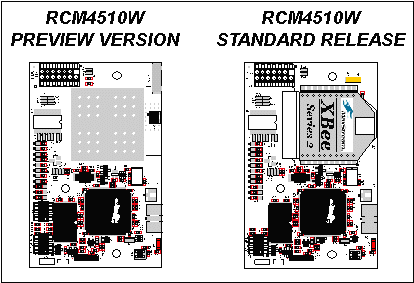
There are two versions of the RCM4510W model—the standard release, available after April, 2007, is identical in form and function to the preview version. The difference between them is that the RF module is made of discrete onboard components in the preview version, and is included in the pluggable Digi International® XBee® RF module on the standard release. The height of the preview version is also about 0.01" (0.2 mm) less than that of the standard release; Rabbit recommends that you use the dimensions for the standard release specified in this manual in your design. The preview version has not undergone certification testing and is intended for development purposes only. The preview version will no longer be offered once the standard release is available.
The RCM4510W is programmed over a standard PC USB port through a programming cable supplied with the Development Kit.
NOTE The RabbitLink cannot be used to program the RCM4510W or other RabbitCore modules based on the Rabbit 4000 microprocessor. Appendix A provides detailed specifications for the RCM4510W.
1.2 Advantages of the RCM4510W
- Fast time to market using a fully engineered, "ready-to-run/ready-to-program" microprocessor core.
- Competitive pricing when compared with the alternative of purchasing and assembling individual components.
- Easy C-language program development and debugging
- Rabbit Field Utility to download compiled Dynamic C .bin files, and cloning board options for rapid production loading of programs.
- Generous memory size allows large programs with tens of thousands of lines of code, and substantial data storage.
- Reference application uses a low-cost, low-power ZigBee/802.15.4 infrastructure to connect Rabbit-based devices
- Supports ZigBee/802.15.4 point-to-point, point-to-multipoint, and mesh topologies
- Easily scalable for commercial deployment applications
- RCM4510W can function as a network coordinator, router, or end device
1.3 Development and Evaluation Tools
1.3.1 RCM4510W Development Kit
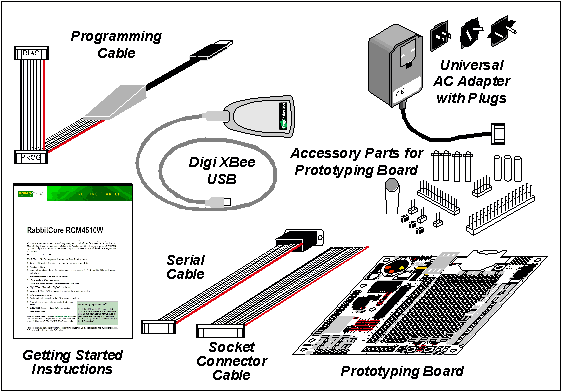
The RCM4510W Development Kit contains the hardware essentials you will need to use the RCM4510W module. The items in the Development Kit and their use are as follows.
- RCM4510W module.
- Prototyping Board.
- Universal AC adapter, 12 V DC, 1 A (includes Canada/Japan/U.S., Australia/N.Z., U.K., and European style plugs). Development Kits sold in North America may contain an AC adapter with only a North American style plug.
- USB programming cable with 10-pin header.
- 10-pin header to DB9 serial cable.
- 14-pin IDC socket connector with bare leads ribbon cable.
- Digi® XBee USB (used as ZigBee coordinator).
- Dynamic C® CD-ROM, with complete product documentation on disk.
- Getting Started instructions.
- A bag of accessory parts for use on the Prototyping Board.
- Rabbit 4000 Processor Easy Reference poster.
- Registration card.
1.3.2 Software
The RCM4510W preview version is programmed using version 10.11 or later of Dynamic C, and the standard version requires version 10.21 or later. A compatible version is included on the Development Kit CD-ROM.
Starting with Dynamic C version 10.40, Dynamic C includes the popular µC/OS-II real-time operating system, point-to-point protocol (PPP), FAT file system, RabbitWeb, and other select libraries. Rabbit also offers for purchase the Rabbit Embedded Security Pack featuring the Secure Sockets Layer (SSL) and a specific Advanced Encryption Standard (AES) library.
In addition to the Web-based technical support included at no extra charge, a one-year telephone-based technical support module is also available for purchase. Visit our Web site at www.rabbit.com or contact your Rabbit sales representative or authorized distributor for further information.
1.3.2.1 XBee Firmware
There are two types of XBee firmware available for the RCM4510W — ZNet 2.5 and ZigBee PRO. The firmware preloaded at the factory on your RCM4510W is indicated with the model number and is reflected in different part numbers (see Table 1). A label on the XBee RF module identifies the factory-installed firmware type. Older RCM4510W modules shipped with ZNet firmware and do not have a sticker on their XBee RF module.

- ZNet 2.5 is a networking solution that was developed around an earlier draft of the ZigBee standard, and will work only with the MaxStream or Digi International® XBee® RF modules used with the RCM4510W or with the preview version of the RCM4510W. Applications built around ZNet 2.5 may be upgraded to the ZB solution by loading the ZB firmware (standard release RCM4510W RabbitCore modules only) and by recompiling the application using Dynamic C v. 10.46 or later.
- ZB firmware was developed using the ZigBee PRO feature set and provides the most advanced ZigBee networking capabilities that will interface with any other devices based on the ZigBee PRO standard adopted in 2007.
Dynamic C v. 10.46 and later versions support the ZB firmware with a 64-bit extended PAN ID instead of a 16-bit PAN ID
Rabbit recommends ZB firmware for new customers and new applications.
1.3.3 Optional Add-Ons
Rabbit has a Mesh Network Add-On Kit available for the RCM4510W.
- Mesh Network Add-On Kit (Part No. 101-1272)
u Digi® XBee USB (used as ZigBee coordinator)
u Digi® XBee USB and serial cables
The XBee ZB RF module is installed on the RF Interface module, which can be connected via an RS-232 serial connection to a Windows PC for setup. The Mesh Network Add-On Kit enables you to add additional devices to explore a ZigBee mesh network.
Contact your authorized Rabbit distributor or your sales representative for more information, or visit our Web site.
1.3.4 Online Documentation
The online documentation is installed along with Dynamic C, and an icon for the documentation menu is placed on the workstation's desktop. Double-click this icon to reach the menu. If the icon is missing, use your browser to find and load default.htm in the docs folder, found in the Dynamic C installation folder.
The latest versions of all documents are always available for free, unregistered download from our Web sites as well.
| Rabbit—A Digi International Brand www.rabbit.com |
| |
|
|