![[Top]](../images/home.jpg)

![[Contents]](../images/contents.jpg)
![[Prev]](../images/previous.jpg)
![[Next]](../images/next.jpg)
![[Last]](../images/index.jpg)


Frame Relay (FR) is a form of packet-switching, using smaller packets and less error checking than traditional forms of packet switching. For every FR interface, you must configure a dedicated line. You can obtain administrative information about the status of the FR interface by defining link management frames, specifically assigning a unique Data Link Connection Identifier (DLCI) address. By setting parameters for IP Routing, you can configure a gateway for all incoming FR calls. You can configure the MAX as a FR switch so that the MAX can receive frames on one interface and transmit them onto another interface. You can enable the MAX to support a FR switched connection over ISDN BRI or PRI connections.
Introduction
In the Frame Relay network, every access point connects directly to a switch. Frame Relay virtual circuits (VCs) are bidirectional data paths between two endpoints. An established permanent virtual circuit (PVC) is a connection between two endpoints, which can include a number of hops in between.
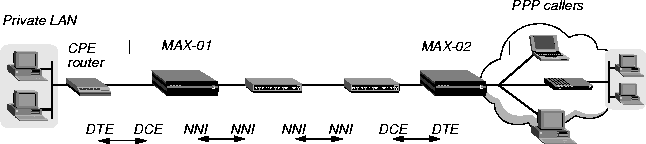
The network-side device connects the CPE device to a Frame Relay network. For example, the MAX labeled MAX-01 in Figure 5-1 receives Frame Relay encapsulated frames from a CPE and forwards them on to another Frame Relay switch. When it is configured with a UNI-DCE interface to Frame Relay, the MAX acts as the network side (UNI-DCE) communicating with the user side (UNI-DTE) of a Frame Relay device.
Figure 5-1. Frame Relay network
Frame Relay link management
Frame Relay link management enables administrators to retrieve information about the status of the Frame Relay interface via special management frames with a unique Data Link Connection Identifier (DLCI) address. (DLCI 0 is the default for link management frames.) Link management frames are used to monitor the interface and provide information about DLCI status. Using the MAX as a Frame Relay concentrator
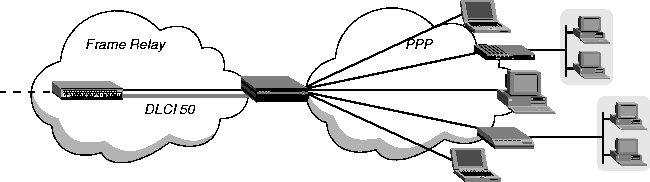
As a Frame Relay concentrator, the MAX forwards many lower-speed PPP connections onto one or more high-speed Frame Relay interfaces, as shown in Figure 5-2:
Figure 5-2. Frame Relay concentrator
Using the MAX as a Frame Relay switch
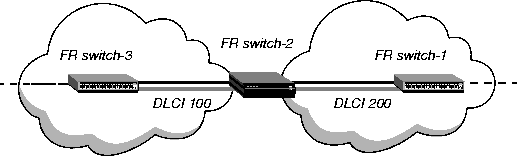
As a Frame Relay switch, the MAX receives frames on one interface and transmits them on another interface. The decision to forward frames onto the Frame Relay interface is made through the assignment of circuit names. The MAX router software is not involved.
Figure 5-3. Frame Relay switch
Components of a Frame Relay configuration
The physical link to another Frame Relay device must be nailed (similar to a dedicated leased line). The administrator allocates nailed bandwidth in a line profile (the profile of a T1, E1, SWAN, or other network line).
Configuring nailed bandwidth for Frame Relay
Each Frame Relay interface in the MAX requires its own nailed bandwidth, which is similar to a dedicated leased line.
Following are some examples of relevant parameters, shown with sample settings:
Net/T1 > Line Config > Line 1 > Ch 2=Nailed
Net/T1 > Line Config > Line 1 > Ch 2 Prt/Grp=1
Net/E1 > Line Config > Line 1 > Ch 2=Nailed
Net/E1 > Line Config > Line 1 > Ch 2 Prt/Grp=1
Serial WAN > Mod Config > Nailed Grp=1
Defining Frame Relay link operations
A Frame-Relay profile defines datalink operations, including link management functions. The same settings can be specified in a RADIUS frdlink pseudo-user profile.
Settings in a Frame-Relay profile
Following are the Frame-Relay profile parameters, shown with sample settings:
Ethernet

      Frame Relay

            Name*=""

            Active=Yes

            Call Type=Nailed

            FR Type=NNI

            Nailed Grp=1

            Data Svc=56KR

            PRI # Type=N/A

            Dial #=N/A

            Bill #=N/A

            Call-by-Call=N/A

            Transit #=N/A

            Link Status Dlci=0

            Link Mgmt=T1.617D

            N391=6

            DTE N392=3

            DTE N393=4

            DCE N392=3

            DCE N393=4

            T391=10

            T392=15

            MRU=1532
Set the Active parameter to Yes to make the profile available for use.
FR Type
You can set the FR Type parameter to NNI (for an NNI interface to the switch), DCE (for a UNI-DCE interface), or DTE (for a UNI-DTE interface). Call Type, telco options, and Data Svc
Nailed is the default call type for Frame Relay connections. When you set Call Type to Nailed, dial numbers and other telco options are N/A. You can specify Switched if the Frame Relay switch allows dial-in. However, Frame Relay networks currently have no dial-out connection capability. The two types of data service available are 64K and 56K. Link management protocol
The Link Mgmt setting can be None (no link management), T1.617D (for T1.617 Annex D), or Q.933A (for Q.933 Annex A). Frame Relay timers and event counts
Frame Relay timers and event counts function as follows:
frdlink-name-N Password="ascend", User-Service = Dialout-Framed-UserThe name argument is the MAX system name (specified by the Name parameter in the System profile), and N is a number in a sequential series, starting with 1. Make sure there are no missing numbers in the series specified by N. If there is a gap in the sequence of numbers, the MAX stops retrieving the profiles when it encounters the gap in sequence.
The following attributes can be used to define a frdlink pseudo-user profile:
Examples of a UNI-DTE link interface
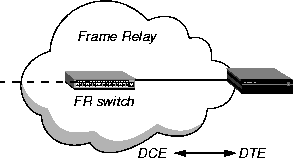
On a UNI-DTE interface, the MAX acts as the user side communicating with the network side DCE switch. It initiates link management functions by sending a Status Enquiry to the UNI-DCE device. Status Enquiries may include queries about the status of PVC segments the DTE knows about, as well as the integrity of the datalink between the UNI-DTE and UNI-DCE interfaces.
Figure 5-4. Frame Relay DTE interface
EthernetWith these link management settings, the MAX uses the CCITT Q.933 Annex A link management protocol to communicate with the Frame Relay DCE. It initiates link management functions by sending a Status Enquiry to the DCE every 10 seconds.
Frame Relay
Active=Yes
FR Type=DTE
Nailed Grp=11
Link Mgmt=Q.933A
On a UNI-DTE interface, the state of a DLCI is determined by the Full status report from the DCE or by an async PVC update. The Full status report from the DCE specifies active and inactive and new DLCIs. If the DCE does not specify a DLCI as active or inactive, the DTE considers it inactive.
Following is a comparable RADIUS profile:
frdlink-max-1 Password = "ascend", User-Service = Dialout-Framed-User

    Ascend-FR-Profile-Name = "fr-dte",

    Ascend-Call-Type = Nailed,

    Ascend-FR-Type = Ascend-FR-DTE,

    Ascend-FR-Nailed-Grp = 11,

    Ascend-FR-Link-Mgt = Ascend-FR-Q-933A,

    Ascend-Data-Svc = Nailed-64K
The UNI-DCE uses the values of the T392, DCE N392, and DCE N393 parameters in the Frame Relay profile to define the parameters of the Status Enquiries expected from the DTE. (These correspond to the Ascend-FR-T392, Ascend-FR-DCE-N392, and Ascend-FR-DCE-N393 attributes in a RADIUS profile.)
For example, if the MAX expects a Status Enquiry from the DTE every ten seconds, it records an error if it does not receive a Status Enquiry in ten seconds.
Figure 5-5 shows an example of the MAX with a UNI-DCE interface.
Figure 5-5. Frame Relay DCE interface
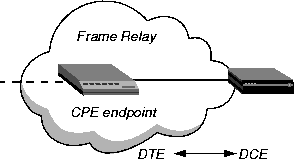
EthernetWith these link management settings, the MAX uses the CCITT Q.933 Annex A link management protocol to communicate with the CPE endpoint. It expects a Status Enquiry at intervals less than seven seconds.
Frame Relay
Active=Yes
FR Type=DCE
Nailed Grp=36
Link Mgmt=Q.933A
T392=15
On a UNI-DCE interface, if the datalink is up, the DLCI is considered to be up as well. In the DCE Full status response to the DTE, if a PVC segment terminates within the DCE, it is reported as active. If the PVC segment is not terminated, the DCE has to request further information on the Frame Relay network. In that case, it requests information about the DLCI from the next hop switch, and reports back to the DTE when the segment is confirmed to be active or inactive.
Following is a comparable RADIUS profile:
frdlink-max-2 Password = "ascend", User-Service = Dialout-Framed-User

    Ascend-FR-Profile-Name = "fr-dce",

    Ascend-Call-Type = Nailed,

    Ascend-FR-Type = Ascend-FR-DCE,

    Ascend-FR-Nailed-Grp = 36,

    Ascend-FR-Link-Mgt = Ascend-FR-Q-933A,

    Ascend-Data-Svc = Nailed-64K,

    Ascend-FR-T392 = 15
Because NNI is bidirectional, all of the link management values defined in the Frame-Relay profile are used. The values of the N391, N392, N393, and T391 parameters define the user side of the NNI. These values define the timing of the status enquiries the MAX MAX sends to its peer switch and the boundary conditions that define link integrity. The values of the T392l, DCE N392, and DCE N393 parameters are used by the network side of the NNI to define the parameters of the Status Enquiries it expects from the its peer switch.
Figure 5-6 shows a MAX with an NNI interface:
Figure 5-6. Frame Relay NNI interface
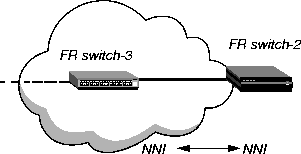
The following parameters specify the nailed group 52 as the bandwidth for the NNI interface to Switch-3 (Figure 5-6). Make sure that the Frame-Relay profile specifies the correct nailed group.
EthernetWith these link management settings, the MAX uses the ANSI Annex D link management protocol to communicate with Switch-3. It sends a Status Enquiry for Link Integrity Verification to Switch-3 every 10 seconds, and requests a Full status report every sixth enquiry (every 60 seconds). It also sends a Full Status report in response to requests from the other switch. If it does not receive a Status Enquiry within a 15-second interval (T392), it records an error.
Frame Relay
Active=Yes
FR Type=NNI
Nailed Grp=52
Link Mgmt=T1.617D
N391=6
T391=10
T392=15
Following is a comparable RADIUS profile:
frdlink-max-3 Password = "ascend", User-Service = Dialout-Framed-User

    Ascend-FR-Profile-Name = "switch-3",

    Ascend-Call-Type = Nailed,

    Ascend-FR-Type = Ascend-FR-NNI,

    Ascend-FR-Nailed-Grp = 52,

    Ascend-FR-Link-Mgt = Ascend-FR-T1-617D,

    Ascend-Data-Svc = Nailed-64K,

    Ascend-FR-N391 = 6,

    Ascend-FR-T391 = 10,

    Ascend-FR-T392 = 15
Configuring a DLCI logical interface
A Connection profile defines a DLCI interface. The same settings can be specified in a RADIUS permconn pseudo-user profile. Overview of DLCI interface settings
Administrators configure a Connection or RADIUS permconn profile that specifies a connection to a far end device across Frame Relay. The first hop of the connection is known by the DLCI assigned in the profile. Settings in a Connection profile
All connections that use Frame Relay must specify the name of a configured Frame Relay profile that defines the data link between the MAX and the Frame Relay network. Forwarded or routed connections over the Frame Relay link use the following sets of parameters (shown with sample settings):
Ethernet
      Answer
            Encaps...
                  PPP=Yes
                  FR=Yes
PPP Options...For gateway connections:
Route IP=Yes
Ethernet
      Connections
            any Connection profile
                  Encaps=FR
                  Encaps options...
                        FR Prof=pacbell
                        DLCI=16
                        Circuit=N/A
Route IP=Yes
Ip options...For Frame Relay circuits:
LAN Adrs=10.2.3.4/24
EthernetFor FR Direct connections:
Connections
any Connection profile
Encaps=FR_CIR
Encaps options...
FR Prof=pacbell
DLCI=16
Circuit=circuit-1
Ethernet
Connections
any Connection profile
Encaps=PPP
Route IP=Yes
                  Ip options...
                  LAN Adrs=10.2.3.4/24
                  Session options...
                        FR Direct=Yes
                        FR Prof=pacbell
                        DLCI=16
A Connection profile that specifies Frame Relay encapsulation must include a DLCI to identify the first hop of a permanent virtual circuit (PVC). The MAX does not allow you to enter duplicate DLCIs, except when they are carried by separate physical links specified in different Frame Relay profiles.
In a circuit, both Connection profiles must specify FR_CIR encapsulation and the same circuit name. Each profile must specify a unique DLCI. The MAX does not allow you to enter duplicate DLCIs, except when separate physical links specified in different Frame Relay profiles carry duplicate DLCIs.
FR Direct is an unusual mode, in that the MAX ignores the destination of the packets. It assumes that some device at the far end of the PVC makes the routing decisions. The Connection profile, however, must use IP routing to enable the MAX to route data back to the client.
permconn-name-N Password="ascend", User-Service = Dialout-Framed-UserThe name argument is the MAX system name (specified by the Name parameter in the System profile), and N is a number in a sequential series, starting with 1. Make sure there are no missing numbers in the series specified by N. If there is a gap in the sequence of numbers, the MAX stops retrieving the profiles when it encounters the gap in sequence.
The following attributes can be used to define a permconn pseudo-user profile that uses Frame Relay:
Examples of a DLCI interface configuration
In the following example, the MAX has a connection to a Frame Relay switch that also supports IP routing, as shown in Figure 5-7:
Figure 5-7. Frame Relay PVC
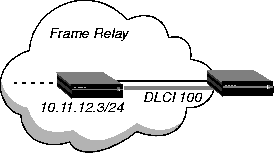
EthernetFollowing is a comparable RADIUS profile:
Connections
any Connection profile
Active=Yes
Encaps=FR
IP options
LAN Adrs=10.11.12.3/24
Encaps options
FR Prof=fr-dce
DLCI=100
Telco options
Call Type=Nailed
permconn-max-1 Password = "ascend", User-Service = Dialout-Framed-User

    User-Name = "max-switch",

    Framed-Protocol = FR,

    Framed-Address = 10.11.12.3,

    Framed-Netmask = 255.255.255.0,

    Ascend-Route-IP = Route-IP-Yes,

    Ascend-FR-DLCI = 100,

    Ascend-FR-Profile-Name = "fr-dce"
Examples of backup interfaces for nailed Frame Relay links
On UNI-DTE and NNI interfaces, the MAX issues Status Enquiries that check the state of the other end of PVC segments on the interface. If a DLCI becomes inactive, and the profile configuring its nailed interface specifies a backup connection, the MAX uses the backup connection to provide an alternate route to the other end.fp7, and the backup interface is another DLCI interface defined in a profile named pvc. In this example, the remote IP address of the primary and the backup connection are different.
EthernetFollowing are comparable RADIUS profiles:
Connections
fp7
Name=fp7
Active=Yes
Encaps=FR
IP options
LAN Adrs=10.168.7.9/24
Encaps options
FR Prof=frt2-7
DLCI=18
Telco options
Call Type=Nailed
Session options
BackUp=pvc
Ethernet
Connections
pvc
Name=pvc
Active=Yes
Encaps=FR
IP options
LAN Adrs=10.168.7.11/24
Encaps options
FR Prof=frt1-7
DLCI=16
Telco options
Call Type=Nailed
permconn-max1-1 Password = "ascend", User-Service = Dialout-Framed-
User

   User-Name = "fp7",

   Framed-Protocol = FR,

   Framed-Address = 10.168.7.9,

   Framed-Netmask = 255.255.255.0,

   Ascend-Route-IP = Route-IP-Yes,

   Ascend-Backup = "pvc",

   Ascend-Metric = 7,

   Ascend-FR-DLCI = 18,

   Ascend-FR-Profile-Name = "radius-frt2-7",

   Framed-MTU = 1524,

   Ascend-Call-Type = Nailed
permconn-max1-2 Password = "ascend", User-Service = Dialout-Framed- UserWhen the MAX brings up the two Frame Relay PVC, the routing table includes entries such as this:
User-Name = "pvc",
Framed-Protocol = FR,
Framed-Address = 10.168.7.11,
Framed-Netmask = 255.255.255.0,
Ascend-Route-IP = Route-IP-Yes,
Ascend-Metric = 7,
Ascend-FR-DLCI = 16,
Ascend-FR-Profile-Name = "radius-frt1-7",
Framed-MTU = 1524,
Ascend-Call-Type = Nailed
...
10.168.7.0/24 10.168.7.9 wan33 rGT 60 1 0 89At this point, both nailed connections are up, and the output of the Ifmgr command contains entries such as the following:
10.168.7.0/24 10.168.7.9 wan33 *SG 120 7 0 198
10.168.7.9/32 10.168.7.9 wan33 rT 60 1 0 89
10.168.7.9/32 10.168.7.9 wan33 * 120 7 198
10.168.7.11/32 10.168.7.11 wan32 rT 60 1 0 51
10.168.7.11/32 10.168.7.11 wan33 *S 120 1 89
...
bif slot sif u m p ifname host-name remote-addr local-addrIf the primary PVC becomes unavailable, the routing table does not change, but the entries in the output of the Ifmgr command look like the following output:
--------------------------------------------------------------------
032 1:03 001 * p wan32 pvc 10.168.7.11/32 11.168.6.234/32
033 1:03 002 * p wan33 fp7 10.168.7.9/32 11.168.6.234/32
bif slot sif u m p ifname host-name remote-addr local-addrNotice that
--------------------------------------------------------------------
032 1:03 001 * p wan32 pvc 10.168.7.11/32 11.168.6.234/32
033 1:17 000 + p wan33 fp7 10.168.7.9/32 11.168.6.234/32
fp7 is shown with a plus-sign (+) to show that it is in the Backup Active state (that it is backed up by another connection). When the primary PVC comes up again, the data flow is directed to that interface again. At that point, the Ifmgr command output again shows both interfaces as up.
Concentrating incoming calls onto Frame Relay
A common way to concentrate incoming connections onto a Frame Relay link is by making use of OSI layer 3 (IP routing). For this purpose, the MAX requires ordinary profiles for the callers, and a DLCI logical interface that specifies a destination IP router. When clients dial in to reach the destination router, the MAX consults its routing table to forward the packets onto Frame Relay. In this type of configuration, the MAX acts as a Frame Relay gateway.
Setting up a Frame Relay gateway
To act as a Frame Relay gateway, the Frame Relay DLCI profile must specify a destination router. Incoming connections are routed in the usual way, and all of the usual options apply. Administrators can choose to create static routes, enable or disable RIP, and so forth. For details, see Chapter 7, Configuring IP Routing.
For background information about specifying a DLCI interface, see Configuring a DLCI logical interface.
Routing parameters in the DLCI profile
In addition to the Frame Relay settings described in Overview of DLCI interface settings, the following Connection parameters are relevant to a gateway DLCI profile:
Ethernet

      Connections

            any Connection profile

                  Route IP=Yes

            IP options

                  LAN Adrs=0.0.0.0/0
Examples of a gateway configuration
In the following example, the MAX acts as a gateway between a client that dials in with the address 10.1.2.3/29, and a remote router that is reachable across Frame Relay, as shown in Figure 5-8:
Figure 5-8. Frame Relay gateway
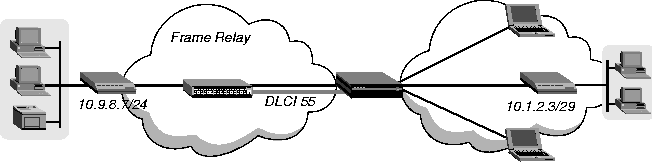
EthernetFollowing is a comparable RADIUS profile:
Connections
mpp-client
Name=mpp-client
Active=Yes
Encaps=MPP
Encaps options
Recv PW=clientpw
IP options
LAN Adrs=10.1.2.3/29
mpp-client Password = "clientpw", User-Service = Dialout-Framed-UserThe next set of parameters configures a DLCI Connection profile to the CPE router:
Framed-Protocol = MPP,
Framed-Address = 10.10.1.3,
Framed-Netmask = 255.255.255.248
EthernetFollowing is a comparable RADIUS profile:
Connections
cpe-router
Name=cpe-router
Active=Yes
Encaps=FR
IP options
LAN Adrs=10.9.8.7/24
Encaps options
FR Prof=fr-dte
DLCI=55
permconn-max-2 Password = "ascend", User-Service = Dialout-Framed-User

    User-Name = "cpe-router",

    Framed-Protocol = FR,

    Framed-Address = 10.9.8.7,

    Framed-Netmask = 255.255.255.0,

    Ascend-Route-IP = Route-IP-Yes,

    Ascend-FR-DLCI = 55,

    Ascend-FR-Profile-Name = "fr-dte"
Configuring Frame Relay Direct
When a PPP Connection profile specifies FR-Direct, the MAX simply forwards the data stream out on a specified DLCI interface. It leaves the task of routing the packets to an upstream device.
Settings in a Connection profile
Following are the relevant FR-Direct parameters, shown with sample settings:
Ethernet

      Connections

            any Connection profile

                  Active=Yes

                  Encaps=PPP

                  Route IP=Yes

                  Encaps options

                        Recv PW=clientpw

                  IP options

                        LAN Adrs=10.111.112.113/24

                  Session options

                        FR Direct=Yes

                        FR Prof=

                        FR Dlci=16
Settings in a RADIUS profile
Following are the relevant RADIUS attributes for FR-Direct connections:
Examples of FR-Direct connections
In the following example, the MAX forwards the data stream from two PPP dial-in hosts across Frame Relay on the same DLCI interface, as shown in Figure 5-9:
Figure 5-9. Frame Relay Direct
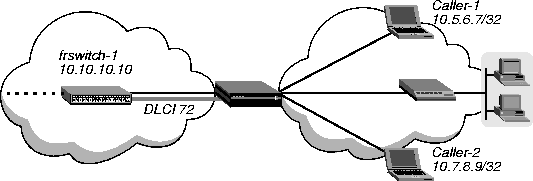
EthernetFollowing is a comparable RADIUS profile:
Connections
frswitch-1
Name=frswitch-1
Active=Yes
Encaps=FR
IP options
LAN Adrs=10.10.10.10/24
Encaps options
FR Prof=fr-dte
DLCI=72
permconn-max-3 Password = "ascend", User-Service = Dialout-Framed-UserThe following set of parameters configures FR Direct Connection profiles for the incoming calls:
User-Name = "frswitch-1",
Framed-Protocol = FR,
Framed-Address = 10.10.10.10,
Framed-Netmask = 255.255.255.0,
Ascend-Route-IP = Route-IP-Yes,
Ascend-FR-DLCI = 72,
Ascend-FR-Profile-Name = "fr-dte"
Ethernet

      Connections

            caller-1

                  Name=caller-1

                  Active=Yes

                  Encaps=PPP

                  Encaps options

                        Recv PW=caller1*3

                  IP options

                        LAN Adrs=10.5.6.7/32

                  Session options

                        FR Direct=Yes

                        FR Prof=fr-dte

                        FR Dlci=72
EthernetFollowing are comparable RADIUS profiles:
Connections
caller-2
Name=caller-2
Active=Yes
Encaps=PPP
Route IP=Yes
Encaps options
Recv PW=caller2!!8
IP options
LAN Adrs=10.5.6.7/32
Session options
FR Direct=Yes
FR Prof=fr-dte
FR Dlci=72
caller-1 Password = "caller1*3", User-Service = Framed-User

    Framed-Protocol = PPP,

    Framed-Address = 10.5.6.7,

    Framed-Netmask = 255.255.255.255

    Ascend-FR-Direct = FR-Direct-Yes,

    Ascend-FR-Direct-Profile = "fr-dte",

    Ascend-FR-Direct-DLCI = 72
caller-2 Password = "caller2!!8", User-Service = Framed-User

    Framed-Protocol = PPP,

    Framed-Address = 10.7.8.9,

    Framed-Netmask = 255.255.255.255

    Ascend-FR-Direct = FR-Direct-Yes,

    Ascend-FR-Direct-Profile = "fr-dte",

    Ascend-FR-Direct-DLCI = 72
Configuring the MAX as a Frame Relay switch
As a Frame Relay switch, the MAX receives frames on one DLCI interface and transmits them on another one. The decision to forward frames is made on the basis of circuit name assignments.
Overview of circuit-switching options
With a Frame Relay circuit configuration, the MAX can operate as a switch on UNI-DCE interfaces, NNI interfaces, or a combination of the two. NNI is not required.
Settings in a Connection profile
Following are the relevant circuit parameters, shown with sample settings:
Ethernet

      Connections

            caller-1

                  Name=caller-1

                  Active=Yes

                  Encaps=FR-Cir

                  Encaps options

                        FR Prof=max

                        DLCI=100

                        FR Circuit=frcir1
Examples of a circuit between UNI interfaces
Figure 5-10 shows a circuit configuration using UNI-DCE interfaces in the MAX:
Figure 5-10. Frame Relay circuit with UNI interfaces

Using local profiles
The following parameters on the MAX define the datalinks to the MAX and to the Pipeline 130 (P130-East):
Ethernet

      Frame Relay

            max

                  Name=max

                  Active=Yes

                  FR Type=DCE

                  Nailed Grp=111
EthernetThe next set of parameters specifies the circuit between the two Frame Relay interfaces:
Frame Relay
p130east
Name=p130east
Active=Yes
FR Type=DCE
Nailed Grp=222
Ethernet

      Connections

            max6

                  Name=max6

                  Active=Yes

                  Encaps=FR-Cir

                  Route IP=No

                  Encaps options

                        FR Prof=max

                        DLCI=100

                        FR Circuit=frcir1
Ethernet

      Connections

            p130

                  Name=p130

                  Active=Yes

                  Encaps=FR-Cir

                  Encaps options

                        FR Prof=p130east

                        DLCI=200

                        FR Circuit=frcir1
frdlink-max-21 Password = "ascend", User-Service = Dialout-Framed-User

    Ascend-FR-Profile-Name = "max",

    Ascend-Call-Type = Nailed,

    Ascend-FR-Type = Ascend-FR-DCE,

    Ascend-FR-Nailed-Grp = 111
frdlink-max-22 Password = "ascend", User-Service = Dialout-Framed-UserThe next set of profiles specifies the circuit between the two Frame Relay interfaces:
Ascend-FR-Profile-Name = "p130east",
Ascend-Call-Type = Nailed,
Ascend-FR-Type = Ascend-FR-DCE,
Ascend-FR-Nailed-Grp = 222
permconn-max-10 Password = "ascend" , User-Service = Dialout-Framed-
User

    User-Name = "max6",

    Framed-Protocol = FR-CIR,

    Ascend-Route-IP = Route-IP-No,

    Ascend-FR-DLCI = 100,

    Ascend-FR-Profile-Name = "max",

    Ascend-FR-Circuit-Name = "fr-cir1"
permconn-max-11 Password = "ascend", User-Service = Dialout-Framed-
User

    User-Name = "p130",

    Framed-Protocol = FR-CIR,

    Ascend-Route-IP = Route-IP-No,

    Ascend-FR-DLCI = 200,

    Ascend-FR-Profile-Name = "p130east",

    Ascend-FR-Circuit-Name = "fr-cir1"
Figure 5-11. Frame Relay circuit with NNI interfaces

Using local profiles
The following parameters on the MAX define the datalinks to the two switches labeled FR-Asnd-A and FR-Asnd-B:
Ethernet

      Frame Relay

            fr-asnd-a

                  Name=fr-asnd-a

                  Active=Yes

                  FR Type=NNI

                  Nailed Grp=333
EthernetThe next set of parameters specifies the circuit between the two Frame Relay interfaces:
Frame Relay
fr-asnd-b
Name=fr-asnd-b
Active=Yes
FR Type=NNI
Nailed Grp=444
Ethernet

      Connections

            asnd-a

                  Name=asnd-a

                  Active=Yes

                  Encaps=FR-Cir

                  Route IP=No

                  Encaps options

                        FR Prof=fr-asnd-a

                        DLCI=100

                        FR Circuit=pvc-pipe
Ethernet

      Connections

            asnd-b

                  Name=asnd-b

                  Active=Yes

                  Encaps=FR-Cir

                  Route IP=No

                  Encaps options

                        FR Prof=fr-asnd-b

                        DLCI=200

                        FR Circuit=pvc-pipe
frdlink-max-23 Password = "ascend", User-Service = Dialout-Framed-User

    Ascend-FR-Profile-Name = "fr-asnd-a",

    Ascend-Call-Type = Nailed,

    Ascend-FR-Type = Ascend-FR-NNI,

    Ascend-FR-Nailed-Grp = 333
frdlink-max-24 Password = "ascend", User-Service = Dialout-Framed-UserThe next set of profiles specifies the circuit between the two Frame Relay interfaces:
Ascend-FR-Profile-Name = "fr-asnd-b",
Ascend-Call-Type = Nailed,
Ascend-FR-Type = Ascend-FR-NNI,
Ascend-FR-Nailed-Grp = 444
permconn-max-12 Password = "ascend", User-Service = Dialout-Framed-
User

    User-Name = "asnd-a",

    Framed-Protocol = FR-CIR,

    Ascend-Route-IP = Route-IP-No,

    Ascend-FR-DLCI = 100,

    Ascend-FR-Profile-Name = "fr-asnd-a",

    Ascend-FR-Circuit-Name = "pvc-pipe"
permconn-max-13 Password = "ascend", User-Service = Dialout-Framed-
User

    User-Name = "asnd-b",

    Framed-Protocol = FR-CIR,

    Ascend-Route-IP = Route-IP-No,

    Ascend-FR-DLCI = 200,

    Ascend-FR-Profile-Name = "fr-asnd-b",

    Ascend-FR-Circuit-Name = "pvc-pipe"
Figure 5-12. Frame Relay circuit with UNI and NNI interface

Using local profiles
The following parameters on MAX-42 define the datalinks to the MAX and MAX-39:
Ethernet

      Frame Relay

            dce-max

                  Name=dce-max

                  Active=Yes

                  FR Type=DCE

                  Nailed Grp=555
EthernetThe next set of parameters on MAX-42 specifies the circuit between its two Frame Relay interfaces:
Frame Relay
nni-39
Name=nni-39
Active=Yes
FR Type=NNI
Nailed Grp=999
Ethernet

      Connections

            max

                  Name=max

                  Active=Yes

                  Encaps=FR-Cir

                  Route IP=No

                  Encaps options

                        FR Prof=dce-max

                        DLCI=100

                        FR Circuit=cir-42
EthernetThe following parameters on MAX-39 define the datalinks to MAX-42 and to the Pipeline 130:
Connections
max39
Name=max39
Active=Yes
Encaps=FR-Cir
Route IP=No
Encaps options
FR Prof=nni-39
DLCI=200
FR Circuit=cir-42
Ethernet

      Frame Relay

            nni-42

                  Name=nni-42

                  Active=Yes

                  FR Type=NNI

                  Nailed Grp=777
EthernetThe next set of parameters on MAX-39 specifies the circuit between its two Frame Relay interfaces:
Frame Relay
dce-p130
Name=dce-p130
Active=Yes
FR Type=dce
Nailed Grp=888
Ethernet

      Connections

            max42

                  Name=max42

                  Active=Yes

                  Encaps=FR-Cir

                  Route IP=No

                  Encaps options

                        FR Prof=nni-42

                        DLCI=200

                        FR Circuit=cir-39
Ethernet

      Connections

            max39

                  Name=max39

                  Active=Yes

                  Encaps=FR-Cir

                  Route IP=No

                  Encaps options

                        FR Prof=dce-p130

                        DLCI=300

                        FR Circuit=cir-39
frdlink-max-25 Password = "ascend", User-Service = Dialout-Framed-User

    Ascend-FR-Profile-Name = "dce-max",

    Ascend-Call-Type = Nailed,

    Ascend-FR-Type = Ascend-FR-DCE,

    Ascend-FR-Nailed-Grp = 555
frdlink-max-26 Password = "ascend", User-Service = Dialout-Framed-UserThe next set of profiles specifies the circuit on MAX-42:
Ascend-FR-Profile-Name = "nni-39",
Ascend-Call-Type = Nailed,
Ascend-FR-Type = Ascend-FR-NNI,
Ascend-FR-Nailed-Grp = 999
permconn-max-14 Password = "ascend", User-Service = Dialout-Framed-
User

    User-Name = "max"

    Framed-Protocol = FR-CIR,

    Ascend-Route-IP = Route-IP-No,

    Ascend-FR-DLCI = 100,

    Ascend-FR-Profile-Name = "dce-max",

    Ascend-FR-Circuit-Name = "cir-42"
permconn-max-15 Password = "ascend", User-Service = Dialout-Framed- UserThe following profiles define the datalinks from MAX-39 to MAX-42 and the Pipeline 130:
User-Name = "max39",
Framed-Protocol = FR-CIR,
Ascend-Route-IP = Route-IP-No,
Ascend-FR-DLCI = 200,
Ascend-FR-Profile-Name = "nni-39",
Ascend-FR-Circuit-Name = "cir-42"
frdlink-max-27 Password = "ascend", User-Service = Dialout-Framed-User

    Ascend-FR-Profile-Name = "nni-42",

    Ascend-Call-Type = Nailed,

    Ascend-FR-Type = Ascend-FR-NNI,

    Ascend-FR-Nailed-Grp = 777
frdlink-max-28 Password = "ascend", User-Service = Dialout-Framed-UserThe next set of profiles specifies the circuit on MAX-39:
Ascend-FR-Profile-Name = "dce-p130",
Ascend-Call-Type = Nailed,
Ascend-FR-Type = Ascend-FR-DCE,
Ascend-FR-Nailed-Grp = 888
permconn-max-16 Password = "ascend", User-Service = Dialout-Framed-
User

    User-Name = "max42"

    Framed-Protocol = FR-CIR,

    Ascend-Route-IP = Route-IP-No,

    Ascend-FR-DLCI = 200,

    Ascend-FR-Profile-Name = "nni-42",

    Ascend-FR-Circuit-Name = "cir-39"
permconn-max-17 Password = "ascend", User-Service = Dialout-Framed-
User

    User-Name = "p130",

    Framed-Protocol = FR-CIR,

    Ascend-Route-IP = Route-IP-No,

    Ascend-FR-DLCI = 300,

    Ascend-FR-Profile-Name = "dce-p130",

    Ascend-FR-Circuit-Name = "cir-39"
Configuring switched Frame Relay connections
You can enable the MAX to support Frame Relay switched connections over ISDN BRI or PRI connections. A switched Frame Relay connection provides either a 56K or 64K connection, depending on the ISDN network configuration. Overview
When a Frame Relay profile and an associated Connection profile are configured for a switched Frame Relay connection, the Connection profile can establish a Frame Relay session either by placing an outgoing call or by matching the CLID or DNIS of an incoming call. Once the session is established, it behaves just like a nailed Frame Relay connection with an access rate of 64K or 56K, depending on the ISDN network configuration. Authentication can be by DNIS and CLID.
To configure a Frame relay profile for a Frame Relay switched connection, proceed as in the following example:
Station=fr-sw-fr
Station=fr-sw-conn
FR Prof=fr-sw-fr
DLCI=165
You can only set Call Type to Switched if the Frame Relay Profile associated with it also has Call Type set to Switched.
1=Dial. If you configure an Answer profile, an incoming call with the correct CLID or DNIS brings up the session.
Copyright © 1998, Ascend Communications, Inc. All rights reserved.