
![[Top]](../images/home.jpg)
![[Contents]](../images/contents.jpg)
![[Prev]](../images/previous.jpg)
![[Next]](../images/next.jpg)
![[Last]](../images/index.jpg)


Configuring X.25
The X.25 protocol operates at the network layer to provide virtual circuits and deliver such services as multiplexing, in-sequence delivery of packets, transfer of addressing information, segmentation and reassembly, flow control, error control, reset, and restart. Allocation of logical channels can be either static (PVC) or dynamic (SVC).
X.25 is not as fast as newer protocols that operate at the data-link layer, leaving network-layer functions to the processors at each end of the connection. However, X.25 became widely established, especially in Europe, and remains in widespread use in many geographical areas.
The MAX supports a single physical X.25 connection. You must configure a physical link and at least one logical link to an X.25 switch. Once you have configured a logical link in an X.25 profile, you can configure individual IP-routing connections in Connection profiles. (The Ascend implementation of X.25 does not support other routing protocols, nor does it support bridging.)
The MAX enables several terminals to share a single network line by performing the functions of an X.25 Packet Assembler/Disassembler (PAD). The MAX PAD supports a unique command interface, and you can configure an X.3 profile to fine-tune PAD settings.
If you use X.25 on an ISDN connection, you can configure the D channel to transmit data. Always On/Dynamic ISDN (AO/DI) can send low-bandwidth transmissions over the D channel and add switched B channels as bandwidth requirements increase. (For example, the D channel is usually sufficient for email transmissions, but not for WWW pages with graphics.) X.25 Transaction Processing Protocol for Point of Service (T3POS) sends transaction data over the D channel.
Introduction to Ascend X.25 implementation
This chapter describes how the MAX supports X.25. The CCITT Blue Book Recommendation X series 1988 has full technical specifications for X.25, X.3, X.28, X.29, and Link Access Protocol-Balanced (LAPB). IETF RFC 1356 has the technical specification for IP over X.25 (X25/IP).
X.25 is a connection oriented (virtual circuits) protocol, providing services such as multiplexing, in-sequence delivery, transfer of addressing information, segmenting and reassembly, flow control, error control, reset, and restart. Allocation of logical channels can be either static (PVC) or dynamic (SVC).
Configuring the MAX to communicate with an X.25 network involves the following elements:
- A physical interface to the X.25 network. This can be a nailed serial-WAN, one of the D-channels in T1 or E1 PRI, or a BRI D-channel connection. The MAX supports only one physical X.25 connection. (To configure the interface, see Chapter 3, Configuring WAN Access.)
- A logical datalink to the X.25 network. Defined in an X.25 profile, the link should normally be set in DTE. See Configuring the logical link to an X.25 network.
- Dial-in connections (defined in Connection profiles) may use X.25. The application layer of an X.25 connection can be a TCP/IP network connection or terminal emulation using X.25 Packet Assembler/Disassembler (PAD).
The MAX supports PPP encapsulation over X.25 as defined in RFC 1598. There are advantages to using PPP/X.25 instead of IP/X.25. PPP/X.25 supports:
- STAC compression
- PAP authentication
- multiprotocol encapsulation including: IP routing, IPX routing, Appletalk routing, and bridging
Configuring the logical link to an X.25 network
An X.25 profile defines the logical data link between the MAX and a remote X.25 network. The Ethernet menu contains X.25 profiles, which include the following parameters (shown with sample settings):
Ethernet
      X.25
        any X.25 profile
            Name=
            Active= No
            Call Type=Nailed
            Nailed Grp=1
            Data Svc=56K
            Tei #=N/A
            PRI #=N/A
            Dial #=N/A
            Bill #=N/A
            Call-by-Call=N/A
            Transit #=N/A
            LAPB T1=3
            LAPB T2=0
            LABP N2=20
            LAPB k=7
            X.25 Seq Number Mode=NORMAL
            X.25 Link Setup Mode=ACTIVE
            X.25 Node Type=DTE
            X.25 window size=2
            X.25 pkt size=128
            X.25 Min pkt size=64
            X.25 Max pkt size=1024
            X.25 lowest PVC=0
            X.25 highest PVC=0
            X.25 lowest SVC=1
            X.25 highest SVC=8
            X.25 Clear/Diag=Yes
            X.25 Reset/Diag=Yes
            X.25 Restart/Diag=Yes
            X.25 options=NPWS
            X.25 Rev Charge Accept=No
            X.25 Network Type=CCITT
            X.25 T20=18
            X.25 R20=1
            X.25 T21=20
            X.25 T22=18
            X.25 T22=1
            X.25 R23=18
            X.25 R23=1
            X.121 src addr=
            VCE Timer Val=300
Understanding the X.25 parameters
This section provides some background information about the X.25 parameters. For detailed information about each of these parameters, see the MAX Reference Guide.
Profile name and activation
User connections link up with the connection specified in an X.25 profile by specifying the profile's name. The name must be unique and cannot exceed 15 characters.
To make the profile available for use, set the Active parameter to Yes.
Type of connection
The Call-Type parameter specifies the type of physical connection, which can be nailed or switched (X.25 PAD requires nailed). For a nailed connection, specify the Nailed Grp number. For a switched connection, specify the Dial # and telco options.
LAPB and reliable data transfer
The X.25 frame layer implements Link Access Protocol-Balanced (LAPB), an HDLC-like protocol that facilitates the exchange of information packets. To configure LAPB, set the following parameters:
- LAPB T1-Maximum number of seconds the transmitter waits for acknowledgment before initiating a recovery procedure (Response timeout). The default is 3 seconds.
- LAPB T2-Maximum number of milliseconds LAPB waits for outgoing data before sending a Restart-Request packet to the network. The default of 0 (zero) specifies immediate acknowledgment.
- LAPB N2-How many times the MAX can resend a frame when the LAPB T1 timer expires. The default is 20. This relatively high value increases the probability of a correct transfer of data.
- LAPB K-Maximum number of sequentially numbered frames that can be unacknowledged at a given time. This value is also called the Level 2 Window Size or the Frame Window Size. The default is 7. Higher values enable faster throughput.
X.25 packet handling
The X.25 packet layer defines the packet format as well as the procedures for the exchange of packets containing control information and user data. The following parameters control X.25 packet handling:
- X.25 Seq Number Mode selects between modulo 8 (Normal) and modulo 128 (Extended) sequence-number mode.
- X.25 Link Setup Mode specifies whether the X.25 link comes up in active- or passive- disconnect mode. In active-disconnect mode (the default), the link layer sends a DISC, and the packet layer sends a Restart-Request packet, upon initialization. In passive-disconnect mode, the link layer sends SABM(E), upon initialization and issues a restart to the network only upon receipt of a Restart-Request packet. It does not issue a Restart-Request packet upon initialization, but responds to Restart packets it receives.
- X.25 Node Type specifies whether the MAX interacts with the remote end of the connection as a DTE (the default) or a DCE (when emulating the X.25 network).
- X.25 Window Size is the default for maximum number of outstanding data packets that can accumulate before the MAX requires an acknowledgment. The default is 2.
- X.25 packet-size parameters as specify the default, maximum, and minimum number of bytes in the data field of a data packet.
X.25 PVC and SVC numbers
The X.25 Lowest PVC and X.25 Highest PVC parameters define a range of PVCs from 1 to 4096. If the lowest PVC number is zero, no PVCs are supported.
The X.25 Lowest SVC and X.25 Highest SVC parameters define a range of SVCs from 1 to 4096. If the lowest SVC number is zero, no SVCs are supported.
X.25 diagnostic fields in packet types
X.25 Clear/Diag specifies whether Clear-Request packets include the diagnostic field. The default is No.
X.25 Reset/Diag specifies whether Reset-Request packets include the diagnostic field. The default is No.
X.25 Restart/Diag specifies whether Restart-Request packets include the diagnostic field. The default is No.
X.25 options
The X.25 options parameter can be set to None (no options) or NPWS (specifying that the MAX negotiates packet and window size). The default is None.
X.25 reverse charge accept
The X.25 RevChargeAccept parameter specifies whether the MAX accepts packets that request charge reversal. The default is No.
X.25 network type
Currently, the MAX supports only the CCITT network type.
Timer and limit for Restart-Requests
The X.25 T20 parameter sets the duration of the Restart timer (the number of ten-second ticks the MAX waits before retransmitting a Restart-Request packet). The corresponding X.25 R20 parameter specifies the number of Restart-Request retransmits the MAX sends before waiting indefinitely for a response.
Timer for Call-Requests
The X.25 T21 parameter sets the duration of the Call-Request timer (the number of ten-second ticks the MAX waits before clearing an unacceptable outgoing call).
Timer and limit for Reset-Requests
The X.25 T22 parameter sets the duration of the Reset-Request timer (the number of ten-second ticks the MAX waits before retransmitting a Reset-Request packet). The corresponding R22 parameter specifies the number of times the MAX retransmits a Reset-Request packet before clearing a call.
Timer and limit for Clear-Requests
The X.25 T23 parameter sets the duration of the Clear-Request timer (the number of ten-second ticks the MAX waits before retransmitting a Clear-Request packet). The corresponding R23 parameter specifies the number of Clear-Request retransmits the MAX sends before waiting indefinitely for a response.
X.121 source address
The X.121 Src Addr parameter specifies the MAX source address for logical links defined in the X.25 profile. An X.121 address contains from 1 to 15 decimal digits (for example, 031344159782738.)
Virtual Call Establishment (VCE) timer value
The VCE Timer Val parameter specifies the number of seconds to maintain a connection to a character-oriented device, such as a terminal server, that has not established a virtual call. This timer value is link-wide. Each X.25 PAD connection has a parameter to enable or disable this timer on a per-connection basis. A value of 0 (zero) disables the timer systemwide, regardless of the value of each connection's VC-timer-enable flag. The default is 300 seconds.
Example of an X.25 profile configuration
This example focuses on an X.25 profile that establishes the logical link to an X.25 switch. It does not show how to configure the nailed channels used for the physical connection to the switch. For details about how to configure physical nailed connections, see Chapter 3, Configuring WAN Access.
You must obtain a copy of the telco's subscription form containing the values provisioned in the switch and then configure the MAX X.25 profile to comply with those values.
Table 6-1 shows a sample telco subscription form and the corresponding settings to enter in an X.25 profile:
To configure the X.25 profile to comply with the subscription form in this example:
- Open the X.25 profile, assign the profile a name, and activate it:
Ethernet
      X.25...
          any X.25 profile
                Name=ATT
              Active=Yes
- Set Call Type to Nailed and specify the nailed group number:
                Call Type=Nailed
                Nailed Grp=7
- Set the LAPB parameters to comply with the settings in the subscription form:
              LAPB T1=5
              LAPB T2=0
              LAPB N2=10
            LAPB k=7
- Set the X.25 Node Type to DTE, as specified in the subscription form:
X.25 Node Type=DTE
- Configure the profile to support up to 8 switched virtual circuits:
              X.25 Link Setup Mode=ACTIVE
              X.25 lowest PVC=0
              X.25 highest PVC=0
              X.25 lowest SVC=1
              X.25 highest SVC=8
- Configure packet sizes and flow control:
            X.25 window size=2
            X.25 pkt size=128
            X.25 Min pkt size=64
            X.25 Max pkt size=1024
- Specify the X.121 source address to use on this link:
X.121 src addr=031344159782738
- Close the X.25 profile.
Configuring X.25 IP connections
This section describes how to configure the MAX to exchange IP datagrams over the X.25 network connection specified in an X.25 profile. X.25 IP connections must be routed. They cannot be bridged. Following are the related parameters (shown with sample settings):
Ethernet
    Answer
            Encaps...
            X25/IP=Yes
Ethernet
    Connections
        any Connection profile
            Encaps=X25/IP
            Encaps options...
                  X.25 Prof=ATT
                  LCN=0
                  Encaps Type=RFC877
                  Reverse Charge=No
                  RPOA=1234
                  CUG Index=
                  NUI=
                  Max Unsucc. calls=0
                  Inactivity Timer=0
                  MRU=1500
                  Call Mode=Both
                  Answer X.121 Addr=
                  Remote X.121 addr=
Route IP=Yes
            Ip options...
                  LAN Adrs=10.65.212.226/24
For detailed information about each parameter, see the MAX Reference Guide.
Understanding the X.25 IP connection parameters
This section provides some background information about the X.25 IP connection parameters and the required IP configuration for this type of connection. For detailed information about each parameter, see the MAX Reference Guide.
X.25 Prof
The X.25 Prof parameter specifies a 15-character text field containing the name of an X.25 profile that the MAX uses for the logical connection. If the specified X.25 profile cannot be found, the MAX does not start a session for this Connection profile. As a safeguard against such misconfiguration, an active Connection profile specifying X.25 encapsulation cannot be saved unless you define the named X.25 profile and make it active.
LCN
The LCN parameter specifies the logical channel number to use in the case of a PVC. The default of 0 (zero) specifies that the MAX does not provide a (logical channel number) number, so the connection is not a PVC.
Encap Type
The encapsulation type can be RFC877 (for backward compatibility), SNAP, or NULL (multiplexing). The Encaps Type parameter specifies which encapsulation to use when calling the remote site. When receiving a call, the MAX accepts any of the three types of encapsulation. The default is RFC877.
Reverse Charge
The Reverse Charge parameter specifies whether the X.25 facility field indicates reverse charge request when the X.25 user calls a host. The default is No.
RPOA
The RPOA parameter specifies the set of Recognized Private Operating Agency (RPOA) user facilities to use in the next call request. The RPOA facilities provide the data network identification code for the requested initial RPOA transit network. You can specify up to 4 digits. The default is null.
CUG Index
The CUG Index parameter specifies the Closed User Group (CUG) index facility to use in the next call request. The CUG index facility specifies for the called switch, the closed user group selected for a virtual call. You can specify up to two digits. The default is null.
NUI
The NUI parameter specifies the set of Network User Identification (NUI) related facilities to use in the next call request. NUI provides information to the network for billing, security, network management purposes, and activation of subscribed facilities. You can specify the NUI, consisting of up to six digits, to use in the next call request. The default is null.
Max Unsucc. calls
You can specify the maximum number of unsuccessful X.25 calls that the MAX can attempt before it drops the modem connection. The default of 0 (zero) allows an unlimited number.
Inactivity Timer
The Inactivity Timer parameter specifies the number of seconds the MAX allows a connection to remain inactive before it drops the virtual circuit.
MRU
The MRU parameter specifies the maximum number of bytes the MAX can receive in a single IP packet on the X.25 link. If the MRU is larger than the X.25 packet size, the IP packet is further fragmented to fit the maximum X.25 packet size. The default is 1500 bytes.
Call Mode
The Call Mode parameter specifies whether the MAX can initiate a call request on the connection. The parameter has three possible settings:
- Incoming-The MAX does not issue a call request when data shows up for forwarding. If there is no virtual circuit is established, the MAX drops the IP packet. If a host receives an incoming call from a host whose address matches the Answer X.121 address (below), the MAX accepts the call.
- Outgoing-The MAX issues a call request to the Remote X.121 address setting when data shows up for forwarding. If the MAX does not establish a virtual circuit and the MAX receives an incoming call request, the MAX rejects the call.
- Both-The MAX accepts incoming call requests and issues a call request to the Remote X.121 address setting when data shows up for forwarding. The called address must match the Answer X.121 address. If the MAX does not establish a virtual circuit and IP packets arrive, the MAX issues a call request to the Remote X.121 address.
Answer X.121 Address
The Answer X.121 Addr parameter specifies the X.121 address of the remote X.25 host to which the profile defines a connection. The remote host must also support RFC1356 encapsulation of IP packets. This setting must not be left blank if you set Call Mode to Both or Incoming.
Remote X.121 address
The Remote X.121 Addr parameter specifies the X.121 address of the remote X.25 host to which the profile defines a connection. The remote host must also support RFC1356 encapsulation of IP packets. This setting must not be left blank if you set Call Mode to Both or Outgoing.
IP configuration parameters
The IP configuration for an X.25 IP connection is identical to an IP routing connection that uses PPP encapsulation. You must set the LAN Adrs parameter to the address of the remote Ascend unit. If you are using numbered interfaces, you can also specify a local IF Adrs and a remote WAN Alias value. For details about IP routing configurations, see Chapter 7, Configuring IP Routing.
Example of an X.25 IP configuration
This section shows a sample configuration that enables two IP networks to connect through a Public or Private Packet Switched Network, as shown in Figure 6-1.
Figure 6-1. Example of an X.25 IP connection

To configure this sample connection:
- Open the Answer profile and enable X.25 IP encapsulation:
Ethernet
      Answer
            Encaps...
                  X25/IP=Yes
- Open a Connection profile, name it, and activate the profile:
Ethernet
      Connections
          any Connection profile
            Name=newyork
            Active=Yes
- Enable IP routing and specify the IP address of the answering unit:
            Route IP=Yes
            Ip options...
                  LAN Adrs=10.65.212.226/24
- Enable X.25/IP encapsulation and then open the Encaps Options subprofile.
- Specify the name of the X.25 profile that carries this connection:
            Encaps=X25/IP
            Encaps options...
                  X.25 Prof=ATT
- Set the inactivity timer. (to 30 seconds, for example):
Inactivity Timer=30
- Set the call mode and the local and remote X.121 addresses:
                  Call Mode=Both
                  Answer X.121 Addr=031344159782111
                  Remote X.121 addr=031344159782111
- Close the Connection profile.
Configuring X.25 PAD connections
An X.25 Packet Assembler/Disassembler (PAD) is an asynchronous terminal concentrator that enables several terminals to share a single network line. It has its own command interface and uses an X.3 profile to fine-tune its parameters.
When a user calls an X.25 PAD through a modem, a digital modem processes and forwards the call to the terminal server. The terminal server authenticates the call, using the password specified in the caller's Connection profile, and establishes the session. If the MAX does not authenticate the session, either because an unauthenticated user enters the PAD command at the terminal-server prompt or because you use the terminal server's immediate X25/PAD services, the MAX uses X.25 parameters specified in the Answer Profile.
When the MAX establishes the session, the caller can see the terminal-server command line or is directed immediately to an X.121 host. If the connection auto-calls an X.121 host, the initial session display is similar to the following:
ATDT 555-1212
CONNECT 9600
ASCEND TERMINAL PAD v0.99:  ASYNC PORT # 1, 9600 BAUD
*
If the MAX directs the user to the terminal-server command line, the user sees the terminal-server login banner. The user can then establish a PAD session by using the PAD command. For example:
ascend% pad
*
(The asterisk is the PAD prompt for input.) The user can then place a call. For example:
*call 031344159782738
For more details, see X.25 PAD commands. This section describes how to configure X.25 PAD connections. Following are the related parameters (shown with sample settings):
Ethernet
      Answer
            PAD options...
                  X25 Prof=
                  X.3 Param Prof=CRT
                  VC Timer enable=DISABLE
                  Auto-Call X.121 addr=
                  Reverse Charge=No
                  RPOA=
                  CUG Index=
                NUI=
Ethernet
      Connections
        any Connection profile
            Encaps=X25/PAD
            Encaps options...
                  X.25 Prof=
                  Recv PW=localpw
                  X.3 Param Prof=CRT
                  VC Timer enable=DISABLE
                  Auto-Call X.121 addr=
                  Reverse Charge=No
                  RPOA=1234
                  CUG Index=
                  NUI=
                  PAD banner msg=
                  PAD prompt=
                  NUI prompt=
                  NUI PW prompt=
                  PAD Alias #1=
                  PAD Alias #2=
                  PAD Alias #3
Understanding the X.25 PAD connection parameters
This section provides some background information about the X.25 PAD connection parameters. For detailed information about each parameter, see the MAX Reference Guide.
Auto-Call X.121 Addr
The Auto-Call X.121 Addr parameter specifies an X.25 host to call immediately when the MAX uses the x or x profile in which you set the parameter to establish an X.25/PAD session. If you set this parameter to specify an address, the PAD session can begin automatically. Otherwise, the MAX displays the terminal-server prompt, where the user can enter the PAD command to begin a session.
CUG Index
The CUG Index parameter specifies the Closed User Group (CUG) index facility to use in the next call request. The CUG index facility specifies for the called switch, the closed user group selected for a virtual call. You can specify up to two digits. The default is null.
NUI
The NUI parameter specifies the set of Network User Identification (NUI) related facilities to use in the next call request. NUI provides information to the network for billing, security, network management purposes, and activation of subscribed facilities. You can specify the NUI, consisting of up to six digits, to use in the next call request. The default is null.
NUI prompt
The NUI prompt parameter specifies the NUI prompt for a PAD application. You can specify up to 15 characters. The default is null. A value in NUI prompt overrides any value entered in the NUI setting.
NUI PW prompt
The NUI PW prompt specifies the NUI password prompt for a PAD application. You can specify up to 12 characters. The default is null. This parameter is used as Call User Data in the outbound Call Request Packet.
PAD Alias #1
PAD Alias #2
PAD Alias #3
These parameters specify a string for single-command substitution. You can specify up to 40 characters. The default is null. For one command string (including a space) to be treated as equivalent to another, you must enter a slash (/) between the two strings.
PAD banner msg
The PAD banner msg parameter specifies the banner message that the user or a calling device sees when starting an X.25 PAD (Triple-X) session on the MAX. The PAD user can either be a user or a calling device running a script. You can specify up to 32 characters. The default is null.
PAD prompt
The PAD prompt specifies the PAD prompt. You can specify up to 12 characters. The default is null.
Recv PW
The Recv PW parameter specifies a case-sensitive password to use for authenticating the caller.
Reverse Charge
The Reverse Charge parameter specifies whether the X.25 facility field indicates reverse charge request when the X.25 user calls a host. The default is No.
RPOA
The RPOA parameter specifies the set of Recognized Private Operating Agency (RPOA) user facilities to use in the next call request. The RPOA facilities provide the data network identification code for the requested initial RPOA transit network. You can specify up to 4 digits. The default is null.
VC Timer Enable
You can enable or disable use of the Virtual Call Establishment (VCE) timer on a per-user basis. The VC Timer Enable parameter specifies the number of seconds to maintain a connection to a character-oriented device (such as the terminal server) that has not established a virtual call. If the X.25 profile disables this parameter, it has no effect in a Connection profile.
X.25 Prof
The X.25 Prof parameter specifies a 15-character text field containing the name of an X.25 profile that the MAX uses for the logical connection. If the specified X.25 profile cannot be found, the MAX does not start a session for this Connection profile. As a safeguard against such misconfiguration, an active Connection profile specifying X.25 encapsulation cannot be saved unless you name the X.25 profile and make it active.
X.3 Param Prof
Table 6-3 lists supported X.3 profiles. You can set the X.3 Param Prof parameter to specify a default X.3 profile for the connection. You can also use a PAD command to specify a profile. A profile specified on the command line overrides the default profile for the length of the current session.
Example of X.25 PAD
This section shows a sample configuration in which the MAX immediately directs the X.25 modem caller to a PAD interface on the host whose X.121 address appears in Figure 6-2.
Figure 6-2. Example of an X.25 PAD connection

To configure this sample X.25 PAD connection:
- Open the Answer profile and enable X.25/PAD encapsulation:
Ethernet
      Answer
            Encaps...
                  X25/PAD=Yes
- Open a Connection profile, name it, and activate the profile:
Ethernet
    Connections
        any Connection profile
            Name=rchan
            Active=Yes
- Enable X.25/PAD encapsulation:
Encaps=X25/PAD
- Open the Encaps Options subprofile and specify the name of the X.25 profile that carries this connection:
            Encaps options...
                  X.25 Prof=ATT
- Specify the password that authenticates the user connection:
Recv PW=localpw
- Specify a default X.3 parameter profile for this connection:
X.3 Param Prof=CRT
- Specify the X.121 address and password for automatic calling:
Auto-Call X.121 Addr=031344159782111 *Dpassword
- Close the Connection profile.
Setting up X.25 PAD sessions
This section describes some of the PAD commands and X.3 parameter profiles that can affect how users' terminal sessions operate.
X.3 parameters and profiles
By setting one or more X.3 parameters or by applying an X.3 profile, the user's terminal or host DTE can modify PAD operations. This section lists the X.3 parameters and profiles and then describes how to set them from the PAD. Table 6-2 lists the X.3 parameters, numbered 1-22.
Table 6-2. X.3 parameters
Parameter
|
Description
|
Possible values
|
|---|
|
1
|
PAD recall
|
0-Escape not allowed
1-Escape allowed (the default)
|
|
2
|
Echo
|
0-No echo
1-Echo (the default)
|
|
3
|
Data forwarding characters
|
0-None (full packet)
1-Alphanumeric
2-Carriage return (the default)
4-ESC, BEL, ENQ, ACK
8-DEL, CAN, DC2
16-ETX, EOT
32-HT, LT, VT, FF
64-All other characters in columns 0 and 1 of International Alphabet #5
|
|
4
|
Idle timer delay
|
0-No timer
1-255-Delay value in twentieths of a second
|
|
5
|
Ancillary device control
|
0-Not operational
1-Use X-ON (DC1 of International Alphabet #5) and X-OFF (DC3 of International Alphabet #5)
|
|
6
|
PAD service and command signals
|
0-Do not transmit service signals 1-Transmit service signals
|
|
7
|
PAD operation on receipt of break signal from the start-stop mode DTE
|
0-No action
1-Transmit Interrupt packet
2-Reset
4-Indication of break (PAD message)
8-Escape from data transfer
16-Discard output to DTE-C
21-Combine actions 1, 4, and 16
|
|
8
|
Discard output
|
0-Normal data delivery (the default)
1-Discard output to DTE-C
|
|
9
|
Padding after carriage return
|
0-No padding
1-7-Number of padding characters inserted after the carriage return
|
|
10
|
Line folding
|
0-No line folding (the default)
1-255-Number of characters per line
|
|
11
|
Terminal-server- access speed
|
10-50 bps
5-75 bps
9-100 bps
0-110 bps
1-134.5 bps
6-150 bps
8-200 bps
2-300 bps
...
|
|
11 (continued)
|
Terminal server access speed
|
The following values are dependent on the PAD type:
4-600 bps
3-1200 bps
7-1800 bps
11-75 bps from, 1200 bps to DTE-C.
12-2400 bps
13-4800 bps
14-9600 bps
15-19200 bps
16-48000 bps
17-56000 bps
18-64000 bps
|
|
12
|
Flow control of the PAD by the start-stop mode DTE
|
0-Not operational
1-Use X-ON and X-OFF (DC1 and DC3 of International Alphabet #5)
|
|
13
|
Linefeed insertion after carriage return
|
0-Option not selected
1-Linefeed insertion after a carriage return in data the PAD sends to DTE-C
2-Linefeed insertion after a carriage return in data the PAD receives from DTE-C
4-Linefeed insertion after echo of each carriage return to DTE-C
|
|
14
|
Linefeed padding
|
0-No padding
1-7-Number of padding characters inserted after the linefeed
|
|
15
|
Editing
|
0-No editing in data transfer
1-Editing in data transfer
|
|
16
|
Character delete
|
0-127 (a character from International Alphabet #5)
|
|
17
|
Line delete
|
0-127 (a character from International Alphabet #5)
|
|
18
|
Line display
|
0-127 (a character from International Alphabet #5)
|
|
19
|
Editing PAD service signals
|
0-No editing PAD service signals
1-Editing PAD service signals
|
|
20
|
Echo mask
|
0-None (full packet)
1-Alphanumeric
2-Carriage return (the default)
4-ESC, BEL, ENQ, ACK
8-DEL, CAN, DC2
16-ETX, EOT
32-HT, LT, VT, FF
64-All other characters in columns 0 and 1 of International Alphabet #5
|
|
21
|
Parity treatment
|
0-No parity checking or generation
1-Parity checking
2-Parity generation
|
|
22
|
Page wait
|
0-No page wait
1-255-The number of linefeed characters sent by the PAD before page wait condition
|
Table 6-3 lists the permanent (noncustom) X.3 profiles, and the settings of their parameters.
Table 6-3. X.3 profiles
X.3 profile
|
Contents
|
|---|
|
CRT
|
1:64, 2:1, 3:2, 4:0, 5:0, 6:5, 7:2, 8:0, 9:0, 10:0, 11:0, 12:1, 13:4, 14:0, 15:1, 16:8, 17:24, 18:18, 19:2, 20:0, 21:3, 22:0
|
|
INFONET
|
1:1, 2:0, 3:2, 4:0, 5:0, 6:0, 7:21, 8:0, 9:2, 10:0, 12:1, 13:0, 14:2, 15:1, 16:8, 17:24, 18:18, 19:0, 20:0, 21:0, 22:0
|
|
SCEN
|
1:64, 2:1, 3:2, 4:0, 5:1, 6:5, 7:21, 8:0, 9:0, 10:0, 12:1, 13:4, 14:0, 15:1, 16:127, 17:24, 18:18, 19:1, 20:0, 21:0, 22:0
|
|
CC_SSP
|
1:1, 2:1, 3:126, 4:0, 5:1, 6:1, 7:2, 8:0, 9:0, 10:0, 12:1, 13:0, 14:0, 15:0, 16:127, 17:24, 18:18, 19:1, 20:0, 21:0, 22:0
|
|
CC_TSP
|
1:0, 2:0, 3:0, 4:20, 5:0, 6:0, 7:2, 8:0, 9:0, 10:0, 12:0, 13:0, 14:0, 15:0, 16:127, 17:24, 18:18, 19:1, 20:0, 21:0, 22:0
|
|
HARDCOPY
|
1:64, 2:1, 3:2, 4:0, 5:2, 6:5, 7:21, 8:0, 9:5, 10:80, 12:1, 13:4, 14:5, 15:1, 16:8, 17:24, 18:18, 19:1, 20:0, 21:3, 22:0
|
|
HDX
|
1:1, 2:1, 3:2, 4:0, 5:2, 6:5, 7:2, 8:0, 9:0, 10:0, 12:1, 13:4, 14:0, 15:1, 16:8, 17:24, 18:18, 19:2, 20:0, 21:3, 22:0
|
|
SHARK
|
1:0, 2:0, 3:2, 4:0, 5:0, 6:0, 7:2, 8:0, 9:0, 10:0, 12:0, 13:0, 14:0, 15:0, 16:0, 17:0, 18:0, 19:0, 20:0, 21:0, 22:0
|
|
DEFAULT (MINIMAL)
|
1:64, 2:1, 3:2, 4:0, 5:2, 6:5, 7:2, 8:0, 9:25, 10:72, 12:1, 13:5, 14:25, 15:1, 16:8, 17:24, 18:18, 19:1, 20:0, 21:0, 22:0
|
|
NULL
|
1:0, 2:0, 3:0, 4:0, 5:0, 6:0, 7:0, 8:0, 9:0, 10:0, 12:0, 13:0, 14:0,15:0, 16:0, 17:0, 18:0, 19:0, 20:0, 21:0, 22:0
|
X.25 PAD commands
This section describes the X.25 PAD user commands in two categories: those that manage calls from the PAD and those that affect X.3 profile and parameter settings for the local or remote PAD. Underlined letters in a command indicate the minimum string you have to type to execute the command. To display a list of all X.25 PAD commands and syntaxes, enter the Help command.
help
Commands for working with X.3 parameters and profiles
Following are the commands you can enter at the PAD prompt (*) to change an X.3 parameter setting or profile:
prof [profile | ?]
The Prof command activates the X.3 profile (specified by the name shown in Table 6-3), or if you use this command with the question mark (?) keyword, it displays the currently active profile followed by a list of available profiles. If you do not specify any arguments, the Prof command displays the currently active profile. For example:
prof infonet
set [param1:value1 [,param2:value2,...]]
The Set command sets one or more X.3 parameter values. For example:
set 1:0, 2:1
set? [param1:value1 [,param2:value2,...]]
The Set command is identical to the Set command, except that it displays all X.3 parameter values after setting those specified on the command line.
tabs [LCL num1][REM num2][EXP num3]
The Tabs command sets and reads three nonstandard X.3 parameters that control tab expansion. You cannot access these parameters by the remote host using Q-bit packet PAD commands on the remote host. You must keep the PAD's view of the current screen position accurate by setting EXP to 0 and LCL to the number of columns to which your terminal expands tabs. The settings enable the PAD to perform correct line folding, line deletion, and character deletion. The keywords function as follows:
- LCL sets the number of columns to which tabs are expanded locally (num1). If the EXP keyword disables local tab expansion, LCL num1 specifies the number of columns to which the asynchronous device expands tabs sent to it. You can specify a number from 0 to 16. Zero specifies that no expansion takes place.
- REM sets the number of columns to which tabs are expanded remotely (num2), that is, on input from the terminal to the network. You can specify a number from 0 to 16. Zero specifies that no expansion takes place.
- EXP enables (1) or disables (0) tab expansion locally. If you specify 1 after this keyword, the MAX expands tabs according to the LCL specification.
Following are similar commands for changing X.3 settings on the remote PAD:
rprof [profile | ?]
The Rprof command activates the X.3 profile for the remote PAD. Or, if you use this command with the question mark (?) keyword, it displays the currently active profile followed by a list of available profiles. If you do not specify any arguments, the Rprof command displays the currently active profile. For example:
rprof infonet
rset [param1:value1 [,param2:value2,...]]
The Rset command sets one or more X.3 parameter values for the remote PAD. For example:
set 1:0, 2:1
rset? [param1:value1 [,param2:value2,...]]
The Reset? command is identical to the Reset command, except that it displays all X.3 parameter values after setting those specified on the command line.
X.25 PAD commands for managing calls
You can enter the following commands at the X.25 PAD prompt to generate calls, specify a matching pattern for incoming calls, and perform related functions:
clr
The Clr command clears a virtual circuit by sending a Clear-Request packet (from a DTE) or a Clear-Indication packet (from a DCE).
facilities [ * | facilities ]
The Facilities command specifies which facilities to use in subsequent Call commands. If you enter the Facilities command with no arguments, the MAX displays the current facilities.
- If you specify an asterisk (*), the command clears the current facilities and resets them to their default values. The default facilities are window size 2 and packet size 128 (420202430707).
- The facilities argument can consist of up to 63 hexadecimal digits. The MAX converts the specified value you specify from hexadecimal format, and it becomes the byte sequence inserted in the Facilities field of outgoing Call-Request packets.
For example,
facil *
full
The Full command selects full-duplex mode.
half [*] | [[-] <ch1>, <ch2>,...]
The Half command selects half-duplex mode and specifies the characters echoed. In half-duplex mode, the MAX does not echo most characters. In half-duplex mode with echo enabled, the PAD does most of the work of echoing and then discards the data instead of sending it to the asynchronous device. The PAD can therefore provide line folding, tab expansion, linefeed insertion, carriage return and linefeed padding, and character and line deletion. For more information about these features, see X.3 parameters and profiles.
If you disable echo, the amount of processing the PAD must perform on every character decreases substantially, and the PAD cannot perform line folding, tab expansion, or other actions described in the previous paragraph. This mode is most efficient for file transfers. The command's arguments function as follows:
- If you specify an asterisk (*), the MAX does not echo any characters.
- If you specify only a list of characters (<ch1>, <ch2>, and so on), the MAX echoes only these characters.
- You must specify each character in decimal format.
- If you insert a hyphen (-) before the list of characters, only the characters you specify are not echoed.
- If you enter the Half command with no arguments, the command sets half-duplex mode without altering the characters selected for echo by any previously entered Half command.
interrupt
The Interrupt command generates an Interrupt packet. An Interrupt packet can transmit from 1 to 32 bytes of data to the remote DTE without being subject to flow control. The exchange of Interrupt packets does not affect the exchange of data packets or flow-control packets.
listen [addr=<address> | data=data]
The Listen command specifies the match pattern for accepting an incoming call. It uses the following syntax:
- The MAX matches the <address> argument against the subaddress specified by the incoming call. If the subaddresses match, the MAX accepts the incoming call.
- The MAX matches the <data> against the last 12 bytes of the user data field of incoming calls. If the data matches, the MAX accepts the incoming call.
reset
The Reset command resets a virtual circuit by generating a Reset-Request packet with 0 cause (DTE originated) and 0 diagnostic.
status
The Status command requests the status of a virtual call placed to a remote DTE.
PAD service signals
The PAD acknowledges commands and informs the user about the internal state of the PAD by transmitting PAD service signals to the terminal server. The terminal-server user can suppress the reception of PAD service signals by setting PAD parameter #6 to 0. Table 6-4 lists the PAD service signals.
X.25 clear cause codes
Table 6-5 shows hexadecimal X.25 clear cause codes.
X.25 diagnostic field values
Table 6-6 shows X.25 diagnostics.
Customizing script support for X.25 PAD
The MAX X.25 PAD provides additional flexibility to work with a variety of devices that have their own expectations of banner messages, PAD prompt, PAD commands, and PAD signals. The MAX provides a way for you to configure the banner messages, PAD prompt, and PAD commands to meet these expectations.
Note: The MAX X.25 PAD supports the X.3, X.28 and X.29 protocols and can be referred to
as a Triple-X PAD.
Parameters and commands
The following parameters and commands allow you to configure the MAX X.25 PAD to meet the expectations of devices to which it might connect.
- Five parameters appear in the Ethernet > Connections >Encaps Options submenu for an X.25/PAD connection.
- Banner
- PAD prompt
- NUI prompt
- NUI PW prompt
- PAD Alias #n (where n=1-3)
- One terminal server command
- Two X.25 PAD commands
Banner
The Banner parameter specifies the Banner message that the user or the calling device sees when starting an X.25 PAD (Triple-X) session on the MAX. The PAD user can either be a human user or a calling device running a script. You can specify up to 32 characters. The default is null.
NUI prompt
The NUI prompt parameter specifies the message that prompts the user or the calling device to enter his/its NUI when starting an X.25 PAD (Triple-X) session on the MAX. The PAD user can either be a human user or a calling device running a script. You can specify up to 20 characters. The default is null.
NUI PW prompt
The NUI PW prompt specifies the message that prompts the user or the calling device to enter his/its NUI password when starting an X.25 PAD (Triple-X) session on the MAX. The PAD user can either be a human user or a calling device running a script. You can specify up to 20 characters. The default is null.
PAD Alias #n (n=1-3)
Each of these three parameters each can declare an alias for an X.25 command. When the calling device uses a script to communicate with the X.25 PAD (Triple-X) of the MAX, the script might send X.25 commands using terminology that the MAX must interpret. If the MAX receives an X.25 command which contains an alias established by a PAD Alias #n it interprets the command as set in the parameter. See the section on Accessing the PAD through X.25 Commands for further information. You can specify up to 40 characters. The default is null. For one command string (including a space) to be treated as equivalent to another, a slash (/) must be placed between the two strings.
PAD prompt
The PAD prompt parameter specifies the prompt the user or the calling device sees when running an X.25 PAD (Triple-X) session on the MAX. The PAD user can either be a human user or a calling device running a script. You can specify up to 12 characters. The default is null.
Terminal server command
X28
X28 appears in the list of terminal-server commands. X28 accesses the PAD. It is not case sensitive and x28 also accesses the PAD.
Note: The current manuals have an error. They are missing PAD, a terminal server command.
Both PAD and X28 have identical functionality; that is, both access the X.25 PAD.
To access the PAD, enter the X28 command at the terminal-server prompt:
% X28
X.25 PAD command
Storeprofile
Storeprof (storeprofile) is a new X.25 PAD command. Use it to store the current settings of the PAD parameters to a specified X.3 profile.
Note: At the moment, you can store the current settings only the X.3 profile named custom.
To store the current settings of the PAD parameters to the X.3 profile name custom, enter the Storeprof command at the PAD prompt using the following syntax:
storeprof custom
See X.25 PAD commands for instructions on how to set the X.3 parameters.
The table listing the 10 named X.3 profile should include the X.3 profile named custom noting that the settings of the X.3 parameters is not preset, but accomplished through X.25 commands.
Call
In the Call command, the called address can be followed by a comma, and the command can accept all the characters after the comma as Call User Data, up to a maximum of 12 characters. For example, you can enter the following command at the PAD prompt:
call 123456789,CallUserData
Accessing the PAD using the PAD script support feature
When the calling device accesses the PAD as a result of matching an X25/PAD profile via CLID, DNIS, or password authentication, the PAD must prompt the calling device for the optional NUI and NUI password. If the input is valid, the PAD must include the NUI input as an NUI facility, and the NUI password input as Call User Data, for all subsequent outgoing calls for the calling device.
Assume that the following aliases have been established by the following parameter settings:
PAD Alias #1=call/n
PAD Alias #2=prof CUSTOM/profile 6
PAD Alias #3=storeprof CUSTOM/storeprofile 6
Assume that a calling device, such as a PC with a modem attached, dials into the MAX, successfully matching a Connection profile that uses X25/PAD encapsulation. The user at the calling device can enter a series of commands as illustrated below. (Note that the user at the calling end may be a result of an application running a PAD script.)
The bold face type gives the user or the calling devices input. The normal face type gives the prompts and messages sent to the user from the PAD at the MAX. In this example, the user starts by command his modem to dial to the MAX atd12234567. The MAX connects and starts the X.25 session by returning the message CONNECTED.
% atd1234567
CONNECTED

THIS IS A BANNER MESSAGE

ENTER NUI:
% 123456
123456

ENTER NUI PASSWORD:
% 654321
******

PROMPT>
PROMPT> profile 6 */User loads the CUSTOM profile. */
PROMPT> set 1:1 /* User sets the Escape char to ctrl-P */
PROMPT> n 031454159782738 /* User places X.25 call. */
PROMPT>
COM /* X.25 call connected. */
PROMPT> <ctrl-P> /* After exchanging some data with the called host,
the user escapes to command mode. */
PROMPT>
PROMPT> clr /* User clears the X.25 call. */
CLR CONF

PROMPT>
PROMPT> storeprofile 6 /* User saves the changed parameters to the CUSTOM
profile */
PROMPT>
PROMPT>+++ /* User quitting modem call */
OK
% ath
OK
Setting up ISDN D-channel X.25 support
This section discusses support of X.25 over the D-channel but T3POS, X25/PAD, X25/IP, X25/PPP, X25/MP protocols are also supported over any channel that supports X.25. For example: B-channel, and serial WAN.
Configuring ISDN D-channel X.25 support
To configure the MAX to support X.25 over the signaling D channel:
- Open Ethernet > X25 > any X25 profile.
- Set TEI to the value specified by your X.25 carrier.
You can set TEI to any value from 0 to 63. The default is 23. If you set TEI to 0 (zero), the MAX requests a TEI assignment from the network.
- Set Call Type to D Channel.
- Exit and save the settings.
Customized X.25 T3POS support
MAX units with X.25 support X25 Transaction Processing Protocol for Point-of-Service (T3POS), which can be used to send point of sale (POS) data over the ISDN D channel.
T3POS is a character-oriented, frame-formatted protocol designed for point-of-service (POS) transactions through an X.25-based packet switched network. T3POS enables you to send data over the ISDN D channel while continuing to send traffic over both B channels. The T3POS protocol involves three parties: the T3POS DTE (DTE), the T3POS PAD (PAD) and the T3POS Host (host), as shown in Figure 6-3.
Figure 6-3. T3POS set up

A typical use of T3POS is performing credit card authorization over the D channel while using the B channels to transmit inventory control data and other traffic. Figure 6-4 shows an example of a T3POS setup.
Figure 6-4. Example of a T3POS configuration
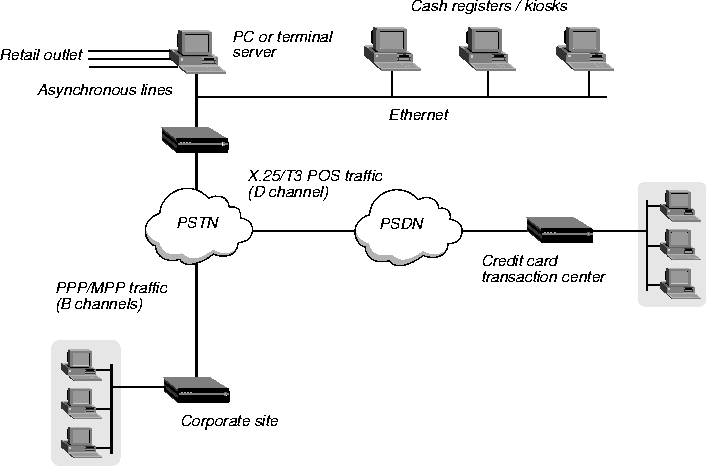
The Ascend T3POS implementation supports the following T3POS features:
- Local, Transparent, Blind, and Binary-Local mode
- T1-T6 timers
- All the control characters, described in Bellcore GR-2803
- Error recovery procedures, described in Bellcore GR-2803 and EIS 1075-V2.1
- DTE-initiated calls
- Host-initiated calls
Protocol summary
This section provides a brief summary of the T3POS protocol. For complete details about the protocol and the MAX X.25 PAD, refer to the documents listed in References.
The T3POS protocol provides reliable and efficient data interchange (transactions) between a host (usually a transaction server) and a DTE (usually a client). The T3POS DTE is usually a client device communicating through an asynchronous port, while the T3POS host is a mainframe or server communicating through an X.25 packet network. The T3POS PAD (the MAX) converts data arriving from a T3POS DTE to a format that can be transmitted over a packet network. It also ensures reliability and efficiency as described in the protocol specifications.
Note that the T3POS PAD does not alter, check, or convert the parity of characters it receives from or sends to the X.25 network or the T3POS DTE. T3POS essentially uses a data format of 8 bits no parity. The format is actually 7 bits, 1 parity, but the MAX ignores the parity bit.
Depending on the current state of a transaction or call, and the mode of operation selected, T3POS uses different data formats and frame structures. The MAX supports four modes of operation: Local, Binary-Local, Transparent, and Blind.
General frames
A general frame (or data frame) is any sequence of octets received from or sent to the DTE within the period specified by the T1 timer (this timer is known as the Char-to-Char timer). In Local and Binary-local modes and in opening frames, general frames are encapsulated in the following format:
STX [data] ETX XRC
where:
- STX is the ascii character \002.
- Data is the user data being sent in this frame.
- ETX the ascii character \003.
- XRC is the checksum. For all modes except Binary-Local, the checksum is a one character Longitudinal Redundancy Check (LRC) checksum. For Binary Local mode, the checksum is a two character Cyclic Redundancy Check (CRC) checksum.
Control frames
The MAX uses a control frame only when establishing a call and not during data transfer. You can configure the T3POS modes and most of the T3POS parameters for the T3POS PAD using the VT-100 interface in the MAX. However, use of a control frame can override the operating mode, called number, call user data, and some user facilities. A control frame is a supervisory frame with the following format:
SOH MSS CUD STX [data] ETX XRC
where:
- SOH is the ascii character \001.
- MSS is the Mode Selection Signal which can be (optionally) used to indicate the mode for the call.
- CUD is the Called User Data. It can contain an X.121 address, and user facilities or call user data in an X.28 format.
- Data is optional in the control frame. In Transparent and Blind modes, the T3POS PAD is essentially restricted to passing data frames between the T3POS DTE and the T3POS host.
- ETX is the ascii character \003.
- XRC is the checksum. For all modes except Binary-Local the checksum is a one character Longitudinal Redundancy Check (LRC) checksum. For Binary-Local mode, the checksum is a two character Cyclic Redundancy Check (CRC) checksum.
T3POS Timers
The T3POS protocol defines six timers:
- T1: Char-to-Char timer
- T2: SYN-to-SYN timer
- T3: ENQ Handling timer
- T4: Response timer
- T5: DLE, EOT timer
- T6: Frame Arrival timer
DTE-initiated calls
If the first T3POS frame (which can be either a general frame or a control frame) the MAX receives is from the DTE, the session is qualified as DTE-initiated. When the MAX receives a general frame from the DTE, it uses the settings in the Answer profile (or the Connection profile) to trigger a call to the host when it receives a control frame from the DTE. The MAX also triggers a call to the host. In this case, however, the MAX uses the mode and called address if any specified in the control frame for the call, overriding any setting configured in the MAX.
Host-initiated calls
The current implementation does not directly support incoming calls to the DTE. Instead, the DTE answers any host-initiated calls by connecting to the T3POS PAD and listening for such calls. The host must send a called address matching the pattern the DTE is listening for. The pattern need not be a complete X.121 address, but can be a subpattern (including wildcard characters). You configure the listening pattern by setting the Listen X.121 Addr parameter (which is described in the MAX Reference Guide).
Flow control
Flow control should not be an issue for the X25 T3POS implementation, because the T3POS protocol has an effective window size of one (that is, every frame must be acknowledged before another frame is sent) and because the MAX buffers all the frames before forwarding them to the DTE or the host. However, you should chose the T2, T3, and T4 timers carefully, because the MAX buffers the data before forwarding it. Note that the current Ascend modem code performs continuous RTS/CTS flow control, which cannot be disabled.
References
The T3POS protocols are derived from several documents that have become de facto standards:
- GR-2803-"Generic requirements for a Packet Assembler/Disassembler supporting T3POS," Bellcore GR-2803-CORE Issue 2, Dec. 1995. This is the basic defining document.
- EIS 1075-V2.1-"External Interface Specification for Data-Terminal-Equipment Support of T3POS," Applied Digital Design, version 2.1, March 1994. Specifies error recovery mechanisms between a T3POS DTE and a T3POS PAD on one side and a T3POS PAD and the T3POS host in the other side.
Configuring a T3POS connection
Configuring a T3POS connection requires two general procedures:
- Create a Connection profile for each authenticated user connecting to the T3POS, or configure the Answer profile for unauthenticated users.
- Create an X.25 profile that defines the X.25 connection the T3POS PAD uses.
Note: For detailed information about the T3POS parameters, see the MAX Reference Guide.
Note: The settings in the Connection or Answer profile can be overridden by the settings sent
in control frames.
To configure a T3POS Connection profile:
- From the Main Edit Menu select Ethernet > Connections > any Connection profile.
- Set Active to Yes.
- Set Encaps to X25/T3POS.
- Open the Encaps Options submenu.
- Set X.25 Prof to the name of the X.25 profile that is to be used for this T3POS connection.
The X.25 profile must exist and be active before you can save this Connection profile.
- Specify the Recv PW value used to authenticate the caller.
- Set specify the parameters used for the T3POS connection.
- Exit and save the Connection profile.
To configure a T3POS Answer profile:
- From the Main Edit Menu select Ethernet > Answer > Encaps.
- Set X25/PAD to Yes and X25/T3POS to Yes.
- Exit the Encaps submenu.
- Select T3POS Options.
- Set X.25 Prof to the name of the X.25 profile that is to be used for this T3POS connection.
The X.25 profile must exist and be active before you can save the Answer profile.
- Set the parameters used for the T3POS connection.
- Exit and save the Answer profile.
Accessing the T3POS
Users can access the T3POS in any of the following ways:
- Through a modem (for MAX units only).
- Via a TCP/IP client to the default TCP modem port 6150 (or to the TCP modem port configured on the Ascend unit).
- Via a TCP/IP client to port 23 (for Telnet access) or to 513 (for Rlogin access).
Accessing the T3POS from a dial-in connection
The following example describes how a user accesses the X.25/T3POS from a modem. The X.25 data link is already up because it is a nailed physical connection. This scenario also applies to Telnet users connecting to port 150 of the MAX.
Note: Telnet client programs should use 8 bit mode to connect to the MAX.
In this example:
- A user dial in through a modem or through Telnet.
- The user is authenticated against a Connection profile. If no Connection profile exists for the user, the Answer profile is used (if configured).
Both the Connection and the Answer profile specify that the user is an X.25 user (that is, Encaps is set to X25/T3POS). An X.25 profile specifies the physical interface where the X.25 call is to be established. The X.25 profile determines the settings for the LAPB (or LAPD) and packet level, (for example, timers and window size). For LAPB, the X.25 profile also specifies the nailed group to use for the logical call.
- The connection is then established on the basis of the settings in both the Connection profile (or Answer profile) and the X.25 profile, and the call is directed to the T3POS.
- The user then must use the normal X.25/PAD commands.
Accessing the T3POS from the MAX terminal-server interface
The following example describes how a user accesses the X.25/T3POS from the MAX terminal-server interface or through Telnet.
- At the terminal-server prompt, the user enters the T3POS command. For example:
ascend% t3pos
- The user is directed to the T3POS PAD, and T3POS traffic can be transmitted.
Accessing the T3POS through immediate mode
To allow access to the T3POS PAD immediately upon connecting, set Immediate Service to X25/T3POS in the Ethernet > Mod Config > TServ Options submenu. Users typically use this mode to connect to the T3POS PAD.
Ascend recommends that, when using immediate service, you set the Banner parameter to suppress the terminal-server banner, and reduce the PPP Delay parameter to its minimum value. Both parameters are in the Ethernet > Mod Config > TServ Options submenu.
Always On/Dynamic ISDN (AO/DI)
The MAX supports Always On/Dynamic ISDN (AO/DI) which is described in the Internet Engineering Task Force (IETF) draft titled Always On/Dynamic ISDN, dated October, 1997. AO/DI enables you to send and receive data through a nailed X.25 connection (supported over an ISDN D-channel, ISDN B-Channel, or leased-56k line), using switched ISDN B-channels only when required on the basis of increased bandwidth utilization.
Introduction
AO/DI is a networking service that enables you to send and receive data by means of an X.25 connection over and ISDN line (or leased-56k line) as well as by means of switched B-channels. Through its use of X.25 and Bandwidth Allocation Control Protocol (BACP), the MAX avoids dialup charges and usage of switched B-channels whenever it sends or receives data over the X.25 connection.
In a traditional ISDN environment, data moves across B-channels, and signalling information moves across the D-channel. Because signalling information uses a small percentage of available D-channel bandwidth, AO/DI was developed to maximize bandwidth usage while reducing the necessity that all data travel over B-channels. Ascend's implementation of AO/DI enables you to configure a nailed X.25 connection over a BRI D-channel, BRI B-channel, or over a leased-56k line.
Among the functions that can take advantage of AO/DI are the following:
- Transfer of email
- Reception of news broadcasts and other pushed information
- Automated collection of data
For all Ascend units, AO/DI enables you to use X.25 bandwidth up to 9600 bps. If data transfers require more bandwidth, B-channels are dialed and combined using BACP. Although MAX units support an X.25 connection over the serial WAN connection rather than an ISDN line, Pipeline units support X.25 only through a B-channel or the D-channel. Contact your carrier for more details.
How it works
When you configure AO/DI for a connection, data flows over the X25 connection as long as bandwidth usage is less than the value specified in the Ethernet > Connections > any Connection profile > Encaps options > Target Util parameter. The MAX dials a B-channel if the Average Line Utilization (ALU) for the connection stays above the value in Target Util for the amount of seconds specified in the Ethernet > Connections > Any Connection profile > Encaps Options > Add Pers parameter.
When the MAX adds bandwidth on the basis of DBA, it brings up a B-channel to transport data and stops sending data over the X.25 connection. Because the 9600 bps bandwidth available over the X.25 connection is so small when compared to that available through the B-channel, it is not efficient to continue to transfer data over the X.25 connection simultaneously.
When ALU for the connection drops below the value specified in the Target Util parameter for the amount of seconds specified in the Sub Pers parameter, the MAX disconnects the switched channel and data traffic flows over the X.25 connection.
The MAX can add bandwidth to a connection using multiple B-channels to transfer data for a specific call, but discontinues using the X.25 connection for data transfer if at least one B-channel is active.
Configuring an AO/DI connection
Configuring an AO/DI connection consists of the following steps:
- Create an X.25 profile that defines the X.25 connection.
- Configure the Answer profile to enable BACP and MP support.
- Create a Connection profile for each AO/DI connection.
Note: For more complete information about each of the X.25 and BACP parameters, see the
MAX Reference Guide.
Configuring the X.25 profile
To configure the MAX to support the X.25 connection:
- Open Ethernet > X25 > any X25 profile.
- Set Name to a descriptive name for the X.25 link.
- Set Active to Yes.
- Set TEI to the value specified by your X.25 carrier.
You can set TEI to any value from 0 to 63. The default value is 23. If you set TEI to 0, the Ascend unit requests a TEI assignment from the network.
- Set Call Type as follows:
- Call Type = D-Channel if X.25 services are over the D-channel.
- Call Type = Nailed if X.25 services are over either a B-channel or the leased-56k line.
- Set Nailed Grp that AO/DI-related Connection profiles reference when using the X.25 connection.
The value specified for Nailed Grp must match the value specified in the Ethernet > Connections > any Connection profile > Telco options > Group parameter of any AO/DI-related profile that uses the X.25 connection.
- Set X.25 highest SVC as directed by your carrier.
- Set X.25 lowest SVC as directed by your carrier.
- Set X.121 src addr to the called number that the remote side sends when establishing the X.25 connection with the MAX. Contact your carrier for the correct value.
- Set any remaining X.25 parameters as your carrier specifies.
- Exit and save the settings.
Configuring the Answer profile
To configure the Answer profile to allow support of AO/DI:
- From the main Edit menu, select Ethernet > Answer profile.
- Open the Encaps submenu.
- Set MP to Yes.
- Set PPP to Yes.
- Close the Encaps submenu.
- Open the PPP options submenu.
- Set BACP = Yes.
- Exit and save the Answer profile.
Configuring a Connection profile to support AO/DI
Before you configure a Connection profile to support AO/DI, you must understand each of the X.25 parameters related to the Connection profile.
Understanding the X.25 connection parameters
The following table displays background information about the X.25 connection parameters.
Parameter
|
Description
|
|---|
|
X.25 profile name
|
This 15-character text field contains the name of an X.25 profile that the MAX uses for this logical connection. If the matching X.25 profile cannot be found, the MAX does not start a session for this Connection profile. To guard against this misconfiguration, an active Connection profile specifying X.25 encapsulation can not be saved unless you define the named X.25 profile and make it active.
|
|
X.25 reverse charge
|
Specifies whether the X.25 facility field indicates reverse charge request when the X.25 user calls a host. The default is No.
|
|
RPOA
|
Specifies the set of RPOA (Recognized Private Operating Agency) user facilities to use in the next call request. The RPOA facilities provide the data network identification code for the requested initial RPOA transit network. You can specify up to 4 digits. The default is null.
|
|
CUG Index
|
Specifies the Closed User Group (CUG) index/selection facility to use in the next call request. The closed user group selection/index facility specifies to the called switch the closed user group selected for a virtual call. You can specify up to two digits. The default is null.
|
|
NUI
|
Specifies the set of Network User Identification (NUI) related facilities to use in next call request. NUI provides information to the network for billing, security, network management purposes, and for activating subscribed facilities. You can specify the NUI to use in the next call request. You can specify up to six digits. The default is null.
|
|
Call mode
|
Specifies whether the MAX can initiate, receive a call request on the connection.
Incoming-Specifies that the MAX does not issue a call request when data shows up for forwarding. If there is no virtual circuit established, the MAX drops the IP packet. If a host receives an incoming call from a host whose called address matches the value specified in Answer X.121 addr or if Answer X.121 addr is blank, the MAX accepts the called number.
Outgoing-Specifies that the MAX issues a call request to the number specified in the Remote X.121 addr parameter when you enable the Connection profile. If the MAX does not establish a virtual circuit and the MAX receives an incoming call request, the MAX rejects the call.
Both-Specifies that the MAX accepts incoming call requests and makes outgoing call requests on the basis of packets that need to be forwarded across the WAN. For incoming calls, the MAX accepts the called address if:
The remote host's called address matches the value specified in Answer X.121 addr or if Answer X.121 addr is blank.
The remote host's calling address matches the value specified in Remote X.121 addr or if Remote X.121 addr is blank.
|
|
Answer X.121 Addr
|
Typically matches the value specified in the X.121 src addr parameter of the X.25 profile on the MAX, although the value might be different because the MAX unit's X.25 connection can have more than one X.121 address. You should not leave Answer X.121 address blank if Call Mode specifies either Both or Incoming.
You can substitute the beginning portion of the address with the wildcard * which indicates that the MAX should accept any value, requiring a match only on the trailing digits that you specify after the wildcard character.
|
|
Remote X.121 Addr
|
Specifies the value specified in the X.121 source address of the remote X.25 host to which the profile connects. You should not leave Remote X.121 addr blank if you set Call Mode to Both or Outgoing. If you configure a value for Remote X.121 address, the MAX attempts to match the incoming call to Remote X.121 address as well as Answer X.121 address.
You can substitute the beginning portion of the address with the wildcard * which indicates that the MAX should accept any value, requiring a match only on the trailing digits that you specify after the wildcard character. For outgoing calls, the MAX dials only the trailing digits specified, ignoring the beginning wildcard character.
|
Configuring a Connection profile
To configure a Connection profile to support AO/DI:
- From the main Edit menu select Ethernet > Connections > any Connection profile.
- Set Active to Yes.
- Set Encaps to MP.
- Set Dial # to the phone number that the MAX dials when additional bandwidth from a B-channel is needed.
- Open the Telco options submenu
- Set Call Type to AO/DI.
- Set Group to the group number that you specified in the Ethernet > X25 > X25 profile > Nailed Grp parameter.
- From the Connection profile menu, open the Encaps options submenu.
- Set BACP to Yes.
- Set both Base Ch Cnt and Max Ch Cnt parameters to the maximum number of channels allowed for the connection.
- Set InterfaceType to X.25.
- From the Connection profile main menu, open the Interface options submenu.
- Set X.25 Prof to the name of the X.25 profile that the MAX uses for the connection.
- Specify additional parameters for the X.25 connection as directed by the carrier.
If you set Call Mode to Incoming or Both, proceed as follows:
- From the Connection profile menu, open the Interface options submenu.
- Set Answer X.121 addr to the value specified in the X.121 src addr parameter of the X.25 profile on the MAX.
Note: You can substitute the beginning portion of the address with the wildcard * which
indicates that the MAX should accept any value, requiring a match only on the trailing
digits that you specify after the wildcard character.
If you set Call Mode to Outgoing or Both, proceed as follows:
- From the Connection profile menu, open the Interface options submenu.
- Set Remote X.121 addr to the value specified in the X.121 source address of the remote X.25 host to which the profile connects. You should not leave Remote X.121 addr blank if you set Call Mode to Both or Outgoing. Also, for incoming calls, the MAX attempts to match the called number of the incoming call to Remote X.121 address (if specified) and the calling number of the incoming call to Answer X.121 address (if specified).
Note: You can substitute the beginning portion of the address with the wildcard * which
indicates that the MAX should accept any value, requiring a match only on the trailing
digits that you specify after the wildcard character. For outgoing calls, the MAX dials only
the trailing digits specified, ignoring the beginning wildcard character.
Exit and save the Connection profile. If you set Call Mode to Outgoing, the MAX sends a call request to the number specified in the Remote X.121 addr parameter when you enable the Connection profile. If you set Call Mode to either Both, the X.25 connection stays idle until the MAX receives a packet to be forwarded across the X.25 link.
When the session and profile are active, the Connection profile displays an asterisk to the left of the profile name on the Ethernet > Connections submenu which indicates that a call is up or is available for a call.
Note: When you modify any AO/DI-related X.25 profile or Connection profile, you must
disable all AO/DI-related profiles and re-enable them.
Displaying AO/DI operation
To make sure AO/DI is installed and configured properly, you can display one status window to indicate whether or not the MAX supports AO/DI, another to observe active AO/DI calls, and a third to indicate how many packets the MAX processes for a particular AO/DI session.
Displaying whether or not the MAX supports AO/DI
The System > Sys Options window provides a read-only list that identifies the MAX and names each of the features (including AO/DI) which it has been equipped. Press the tab key to highlight any status window, then use the left and right arrow keys to display the Sys Options window.
When the MAX displays the Sys Options window, press the down arrow key until the AO/DI feature appears. For example, the following screen indicates that the MAX supports AO/DI:
|-------------------|

|00-100 Sys Options |

|ISDN Sig Installed  |

|AO/DI Installed        |

|Net Mgmt Installed  |

|-------------------|
If you ordered AO/DI but the MAX displays AO/DI Not Inst, contact your authorized Ascend reseller.
Displaying active AO/DI calls
The Ethernet > Dyn Stat window displays the name, quality, bandwidth, and bandwidth utilization of each online connection. For example, when the MAX establishes an AO/DI connection for DMILLER, the following window appears:
|-------------------|

|DMILLER                       |

|Qual Good 05:07:00 |

|9k            1 channels |

|CLU    12%    ALU    30% |

|-------------------|
When the MAX adds a B-channel on the basis of bandwidth utilization, the following window appears:
|-------------------|

|DMILLER                       |

|Qual Good 05:07:00 |

|56k          2 channels |

|CLU    50%    ALU    34% |

|-------------------|
Although the connection contains two active channels, data passes only over the B-channel as described in How it works.
When the MAX adds a second B-channel on the basis of bandwidth utilization, the following window appears:
|-------------------|

|DMILLER                       |

|Qual Good 05:07:00 |

|112k        3 channels |

|CLU    88%    ALU    64% |

|-------------------|
The 112k indicates that data flows through the two B-channels only.
Displaying packet processing for a specific session
The Ethernet > WAN Stat window displays the name, number of received packets, number of transmitted packets, and number of CRC errors of each online connection. For example, when the MAX establishes an AO/DI connection for DMILLER, the following window appears:
|-------------------|

|DMILLER                       |

|Rx Pkt:              7085 |

|Tx Pkt:                603 |

|      CRC:                    0 |

|-------------------|
techpubs@ascend.com
Copyright © 1998, Ascend Communications, Inc. All rights
reserved.